Bromure 5 gives the browser a GPU
Bromure Web runs Chromium in a Linux VM that had no GPU, so the CPU drew every WebGL frame and composited layer. On macOS 27, Bromure 5 gives each browser VM a GPU backed by Metal. On three WebGL workloads, median batch times fell from 170, 965 and 3,555 ms to 21, 32 and 68 ms: batch completion times 7% to 61% longer than native Chrome on these workloads, on the same Mac.
Browser makers sell speed with numbers. Apple's Safari page calls Safari "the world's fastest browser" and, from Apple's August 2026 testing, claims 5.3x faster rendering than Chrome on macOS in MotionMark, a benchmark that "focuses on graphics performance". Google reported "a 22% improvement since August 2024" on Speedometer and estimated it saves 116 million hours of waiting for users who browse 10 minutes a day. In June 2026 it posted record scores of 469 on JetStream and 61 on Speedometer. Microsoft says that from version 134, "Microsoft Edge is up to 9% faster as measured by the Speedometer 3.0 benchmark". The teams behind Blink, Gecko and WebKit built Speedometer 3.0 together.
You compare Bromure Web with those browsers, so it has to keep up with them.
A browser without a GPU
Bromure Web runs Chromium in a disposable Linux VM on your Mac. Until Bromure 5, that VM had no GPU.
Apple's ParavirtualizedGraphics framework "implements hardware-accelerated
graphics for macOS running in a virtual
machine",
the supported path for macOS guests. For Linux guests, the Virtualization
framework offers a Virtio graphics
device
that you configure with a display size. In our VM it gave Chromium a screen
and no 3D acceleration, so Chromium fell back to Mesa's llvmpipe, which runs
OpenGL on the CPU, and switched GPU compositing off. Pages drew the right
pixels, and maps, canvas charts, 3D viewers and design tools crawled.
How Bromure 5 adds a GPU
macOS 27 lets an app implement its own Virtio device with
VZCustomVirtioDeviceConfiguration. Bromure 5 uses it to present a standard
Virtio GPU (device type 16), so the guest needs no custom kernel driver. It
uses Ubuntu 24.04 and the stock virtio_gpu kernel module; the compatible
browser image also includes pinned and patched userspace Mesa and browser video
integration.
A WebGL frame now takes this path:
- Chromium draws through ANGLE onto Mesa's VirGL driver.
- VirGL sends the OpenGL commands over the Virtio GPU queues.
- A renderer worker on the Mac replays them through ANGLE on Metal.
- The browser window shows the finished frames as IOSurfaces.
- One renderer per VM. Each browser VM gets its own sandboxed renderer process. In testing, two workers reused the same identifiers and kept independent surfaces, and the second kept running after the first closed.
- Native cursor. macOS draws the pointer from the cursor images the guest sends.
- H.264 in hardware. Bromure bridges the guest's video decoder to VideoToolbox. Chromium still decodes AV1 in software.
- Graphics only. The device carries rendering and video decode and no general GPU compute, so code in the VM can't run machine-learning workloads on your GPU.
The numbers
We ran one WebGL workload three ways on one Mac: Chrome in the Bromure VM with
the new renderer, Chrome in the same VM on Apple's graphics device (and so on
llvmpipe), and Chrome on macOS.
| Workload | Bromure VM, Metal renderer | Same VM, Apple VZ graphics (software) | Native Chrome on macOS |
|---|---|---|---|
| 2,048 draws at 64 × 64 | 20.8 ms | 169.5 ms | 12.9 ms |
| 64 draws at 1,280 × 720, 32 shader iterations | 32.2 ms | 965.2 ms | 22.8 ms |
| 24 draws at 1,920 × 1,080, 128 shader iterations | 68.2 ms | 3,555.1 ms | 63.9 ms |
Each figure is the median of five trials, in wall-clock time to finish a batch of GPU work. Lower is better.
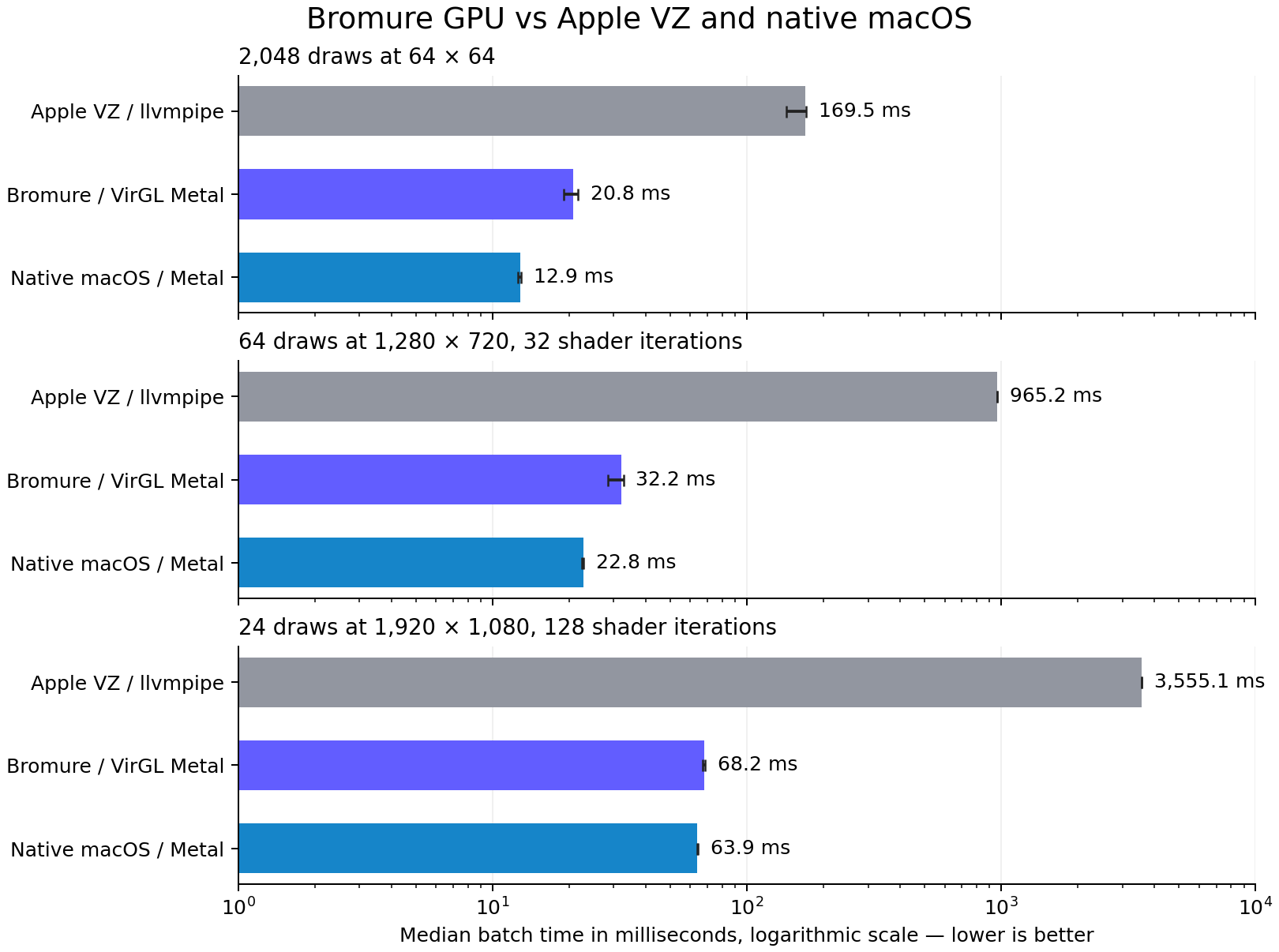
Against software rendering, the new path ran 8.1x, 30.0x and 52.1x faster, and the gap grew with the pixel work. Against native Chrome, the VM took 1.61x, 1.41x and 1.07x as long. Many small draw calls cost the most, and on the heaviest shader the VM came within 7% of native.
Setup: Bromure 5.0.1 on an Apple M5 Pro with 18 CPU cores and 64 GB, running macOS 27.0.1. The VM ran Ubuntu 24.04 ARM64 with Mesa 25.2.8, 9 vCPUs and 4 GB. All three paths used Chrome 154.0.8037.57. Each sample warms up first and ends with a one-pixel readback that forces the GPU to finish, so the times cover the browser, the driver and the readback, and leave out shader compilation.
Getting frames onto the screen
Publish on flush. A Virtio GPU guest names the scanout resource first and flushes once the contents are ready. Our first version published on the scanout and could show a half-painted surface. Bromure now updates the window on the flush.
A bounded hold during resize. At a new size, the first frame often comes out near-black or full of holes, before the page repaints. During a resize, Bromure keeps the previous painted frame on screen for a bounded time while the new one looks unpainted, and the host and guest pace the resize together. The check errs toward holding, so a dark page can lag for a moment during a resize. Outside a resize, frames show at once.
In a traced run with four VMs, 24 tabs and 40 site visits, four 200-second recordings had no near-black frames.
Cursor alpha. Linux allocates cursor images in a format with no alpha channel, then uses that memory as a cursor with alpha. The renderer keeps the alpha values the guest wrote, so cursors stay transparent.
Backpressure. The guest can submit 3D commands faster than the host replays them. Bromure caps each submission at 1 MiB and reuses one Metal command queue to capture frames.
How it was built
Astra 6.1 did the whole implementation, running as two agents in Bromure: one on the Mac and one in Linux. We set the requirements and tested the results.
- The macOS agent built the renderer, the Virtio device, and presentation and input.
- The Linux agent built the Mesa and VirGL packaging, the prerequisite checks, and the pointer agent and resize watcher in the VM.
- Independent regression testing and source review checked the work along the way.
Both agents worked on the same shared feature branch. They exchanged messages, attachments, requests and test evidence across the two environments through Bromure’s agent messaging. The host brokers, screens and logs messages and copies attached files between machines. The upcoming Bromure Sidecar app is part of this broader effort; we will describe it when it ships.
Turning it on and off
In Bromure 5, the Metal renderer sits under Performance in each Bromure Web profile. It is on by default, existing profiles included.
- It needs macOS 27. On macOS 26 and earlier, Bromure keeps rendering in software.
- The global setting stays the master switch, and changes apply to new windows.
- A profile with it off gets its own VM on the old graphics path.
- A VM image needs a marker showing we validated it for the new renderer. Without one, Bromure falls back to software.
We verified the old graphics path on macOS 27 and tested it on a Mac running macOS 26. The new code requires macOS 27 or later.