Bromure Agentic Coding 4.4: a board for coding tasks, review that talks back, and automations you can watch
Bromure Agentic Coding 4.4 gives the agent's work a shape you can steer. A new coding-tasks kanban carries a written brief from plan to merged diff — a planner decomposes it into dependency-aware phases, each runs autonomously in its own worktree, and the review window lets you comment on the diff line by line and send it straight back to the agent for another round. Automations move onto a board of their own, where every scheduled run flows from Scheduled to Done in front of you. Plus fixes for a rich-client tab swap and a VPN that didn't always come up.
Bromure Agentic Coding runs your coding agent inside a disposable Linux VM, with a man-in-the-middle proxy on the host watching every byte it sends to the model APIs. Version 4.4 is about seeing the work: giving what the agent produces a shape you can plan, review, and merge — instead of a terminal you have to babysit. Two of your workflows become boards, and code review learns to talk back.
A kanban board for coding tasks
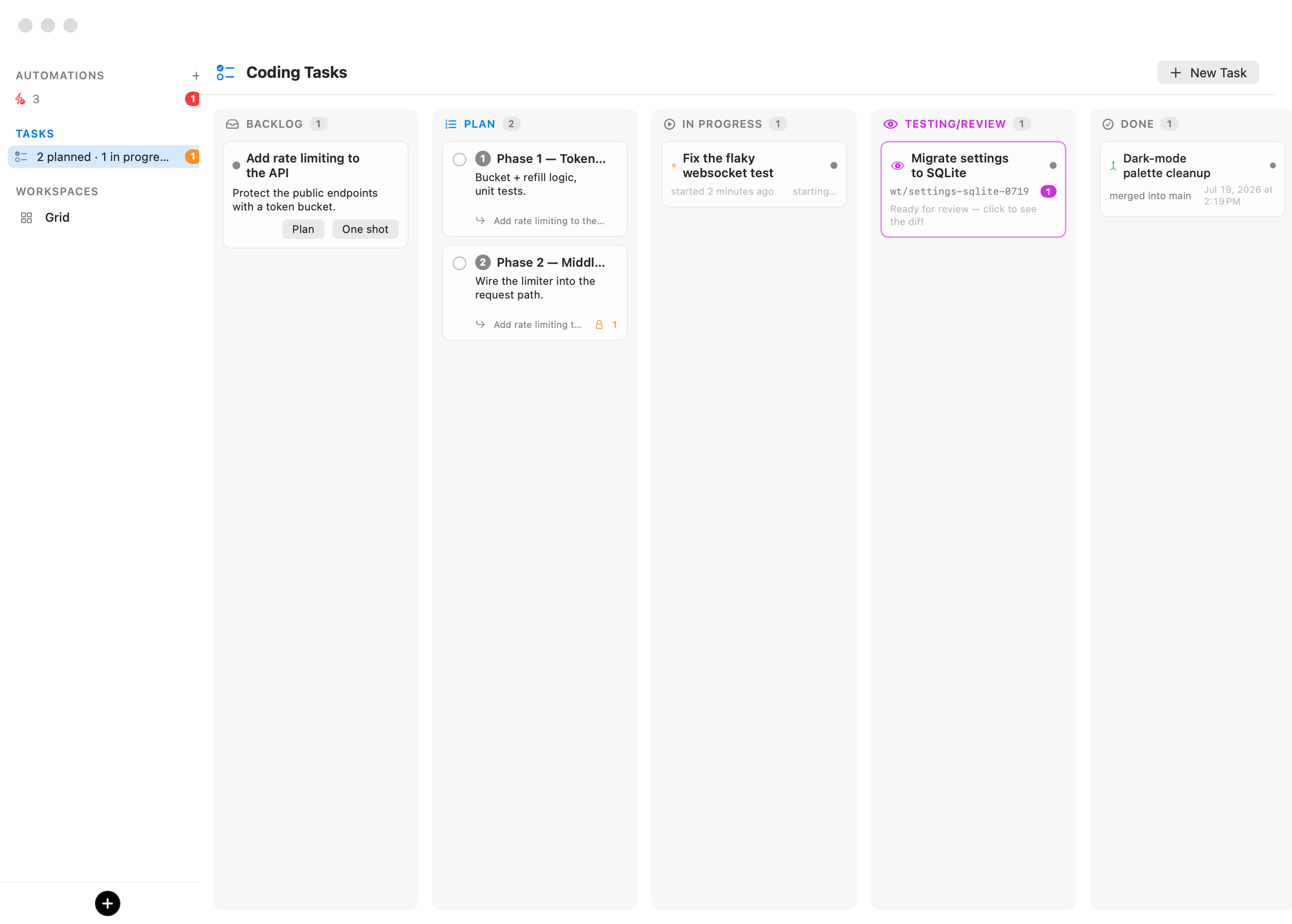
Write a brief, hand it to the board, and watch it become merged code. The new Coding Tasks board (⇧⌘T, or the TASKS pulse row that now sits near the top of the sidebar) turns a written task into finished work across five columns — Backlog, Plan, In Progress, Testing/Review, and Done — with as much ceremony as you want and no more.
A brief in the Backlog offers two paths. Plan opens a visible, interactive planning session: a native conversation, no terminal required, where the agent explores your repository read-only, narrates what it finds, and asks the questions your brief left open — arriving as a tabbed card whose answers stay editable until you submit them all at once. When it has what it needs, it files ordered phase cards, each roughly one reviewable pull request of work, with dependencies drawn between them. Or skip planning entirely and one-shot the task straight through.
Started phases and one-shot tasks each run fully autonomously in a fresh git worktree and branch. The card shows a live agent-status dot, and a red Needs your input badge the moment one is blocked on a question — the sidebar counts those so you never miss one. When the agent reports done, the task slides to Testing/Review and its terminal tab closes on its own.
Review the diff — then send it back
A finished task lands in Testing/Review, and its card opens a full review window: the branch's entire diff against its parent, read live from the VM, with per-file expanders and add/remove counts. Read it like a pull request.
Hover any added or context line, click the margin bubble, and attach a comment
to that exact line; file-level and general notes work too. Then choose your
ending. The Merge split button defaults to merging into the parent branch —
hold it for Squash & Merge, Create Pull Request… when the workspace has
a GitHub token, or merging into any other branch. Or, instead of merging, press
Send Back to In Progress: every drafted comment is delivered to the agent as
a line-anchored instruction — In foo.js, line 196: use a different method —
and the task returns to In Progress on the same worktree and branch for another
round. Review, revise, repeat, without ever leaving the app.
The same margin bubbles appear outside the board, too: whenever the active tab runs a coding agent, the file explorer's diff pane grows them, and Send to agent batches your comments straight into that session — code review without ever creating a task.
Automations, now on a board of their own
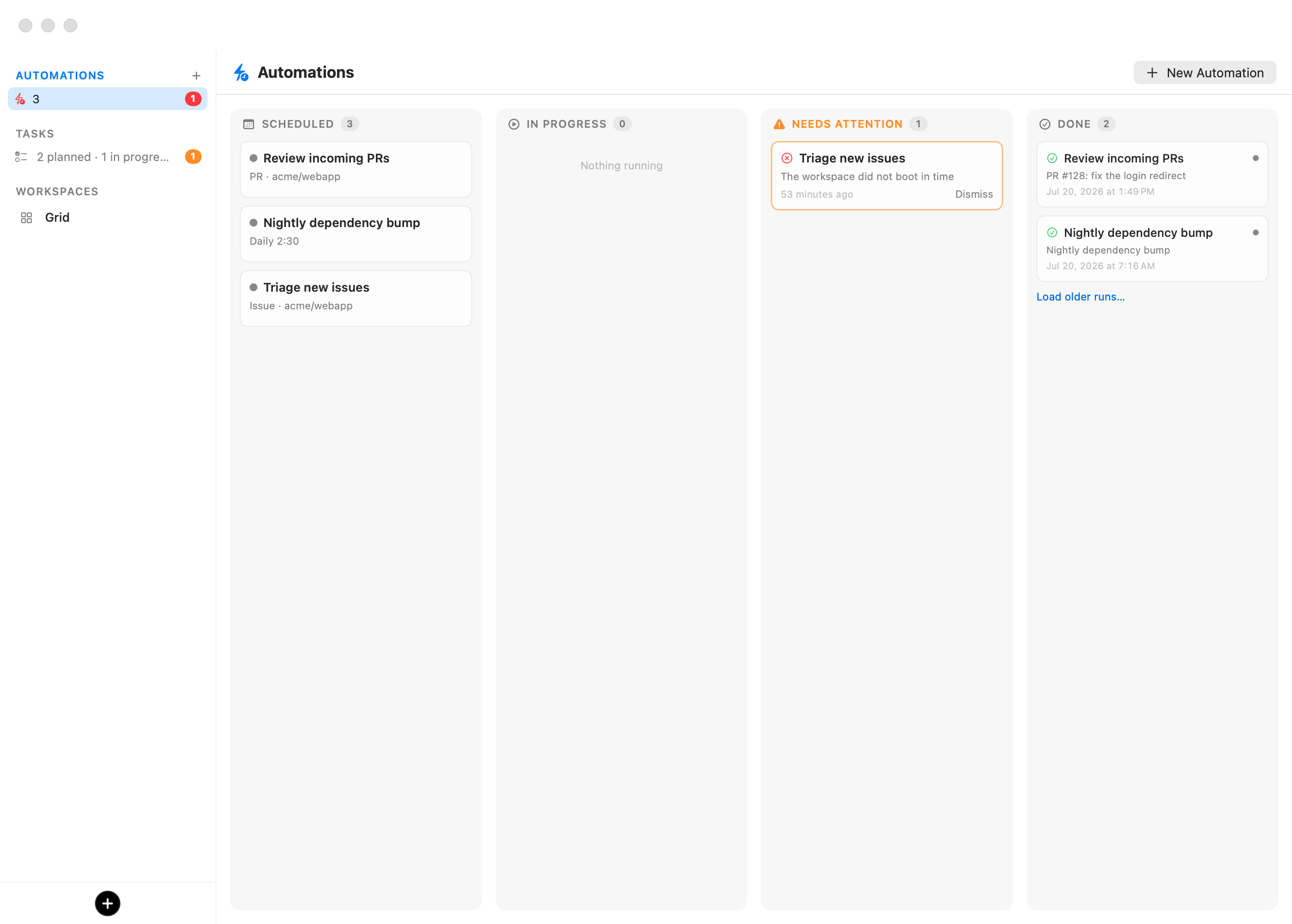
Automations — recurring, unattended agent runs bound to a workspace — get the same treatment. The AUTOMATIONS section sits at the very top of the sidebar with a + to create one and a pulse row summarizing the fleet; click it, or press ⇧⌘A, to open the board.
Its model is deliberately asymmetric: an automation card never leaves Scheduled — each time it fires it spawns a run card that flows across the board on its own, through In Progress, into Done, or into a Needs Attention column that only appears when a run actually needs you (a healthy board never shows it). Click any run to open its run window: a live, read-only view of the session while the agent works, and the saved transcript — prompt, narration, every tool call and result — long after the worktree is gone. As always, it all runs on your Mac, on the workspace's own credentials, with no cloud service and no inbound network surface.
You can read the full details in the manual: Automations, or see both boards in context on the Agentic Coding page.
Also fixed in 4.4
- Rich client tab order. Mirroring a remote instance could occasionally swap two tabs in the sidebar; their order now stays faithful to the host.
- Reliable VPN startup. The ad-hoc VPN sometimes failed to come up on the first attempt — it now starts consistently.
Bromure Agentic Coding is free and open source on Apple Silicon. Grab 4.4 on the downloads page, or learn more →.