Agents
The Agents pane decides which coding agents are available in a workspace and how each one signs in. Bromure Agentic Coding ships five agents — Claude Code, Codex, Grok Build, Kimi Code, and Oh My Pi — and any subset can be enabled per workspace. The pane's subtitle states the model plainly: enable each agent you want available in this workspace; the one marked Primary auto-launches in the first tab, and other enabled agents are installed and authenticated but you run them on demand from a new tab.
Whatever credential you enter here never reaches the VM. The agent inside the sandbox is handed a decoy key; the host proxy swaps the decoy for the real value on the wire. That wire boundary — and the subscription-registration and token-swap machinery the auth modes below depend on — is the subject of the Credentials chapter.
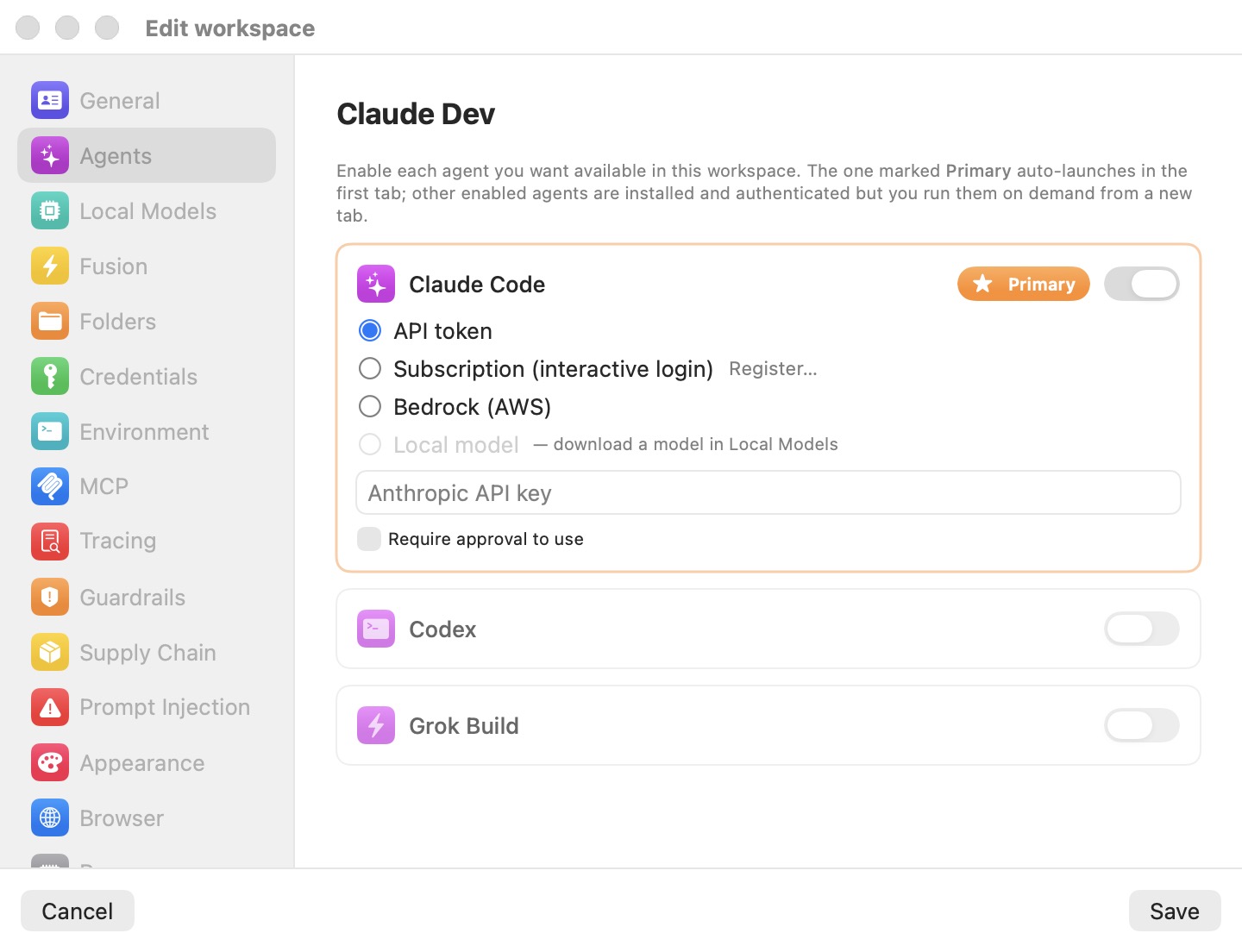
Enabling agents and choosing the primary
Each agent is a card with an enable switch in its top-right corner. Toggle it on to reveal that agent's authentication options; toggle it off to collapse the card and remove the agent from the workspace.
One enabled agent is always the Primary, marked with an orange star pill. The primary auto-launches in the first terminal tab when a session opens; the other enabled agents are installed and authenticated but wait until you start them from a new tab. To promote a different agent, enable it and click Make primary on its card — the previous primary is demoted but keeps its own authentication. Disabling the current primary automatically promotes another enabled agent, and the last remaining agent cannot be disabled: a workspace always has at least one.
Authentication modes
When an agent is enabled, a radio group selects how it authenticates. Which modes are offered depends on the agent — Bedrock is exclusive to Claude Code, and Oh My Pi is API-key only (its terms of service do not permit OAuth subscription reuse):
| Mode | Claude Code | Codex | Grok Build | Kimi Code | Oh My Pi |
|---|---|---|---|---|---|
| API token | Yes | Yes | Yes | Yes | Yes |
| Subscription (interactive login) | Yes | Yes | Yes | Yes | — |
| Bedrock (AWS) | Yes | — | — | — | — |
| Local model | Yes | Yes | Yes | Yes | Yes |
API token
Paste a provider API key into the secure field — its placeholder names the provider: Anthropic API key, OpenAI API key, xAI API key, Moonshot API key, or, for Oh My Pi, the key of whichever provider you picked (see below). The key is stored on the host, encrypted; the VM only ever sees a decoy that the proxy rewrites to the real value on requests bound for that provider. A Require approval to use checkbox (off by default) is described under Require approval to use below.
Newly enabled agents default to this mode.
Subscription (interactive login)
Signs the agent in with your paid subscription (Claude, ChatGPT/Codex, Grok, or Kimi) rather than an API key. An inline Register… button runs a one-time interactive login flow; once it completes, a green seal appears next to the mode alongside Re-register… and Forget controls. The real OAuth tokens stay on the host and are refreshed there while the VM is served fakes — whether that swap is currently active is shown, and can be reset, in the Tracing pane.
This is the factory-template default for Claude Code.
Bedrock (AWS) — Claude Code only
Routes Claude Code through Amazon Bedrock using the AWS credentials you configure under Credentials → AWS. A Default Model ID field overrides the Bedrock model Claude Code requests — for example us.anthropic.claude-sonnet-4-6-v1:0; leave it empty to use Claude Code's built-in default. Bedrock is not offered for Codex or Grok Build.
Oh My Pi's provider picker
Oh My Pi (omp) is provider-agnostic, so its card adds a Provider picker: Anthropic (Claude) (the default), OpenAI, xAI (Grok), z.ai (GLM), or Custom (OpenAI-compatible). Pick a provider and paste its API key; choosing Custom reveals a base-URL field for any OpenAI-compatible endpoint (https://…/v1). An optional Model field pins the model omp launches with (fuzzy names like opus or gpt-5.2 work). Switching provider — or moving the workspace to Local model — is one click and takes effect on the next session.
Local model
Runs the agent entirely against an on-device model served by the host, with no cloud provider involved. The option is greyed out — labeled — download a model in Local Models — until at least one model is installed in the Local Models pane. Once a model is available, the agent is pointed at the local engine through its base-URL environment variable (ANTHROPIC_BASE_URL, OPENAI_BASE_URL, or XAI_BASE_URL) and serves the model selected in Local Models. The engine, on-device routing, and hybrid fallback are covered in the Local Models chapter.
Note: Turning on Enable local models for the workspace pins every enabled agent to Local model automatically, and turning it back off restores each agent's previous mode. You normally set on-device inference from the Local Models pane rather than agent by agent.
Require approval to use
In API token mode, the Require approval to use checkbox adds a consent gate: before the proxy swaps the decoy key for the real one, the host pops a dialog so you can allow the use once, for a short window, or for the rest of the session. It is off by default. The same per-credential approval pattern recurs throughout the Credentials pane.
Settings reference
| Setting | Description |
|---|---|
| Enable (per agent) | Makes the agent available in this workspace. Default: Claude Code on and primary; Codex, Grok Build, Kimi Code, and Oh My Pi off. |
| Primary / Make primary | Marks the agent that auto-launches in the first tab. Default: Claude Code. The last enabled agent cannot be turned off. |
| Auth mode | Radio: API token / Subscription (interactive login) / Bedrock (AWS) (Claude Code only) / Local model (needs an installed local model). Default: Subscription (interactive login) for Claude Code in the factory template; newly enabled agents default to API token. |
| API key | Secure field for the provider key in token mode (ANTHROPIC_API_KEY / OPENAI_API_KEY / XAI_API_KEY; Kimi's key is written into its config.toml, Oh My Pi's into its chosen provider's variable). Injected into the VM as a decoy; swapped on the wire. Default: empty. |
| Require approval to use | Checkbox (token mode). Consent dialog before each decoy→real key swap. Default: off. |
| Default Model ID | Bedrock mode only. Overrides the Bedrock model id, e.g. us.anthropic.claude-sonnet-4-6-v1:0. Default: empty (agent's built-in default). |
| Register… / Re-register… / Forget | Subscription mode only. Runs or clears the interactive-login registration. Default: not registered. |
| Provider / Base URL / Model | Oh My Pi only. Upstream provider (default Anthropic (Claude)), the OpenAI-compatible base URL when Custom is selected, and an optional model override. |
Tip: Each agent keeps itself current from inside the VM — run its own update command (
claude update,codex update, and so on) in a terminal tab. Updates are fetched on demand and survive across sessions of the same workspace.
Related chapters
- Credentials — how keys, subscription tokens, and AWS credentials are held on the host and swapped fake→real on the wire.
- Local Models — the on-device engine that backs the Local model auth mode.
- Fusion — the multi-model pane draws its legs from the agents you configure here.
- Tracing — the subscription token-swap status rows for the Subscription modes.