Credentials & the Wire Boundary
An agentic coding session needs credentials — an Anthropic key to talk to Claude, a GitHub token to push, AWS keys to deploy. It also runs arbitrary code, installs arbitrary packages, and follows instructions from files it did not write. Giving such an environment your real secrets is how keys end up in a stealer's inbox.
Bromure Agentic Coding resolves this tension with the wire boundary: the agent inside the VM only ever sees fake placeholder tokens. Your real credentials live encrypted on the macOS host and are substituted onto the wire by a host-side MITM proxy at the last possible moment — after the request has left the VM, and only when it is bound for the host the credential belongs to. No file, environment variable, or process inside the VM ever contains a real API key, OAuth token, AWS secret, or SSH private key.
This chapter explains the mechanism end to end, then walks through how agents sign in, every supported credential type and its lifecycle, the per-use approval system, the compromise detector, the escape hatches for hosts that break under interception, and how to verify the boundary yourself.
Credentials are configured per machine. A machine is what the settings editor still calls a workspace; both words mean the same VM and its settings.
Note: This chapter covers the concepts and runtime behavior. For a field-by-field reference of the settings pane, see Settings → Credentials. Agent API keys and subscriptions are no longer set in that pane; they live in Preferences › Models (see Models & Providers).
The wire boundary at a glance
Three principles define the model:
- Fakes in the VM. Every credential you configure is replaced inside the VM by a structure-preserving fake. Fakes keep the shape validators expect — an Anthropic fake starts with
sk-ant-api03-brm-, a GitHub fake isghp_plus 36 characters — so tools likeclaude,gh, anddoctlaccept them without complaint. - Reals on the wire only. Every HTTPS request the VM makes is tunneled to the host proxy, which decrypts it, swaps the fake for the real value, and re-encrypts it upstream. The swap is scoped to the destination host the credential was minted for.
- Fail closed. If anything bypasses the proxy, the request carries only a fake and upstream authentication fails. There is no path on which a real secret leaks by accident.
Fakes are deterministic: each one is derived from the real value plus a per-install 32-byte salt via HKDF-SHA256. The same real key always maps to the same fake on your Mac, so clients that fingerprint their key (Claude Code caches a key hash, for example) never see the credential "rotate" between sessions.
| Credential | Fake shape in the VM |
|---|---|
| Anthropic API key | sk-ant-api03-brm-… |
| OpenAI API key | sk-brm-… |
| xAI API key | xai-brm-… |
| Moonshot (Kimi) API key | sk-kimi-brm-… |
| OpenRouter key used by Claude Code | sk-or-v1-brm-… |
| Amazon Bedrock API key | bedrock-brm-… |
| GitHub token | ghp_ + 36 characters (40 total) |
| GitLab token | glpat- + 20 characters |
| DigitalOcean PAT | dop_v1_ + hex (64 characters total) |
| Linear API key | lin_api_ + 40 characters (48 total) |
| Twilio auth token / API key secret | brm-twilio-… (at least 32 characters) |
| MCP bearer token | brm-mcp_… |
| Docker registry password | brm-docker-… (at least 40 characters) |
| Kubernetes bearer token | brm-k8s-… |
| Database secret | brm-db-… (at least 32 characters) |
| Generic manual token | brm_… |
There is no on/off switch for the boundary. The proxy is the VM's only egress path; the swap is simply how credentials work in this app.
How the swap works end to end
The full round trip of one authenticated request:
- Session launch — the token plan. When a machine's VM starts, the app builds a per-machine token plan pairing each real credential with its derived fake. The fakes are written into the VM: environment variables (
ANTHROPIC_API_KEY,GH_TOKEN,LINEAR_API_KEY, …) and config files (~/.git-credentials,~/.docker/config.json,~/.kube/config,~/.aws/config,~/.config/doctl/config.yaml, MCP configs). The real values are loaded into the proxy's in-memory swap map, each keyed to the destination host it belongs to. - The request leaves the VM. The guest's HTTPS traffic is tunneled over a virtio socket (vsock port 8443) to the host proxy. The VM has no other route to the network.
- TLS termination. The proxy presents a forged per-host leaf certificate — the destination hostname as CN and SAN, a per-host EC key — signed by the Bromure Agentic Coding Root CA. Because that CA's public certificate was installed into the VM's trust store at boot, the guest's TLS clients accept the connection, and the proxy can read the plaintext request.
- The swap. The proxy looks up every fake token appearing in the request (headers, and for opted-in credential types the body) and, if the destination host matches the credential's scope, replaces it with the real value.
- Re-encryption upstream. The rewritten request is re-emitted to the real destination via Apple's
URLSession, i.e. macOS's own TLS stack, which validates the upstream server's genuine certificate. The response streams back through the tunnel to the guest.
If the destination does not match a fake's scope, the fake goes out unchanged (and fails upstream auth) — or, when the mismatch looks like exfiltration, the request is blocked outright (see The compromise detector below).
The Bromure Agentic Coding Root CA
The CA is per-install and lives at ~/Library/Application Support/BromureAC/ca/ (cert.pem plus a mode-0600 key.pem). Its subject is "Bromure Agentic Coding Root CA", organization "Bromure". Properties worth knowing:
- CA validity is 10 years. Forged per-host leaf certificates are valid for 1 year and back-dated by 24 hours, so a guest whose clock drifted during suspend/resume still accepts them. Leaves are cached per host for the life of the app process.
- The public certificate is installed into every VM's trust store at boot (delivered through the meta share and applied with
update-ca-certificates). It never leaves your machine and is trusted by nothing except your VMs. - To rotate the CA, quit the app and delete the
ca/directory. A fresh CA is minted on the next launch and each VM picks up the new public certificate at its next boot. Rotation invalidates nothing else — workspace secrets andprofile.jsonmetadata are untouched.
Host scoping
Each swap entry is bound to a host scope. Matching is exact-or-subdomain and case-insensitive, never substring: a credential scoped to openai.com matches api.openai.com but not openai.com.evil.example — a look-alike host cannot trick the proxy into decorating its request with a real key. Manual token rules may deliberately use a blank host filter, which means "inject on any host"; that is an explicit choice you make per entry (see Generic API keys).
Fail-closed by construction
The design never relies on the proxy being unavoidable for secrecy — it relies on the secrets not being there:
- A request that somehow skips the proxy carries a fake token; the upstream API rejects it.
- AWS requests signed inside the VM are signed with a fake secret key; if they reached AWS directly they would fail with
InvalidSignatureException(see AWS below). - SSH private key bytes are never in the VM at all; only signatures cross the boundary.
Managing credentials in the workspace editor
Service credentials — git tokens, cloud keys, registries, databases, SSH keys — are configured per machine. Open the machine's settings (Settings… in the machine menu, or “machine” Settings… from a session's menu) and select Credentials under Security in the sidebar.
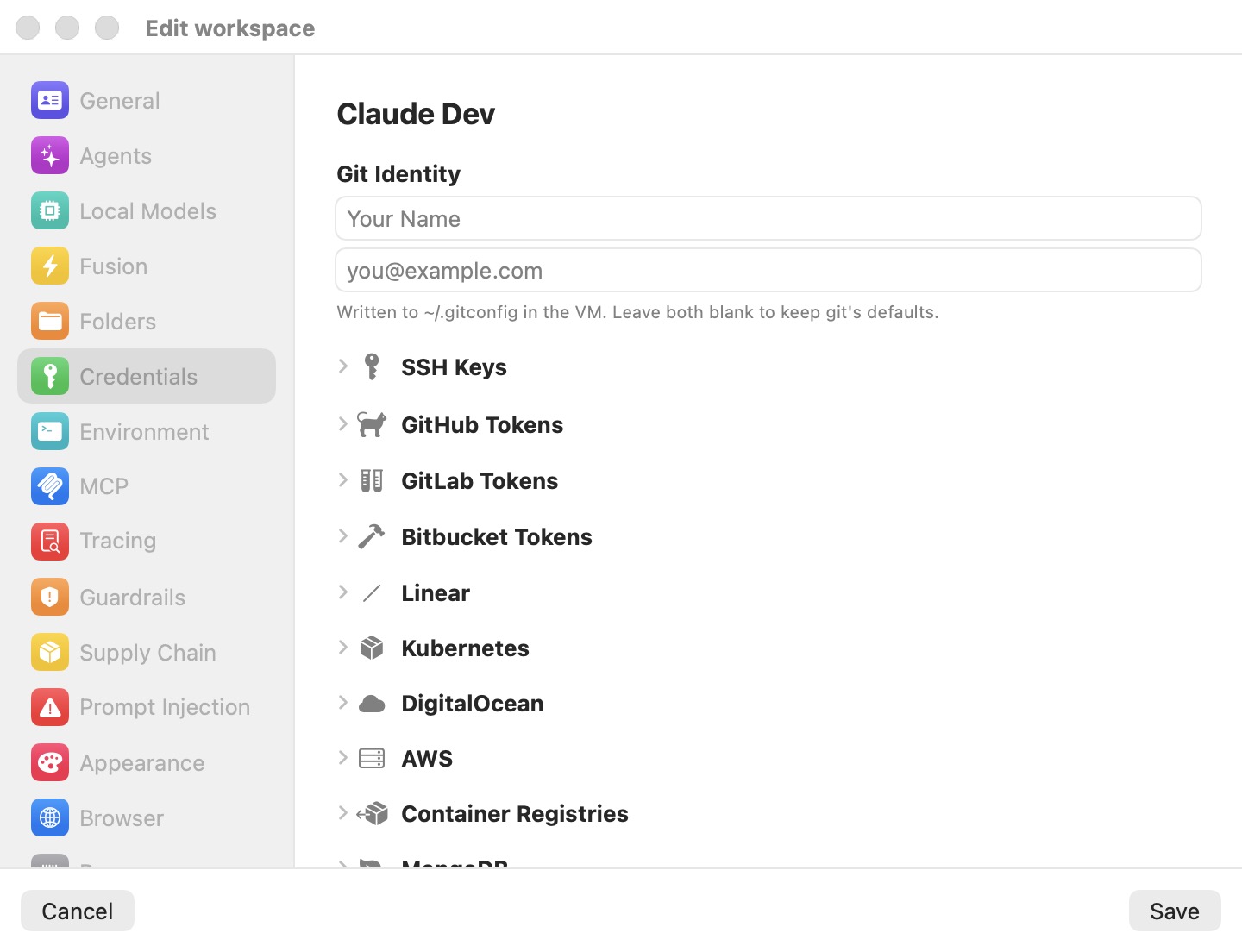
The pane opens with Git Identity (a name and email written to ~/.gitconfig in the VM; leave both blank to keep git's defaults — the placeholders are just examples, not credentials), followed by a list of only the credentials you have configured, grouped under category headers (Agents, Git, Cloud, Databases, SSH, Other). With nothing configured, the pane reads No credentials yet. Two buttons sit at the bottom: Add credential opens a picker of the credential types — Git token, SSH key, AWS credentials, DigitalOcean token, Linear API key, Twilio API key, Kubernetes, Container registry, Database, and Other API key — and Import env file… bulk-imports from a .env or ~/.bashrc. Click Save; the next session launch writes the fakes into the VM and loads the reals into the proxy.
Agent API keys (Anthropic, OpenAI, xAI, Moonshot and the other model providers) are not in this picker: they are set in Preferences › Models, described next. The Agents group appears only on a workspace that still stores an agent key of its own from an earlier release; its Edit in Models… menu item opens Preferences › Models. To change model access, use Preferences › Models or the machine's Models pane.
The per-credential approval gate (Ask before use) and each service's write policy are set in the Guardrails pane, not here. See Settings → Credentials for the field-by-field reference.
Seven providers are auto-handled — Anthropic, OpenAI, GitHub, GitLab, DigitalOcean, Twilio, and Kubernetes need no manual token rules; their dedicated sections cover them. Everything else goes through Other API keys.
Importing from an env file. Import env file… reads an existing .env file — or a ~/.bashrc — and turns its variables into credentials. The parser handles KEY=VALUE and export KEY=VALUE, strips surrounding quotes and trailing comments, and deliberately skips anything that would need shell evaluation ($VAR interpolation or $(…) substitution), so it is safe to point at a real .bashrc. A review sheet then shows the variables with masked values: recognized names (GH_TOKEN/GITHUB_TOKEN, GITLAB_TOKEN, AWS_ACCESS_KEY_ID/AWS_SECRET_ACCESS_KEY/AWS_SESSION_TOKEN, DIGITALOCEAN_ACCESS_TOKEN, LINEAR_API_KEY, TWILIO_ACCOUNT_SID/TWILIO_AUTH_TOKEN, and the model-provider keys ANTHROPIC_API_KEY, OPENAI_API_KEY, XAI_API_KEY, MOONSHOT_API_KEY and KIMI_API_KEY, which go to the matching provider in Preferences › Models — or, for a remote machine, into its own Models override) auto-map to their credential type, while unrecognized names can be imported as generic manual tokens with a comma-separated host scope you supply. Already-configured entries are flagged and left unchecked so a re-import never clobbers a secret silently.
Agent keys and subscriptions
Every coding agent — Claude Code, Codex, Grok, Kimi, and omp — gets its model access from a provider configured in Preferences › Models (⌘, then Models). The same pane exists in each machine's settings as an optional per-machine override. The full reference — providers, per-agent model choices, the per-machine override, OpenRouter, custom servers and on-device models — is in Models & Providers. This section covers what matters for credentials: how a key or a subscription reaches the agent without ever entering the VM.
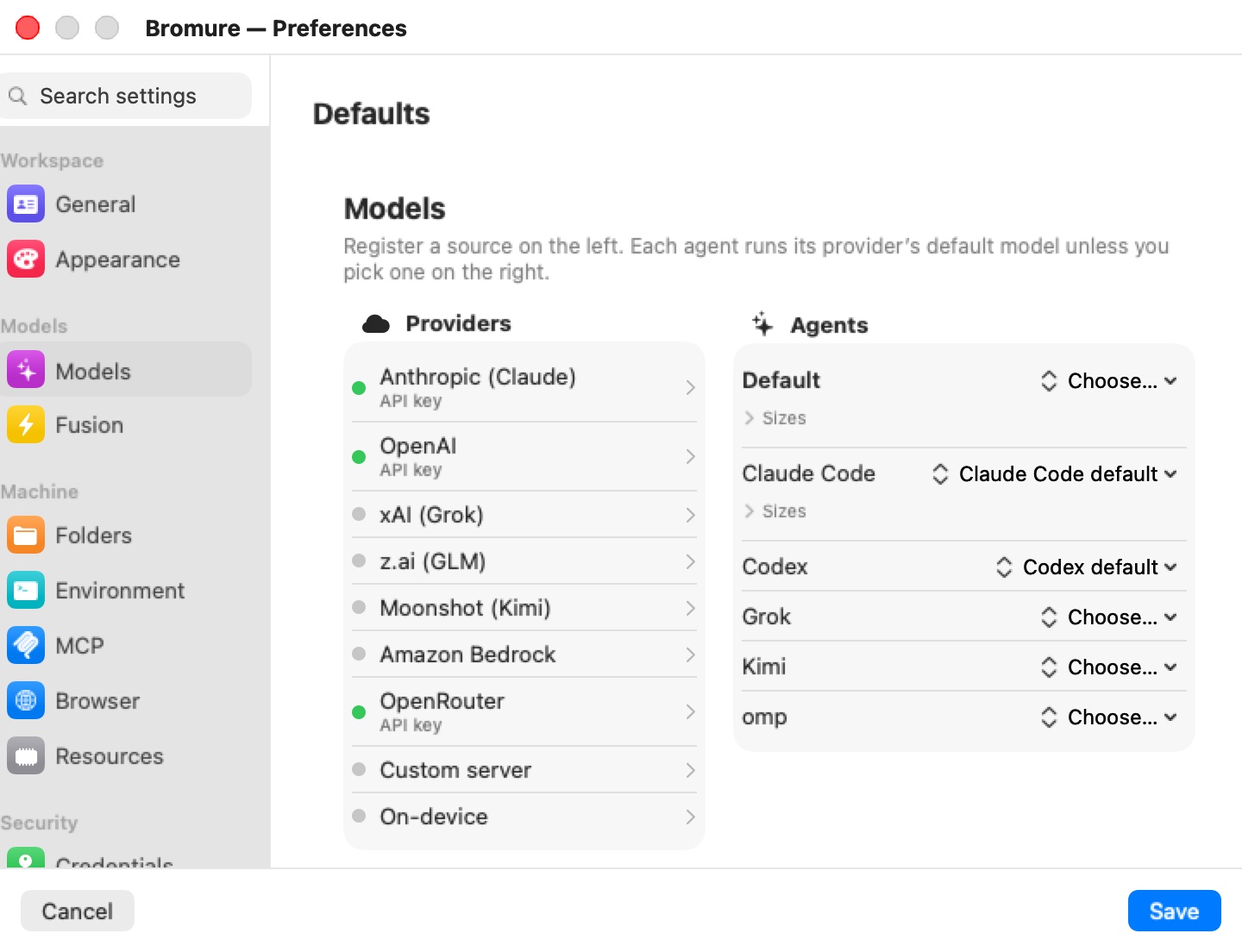
Click a provider in the Providers column to open its popover. For every provider it holds an API key field; for the four providers that offer subscriptions it also holds the sign-in controls.
API keys
Paste the key into the popover's API key field. In Preferences the pane saves as you type; in a machine's settings, the key is saved with Save. Lifecycle:
- In the VM: the agent's usual variable (
ANTHROPIC_API_KEY,OPENAI_API_KEY,XAI_API_KEY, …) holds the provider-shaped fake (sk-ant-api03-brm-…,sk-brm-…,xai-brm-…,sk-kimi-brm-…). - On the wire: swapped to the real key on requests to that provider's hosts only (
anthropic.com,openai.com,x.ai,moonshot.ai, …). - At rest: the keys, like the rest of the model settings, are stored encrypted in
models.enc(see Where secrets live on the host).
Keys set in Models do not appear in the Credentials or Guardrails panes, so they have no Ask before use row. (An agent key still stored on the workspace itself from an earlier release does appear there and can be gated. Importing an env file no longer creates such keys: it puts agent keys into the model settings.)
From the CLI, bromure-cli workspaces create --auth token|subscription|bedrock|local and bromure-cli vm run --auth token|subscription|bedrock|local still choose the auth mode of the workspace's primary agent.
Subscriptions: Claude, ChatGPT, Grok and Kimi
If you have a subscription rather than an API key, sign in instead. Subscriptions exist only for Anthropic (Claude), OpenAI (ChatGPT, used by Codex), xAI (Grok) and Moonshot (Kimi); z.ai, Amazon Bedrock, OpenRouter and custom servers take keys only, and omp is API-key only. A subscription powers only its own agent: a Claude sign-in runs Claude Code, a ChatGPT sign-in runs Codex, and so on.
Whichever way you sign in, the result is the same: the real OAuth tokens live only on the host, and the guest runs with a bogus key — a fake ANTHROPIC_API_KEY for Claude, a seeded ~/.codex/auth.json holding a bogus far-future-expiry JWT for Codex (so the client never tries to refresh it), and stand-in tokens in Grok's and Kimi's own credentials files. The proxy recognizes the bogus value and injects a live Authorization: Bearer access token on the wire.
Signing in from Preferences › Models
The provider's popover shows one of three states:
| State | What the popover shows |
|---|---|
| Not signed in | Sign in with provider, "Interactive login in a temporary VM — no API key needed.", then "or paste an API key" above the API key field. |
| Signed in | A green "Signed in" line with the date of the sign-in, Sign in again… and Log out…. |
| Expired | An orange Sign-in expired panel — "provider rejected the saved sign-in (from …). Sessions can't use it until you sign in again." — with Sign in again and Log out…. |
Sign in with provider runs the registration flow:
- An explainer titled Register with provider says what is about to happen. Click Continue. (Registration is refused if the Bromure proxy isn't running.)
- A throwaway registration VM boots — temporary, isolated, with no workspace folders, no saved secrets and no credential swap map. Inside it, the agent's own login command runs.
- Your Mac's default browser opens the provider's sign-in page. Sign in as usual.
- The resulting tokens are captured on the host, encrypted and stored; the throwaway VM is shut down and deleted.
A sign-in started from Preferences is always shared by every machine. Log out… asks "Log out of provider?" — "Workspaces using this sign-in stop working until you sign in again." — and deletes the stored sign-in. Log out… is hidden where it can't act.
Signing in from a machine's Models pane: share scope
The same popover appears in a machine's own Models pane. A sign-in started there ends with a question, Share with every workspace?:
| Button | Effect |
|---|---|
| Every workspace | Stores the sign-in as the shared one and removes every machine's own sign-in for that provider, so every machine really uses the new one. |
| Just this workspace | Stores the sign-in for this machine only. |
Scope matters because a machine reads its own sign-in first and falls back to the shared one only when it has none. A machine that once signed in for itself keeps using that login, even after a newer shared sign-in, until you choose Every workspace or log that machine out. A remote client that starts the sign-in is asked the same question; if nobody answers, the sign-in stays with that machine only.
Signing in from the chat
You don't have to visit Preferences first. When an agent in a session needs to sign in, the chat shows a card titled Sign in to provider — "Bromure signs you in on this Mac and keeps your provider account out of the machine — the agent only ever sees a stand-in key." — with a Sign in to provider… button, and the session's row in the sidebar reads Sign in needed. When an agent's saved sign-in has been rejected, the red error card offers the same button.
Clicking it signs in without a throwaway VM:
- The session's own terminal runs the agent's login command, and the provider's sign-in page opens in your Mac's browser ("Opening your browser to sign in…").
- When the agent exchanges its authorization code for tokens, the proxy answers that exchange itself: the real tokens go straight into the host's store. Claude Code and Codex are told the credential stays on the Mac; Grok and Kimi receive stand-in tokens, which their CLIs write to their credentials files.
- The agent restarts on the stand-in ("Signed in. Starting … again…").
A sign-in from the chat replaces the login the machine was reading: the machine's own, if it has one, otherwise the shared one. If no sign-in reaches the proxy within 5 minutes, the card reports "Bromure didn't receive a provider sign-in in time. You can try again." Only one sign-in can run per machine at a time.
omp has no account to sign in to; its card reads "omp needs a model provider" and offers Machine settings… instead.
Warning: Don't run
/login(or the agent's login command) by hand inside the VM to fix an expired sign-in. Use the card or Preferences › Models, so the tokens are captured by the host instead of staying in the VM.
Kimi signs in to the international region
Kimi Code's CLI defaults to the mainland-China region, which rejects accounts from elsewhere. Bromure signs Kimi in on the international region (auth.kimi.ai, API at api.kimi.ai) by setting the CLI's region variables in the registration VM and in every session. A Kimi sign-in captured on the older auth.kimi.com region is still recognized.
Token custody: one grant, one refresher
Token refresh is entirely host-side, and each sign-in is refreshed by exactly one owner:
- One grant per slot. The shared sign-in and each machine's own sign-in are separate slots. For each slot, one refresh runs at a time, and every machine that reads that slot uses its result. The guest never holds a refresh token.
- Refresh timing. The host refreshes about 5 minutes before expiry, against the provider's token endpoint (
platform.claude.comfor Claude,auth.openai.comfor Codex,auth.x.aifor Grok,auth.kimi.aifor Kimi). A freshly registered sign-in is stored as already expired, so the first use proves the refresh path works. - Automation clones share the grant. A machine cloned for an automation points at its base machine's login rather than copying it.
- Your Mac's own CLI logins are not imported. Sharing a grant with a CLI on the host would log one of them out every time the other refreshed.
- When no token is available for a Claude request, the proxy answers the agent itself instead of forwarding the bogus key: a temporary failure comes back as a retryable
529, and a rejected sign-in as a401that tells you to sign in again from Bromure. The popover then shows Sign-in expired.
Service credentials
AWS
AWS gets the deepest treatment of any provider, because AWS requests are not authenticated by a bearer token — they are signed (SigV4). Open Credentials → AWS in the workspace editor; a segmented control chooses between Static keys and SSO / Identity Center.
Static keys and the host resigner
Paste your Access key ID and Secret access key (plus an optional STS Session token and a Default region). The lifecycle:
- In the VM:
~/.aws/configpoints at a credential_process helper that vends — over vsock port 8445 — the real Access key ID paired with a 40-character fake Secret access key, omitting the session token. Every AWS SDK, theawsCLI, terraform, and boto3 pick this up natively; no tool-specific setup is needed. - What the guest does: signs its requests with the fake secret, producing a syntactically valid but cryptographically doomed SigV4 signature.
- On the wire: the host's AWS resigner detects requests bound for AWS in any partition, on its IPv4 or dual-stack name (
*.amazonaws.com,*.api.aws,*.amazonaws.com.cn,*.api.amazonwebservices.com.cn, the European Sovereign Cloud and ISO partitions' domains; GovCloud, regional, FIPS and bucket-style S3 hosts included). The AWS guardrail covers the same hosts, and the minted-credential rewrite below covers them pluspublic.ecr.aws, strips the guest's signature, injects the realX-Amz-Security-Tokenwhen a session token is present, and re-signs with the real secret before the request leaves your Mac. Each successful resign emits acredential.aws_signaudit event with a masked access key, shown as a Credential used row in the Security Timeline.
This is fail-closed in the strongest sense: the real secret key never exists in the VM in any form, and a request that bypasses the proxy is rejected by AWS with InvalidSignatureException.
Three request styles are not supported and return a clear error to the guest rather than a silent failure: chunked streaming S3 uploads (STREAMING-AWS4-HMAC-SHA256-PAYLOAD, answered with 501), SigV4A asymmetric signing, and presigned query-string URLs (which embed the signature where the resigner cannot replace it).
Credentials the VM creates
Some calls issue a new credential: aws sts assume-role / get-session-token / get-federation-token, aws iam create-access-key, IAM Identity Center's role credentials, Cognito's GetCredentialsForIdentity, aws ecr get-login-password, and on DigitalOcean doctl registry login, doctl kubernetes cluster kubeconfig save (and its credentials call), and doctl spaces keys create. The proxy holds back the response to such a call and replaces every secret in it with a fake before the VM sees it. A temporary AWS key keeps its real access key ID, with a fake secret and session token, so the resigner can tell which key the guest signed with. A registry or cluster token becomes a fake that's swapped back only on that registry or cluster.
The real values are saved, encrypted, in the workspace's configuration, so fakes the VM stored (in ~/.aws, ~/.docker/config.json or a kubeconfig) keep working after a restart. A minted AWS key is re-signed with its own secret and session token. Once it expires, requests signed with it are refused rather than re-signed with the workspace's own key, which would run them as a different identity. Expired credentials are dropped 30 days after they expire.
A response the proxy can't rewrite completely is never passed on: the guest gets a 502 instead. Calls that set a secret the VM itself chooses, which no fake can stand in for, are refused in every guardrail mode: iam:CreateLoginProfile, UpdateLoginProfile, CreateServiceSpecificCredential and ResetServiceSpecificCredential. An AWS consent prompt names the call it would sign (for example sts:AssumeRole), and each minted credential emits a credential.minted event.
SSO / IAM Identity Center
If your organization uses IAM Identity Center, select SSO / Identity Center instead of pasting long-lived keys:
- Click Grant access to ~/.aws and approve the folder access prompt (a security-scoped grant; the folder is read on the host and never mounted into the VM).
- Pick your profile from the SSO profile picker. The app discovers
[profile …]sections in~/.aws/configthat carrysso_start_url,sso_account_id, andsso_role_name, resolving[sso-session …]references; account ID and role are shown read-only. - On session start, the host resolves temporary role credentials from the SSO token cache (
~/.aws/sso/cache). If the cached token has expired, your browser opens foraws sso login— run on the host, from/usr/local/bin/aws.
The resolved temporary keys feed the same resigner as static keys; the VM still never sees a secret. Credentials auto-refresh on the host about 5 minutes before they expire.
Bedrock
Amazon Bedrock is a model provider for every agent, not an auth mode of one. Turn on Use Amazon Bedrock in the Amazon Bedrock popover of Preferences › Models (or a machine's Models pane), then pick Bedrock model ids per agent. Claude Code runs on Bedrock natively; the other agents reach it through Bedrock's OpenAI-compatible API. Requests are signed with each machine's own AWS credentials (Credentials → AWS, static or SSO) through the same resigner path, since Bedrock endpoints are *.amazonaws.com hosts — or, if you paste one into the popover's Bedrock API key (optional — else AWS credentials sign) field, with that key, which the VM only sees as a bedrock-brm-… fake. The popover also takes an AWS region; leave it empty to use each machine's AWS region. See Models & Providers.
Git HTTPS tokens (GitHub, GitLab, Bitbucket, self-hosted)
Personal access tokens for git-over-HTTPS live under GitHub Tokens / GitLab Tokens / Bitbucket Tokens (collectively, HTTPS tokens). Each entry takes a host, a username, and the token; self-hosted GitLab or Gitea instances work by setting the host field. Lifecycle:
- In the VM: a fake is written into
~/.git-credentialsand thegh/glabconfiguration;GH_TOKENandGITLAB_TOKENare exported so the CLIs authenticate automatically. Fake shapes match each vendor's validators (ghp_+ 36 for GitHub,glpat-+ 20 for GitLab,brm_…otherwise), so prefix-and-length checks inghandglabpass. - On the wire: swapped to the real token on requests to that entry's git host.
- Approval: each entry gets its own Ask before use row in the Guardrails pane.
If you only need git push over SSH, you may not need an HTTPS token at all — see SSH keys below.
Generic API keys (Other API keys / Manual token rules)
For any API the app does not auto-handle, add an entry under Other API keys (the manual token rules, also surfaced as MITM token swap). Click Add token and provide:
| Field | Meaning |
|---|---|
| Name | A label for the entry. |
| Value | The real secret (stored encrypted on the host). |
| Env var name | The variable the fake is exported under inside the VM. Reference it from your code. |
| Host filter (optional) | The host scope for the swap. |
Two edge cases are deliberate:
- Empty env var name: nothing is exported; you copy the fake from the session's welcome banner and place it wherever your tooling needs it.
- Blank host filter: the real value is injected on any host, without asking. That is an explicit always-on choice — useful for APIs with many regional hostnames — but it means the credential's scope no longer protects it. To gate an unscoped secret, turn on Ask before use for it in the Guardrails pane (or give it a host filter after all).
Anthropic, OpenAI, GitHub, GitLab, DigitalOcean, and Kubernetes never need manual entries here.
1Password secret references (op://)
Instead of pasting a real secret, an Other API key value can be a 1Password secret reference — op://vault/item/field, or the brace form {{ op://vault/item/field }} that op inject and .env.op files use. Only the reference is ever stored on disk; the secret itself is never written anywhere on the host or the VM. The editor recognises the reference, shows it in the clear (it isn't a secret), and notes that it resolves through 1Password.
At each workspace launch Bromure resolves the reference host-side with the 1Password CLI (op read), mints a fake from the reference string (so the fake stays stable even when the secret rotates), and exports only that fake into the VM. The MITM proxy then swaps the fake for the resolved value on the wire, exactly as it does for a pasted secret — and it re-resolves every 2 minutes, so rotating the item in 1Password takes effect within a couple of minutes without a reboot.
This needs the op CLI installed and signed in — biometric unlock via the 1Password app, or op signin in a terminal. If op isn't found, the editor shows a Get 1Password CLI link and the workspace surfaces install instructions on launch; if resolution fails (not signed in, or the item doesn't exist), Bromure surfaces the error so you can fix it and restart the workspace.
Importing a .env or .env.op file (Import env file… in the Credentials pane) recognises op:// values automatically — under recognised names like ANTHROPIC_API_KEY or arbitrary ones like STRIPE_KEY — and stores each as a manual token holding the reference.
DigitalOcean
Paste a personal access token under Credentials → DigitalOcean (the Open DigitalOcean token page in your browser link takes you to token generation). The fake (dop_v1_ + hex, 64 characters) is exported as DIGITALOCEAN_ACCESS_TOKEN and written into ~/.config/doctl/config.yaml, so doctl auth init is unnecessary. The swap covers requests to digitalocean.com, plus a second entry for the base64 Basic-auth blob used by docker login / doctl registry login against registry.digitalocean.com, so registry pushes and pulls resolve too.
Linear
Paste a personal API key under Credentials → Linear (link: Open Linear API settings in your browser; keys come from linear.app → Settings → API). The fake (lin_api_ + 40) is exported as LINEAR_API_KEY, which the Linear SDK, MCP servers, and CLI tools pick up automatically; the swap is scoped strictly to linear.app (GraphQL at api.linear.app and MCP at mcp.linear.app). A Linear key on the workspace is also the prerequisite for Linear-issue automation triggers — see Automations.
Twilio
Add a Twilio API key credential with the SID in Account SID (AC…) or API Key SID (SK…) and the secret in Auth Token / API Key secret (both from console.twilio.com). Twilio authenticates with HTTP Basic auth, where the SID is an identity — it travels in the request URL — and only the token is secret. Lifecycle:
- In the VM:
TWILIO_ACCOUNT_SIDholds the real SID andTWILIO_AUTH_TOKENabrm-twilio-…fake, so Twilio SDKs and the CLI pick them up without setup. - On the wire: on requests to
twilio.com, the proxy swaps both the bare fake token and the pre-encoded base64SID:tokenBasic-auth blob for the real ones. - Approval: via Ask before use in the Guardrails pane.
Import env file… recognizes TWILIO_ACCOUNT_SID / TWILIO_API_KEY_SID and TWILIO_AUTH_TOKEN / TWILIO_API_SECRET and assembles them into one Twilio credential.
MCP server bearer tokens
HTTP-transport MCP servers configured in the MCP pane get the same treatment: the real bearer token stays on the host, a brm-mcp_… fake is injected into the MCP config the agent reads, and the proxy swaps it on the wire, scoped to the server's host. Only enabled HTTP-transport servers with a non-empty bearer token receive a swap entry.
One extra courtesy: for hosts with a brm-mcp_ entry, the proxy answers the OAuth/OIDC discovery paths (.well-known authorization-server, protected-resource, and OpenID configuration endpoints) with 404. Claude Code then treats the server as pre-authenticated instead of attempting its own OAuth flow — which could never complete inside the VM anyway.
Container registries (Docker Hub, GHCR, and friends)
Credentials → Container Registries manages HTTP Basic auth for docker pull/push. Presets exist for Docker Hub (docker.io), GitHub Container Registry (ghcr.io), and GitLab Container Registry (registry.gitlab.com); any other registry can be added by host. Lifecycle:
- In the VM:
~/.docker/config.jsoncontains a fake auth blob — the base64 of your username paired with a derivedbrm-docker-…password — so Docker believes it is logged in. - On the wire: the proxy substitutes the real base64 blob at the matching registry host. The distribution-spec token dance is handled too: swap entries are added for known auth realms (Docker Hub authenticates against
auth.docker.io, DigitalOcean's registry againstapi.digitalocean.com). - Import: click Import config.json… to pull entries from an existing
~/.docker/config.jsonon the host. Entries delegated tocredsStore/credHelpersare skipped — their passwords live in the OS keychain, not the file — and the import summary reports how many were skipped and why. - Approval: per registry, via Ask before use in the Guardrails pane. Remove this registry deletes an entry.
Kubernetes contexts
Credentials → Kubernetes turns kubeconfig contexts into proxy-mediated cluster access. Click Import kubeconfig to parse an existing kubeconfig into one row per context (the current-context first, auth type auto-detected), or Add context to enter a server URL, credentials, namespace, and cluster CA manually. In every case the VM receives a synthetic ~/.kube/config: kubectl in the guest talks to the proxy (trusted via the Bromure CA), never to the API server directly.
Per auth type:
- Bearer token contexts get a
brm-k8s-…placeholder in the VM, swapped to the real token on the wire. - Client certificate contexts get a throwaway self-signed certificate and key in the VM; the real certificate and key are registered on the host as a
SecIdentityand used for upstream mTLS. - Exec plugin contexts never run the plugin in the VM at all. The exec-plugin poller runs the command on the host every refresh interval (default 600 seconds, floor 60), parses the
ExecCredentialJSON, and feeds the fresh token into the swap map. Refreshes preserve the entry's consent state.
If the kubeconfig supplies the cluster's own CA, it is forwarded so the proxy can verify the upstream API server. File-path fields in an imported kubeconfig (CA, cert, key) are read eagerly at import time — later changes to those files on disk are not picked up. Each context gets its own Ask before use row in the Guardrails pane, where a write policy can additionally strip destructive verbs (kubectl delete, AWS Delete*/Terminate*, docker push, git push) host-side before a byte is forwarded — a separate layer from the credential swap.
HTTP databases (MongoDB, ClickHouse, Elasticsearch)
Credentials → Databases (the MongoDB / ClickHouse / Elasticsearch sections) covers HTTPS-speaking database endpoints — the Mongo Data API, ClickHouse's HTTP interface, Elastic. Each endpoint takes an engine, host, secret, username, auth type, and one or more env var names (comma-separated) under which the brm-db-… fake is exported; reference those variables from your code or connection strings.
Database credentials are the one family where the swap sweeps the request body as well as headers and query parameters, because connection secrets routinely ride inside JSON or SQL payloads. The proxy patches Content-Length after a body swap; unrelated multipart or binary bodies of other traffic are never touched (all other swaps are header-scoped). Basic-auth endpoints also get their base64 user-and-secret blob swapped. Per-endpoint Ask before use and the write policy are set in the Guardrails pane.
SSH keys
SSH is handled without any token at all: the VM's SSH_AUTH_SOCK is backed by an ssh-agent bridge over vsock (port 8444). The guest can list identities and request signatures, but the private key bytes live only on the host and physically cannot be read or extracted from inside the VM. Two key sources exist, both under Credentials → SSH Keys:
- The per-workspace default key. A shared default ed25519 keypair is generated at app startup (stored under
default-ssh/in Application Support) and copied into each new workspace's agent directory. The pane shows the workspace's public key so you can paste it into your git host (for GitHub: github.com/settings/keys). You can also mint a fresh key from the CLI withbromure-cli workspaces ssh-keygen <workspace-id|name>, which prints the new public key. - Imported keys. Click Import… / Import file… under Imported SSH keys and point the app at an existing private key file — RSA, ed25519, and ECDSA are supported, encrypted keys included. An encrypted key prompts for its passphrase once at import; the passphrase is stored in the macOS Keychain (service
io.bromure.agentic-coding.ssh-key-passphrases) and supplied viaSSH_ASKPASSat launch, never logged. Imported-key signing flows through a private ssh-agent process the app spawns for itself (ssh-agent -Don a socket under the temporary directory) — separate from anything else on your system. - Keys from a host agent. A key whose private half can't leave its device — a YubiKey or other security key behind gpg-agent, Secretive, 1Password — is added with From host agent… instead. Choose the agent's socket (empty = the app's own
SSH_AUTH_SOCK, which for an app opened from the Finder is the macOS agent, not one your shell exports; for gpg-agent use~/.gnupg/S.gpg-agent.ssh), click Load, and tick the keys the workspace may use. Nothing is copied: the VM is shown only the ticked keys — and only while the agent holds them, so an unplugged key isn't offered — and their sign requests are forwarded to that agent, so a touch or PIN prompt appears on your Mac as usual (the request waits up to two minutes for it). The agent's other keys stay invisible to the VM, and a request to sign with one of them is refused.
Per imported key, turning on Ask before use in the Guardrails pane makes every in-VM signature request prompt for consent. Every signature — default or imported key — emits a credential.ssh_sign audit event carrying the key's SHA256 fingerprint and whether it was a managed, imported or host-agent key.
Note: Your macOS login ssh-agent (the launchd one) — or any other host agent — is deliberately never exposed to the VM as a whole. Only per-workspace keys, keys you explicitly imported, and the individual host-agent keys you picked are reachable from a session.
Per-use approval and grant durations
Any credential in this chapter can be flagged Ask before use — a per-credential checkbox in the Guardrails pane (labelled Require approval to use on the control itself), off by default, described in the UI as: "Pop a confirmation dialog the first time this credential is used in a session."
When a gated credential is first used in a session, the proxy holds the request and shows a consent dialog titled Allow “workspace name” to use credential? (with your workspace's name and the credential's label filled in), offering four buttons:
| Button | Grant |
|---|---|
| Allow for 5 minutes | Time-bounded; the credential flows without further prompts for 5 minutes. |
| Allow for 1 hour | Time-bounded, 1 hour. |
| Allow for the rest of the session | Until the machine's VM shuts down. |
| Don't allow | The request is refused; the denial is remembered for 5 minutes so an agent retry-storm doesn't produce a dialog storm. |
Behavior worth knowing:
- Coalescing. Concurrent requests needing the same credential collapse onto one dialog — a chatty agent firing twelve parallel API calls produces one prompt, and all twelve follow your decision.
- Deny wins. A live denial short-circuits before any older allow is consulted.
- Ephemeral by design. Grants and denials are held in memory only and are revoked when the VM shuts down. "Rest of the session" never survives a VM restart, and nothing is persisted across app runs.
- Headless sessions. In an SSH or headless session the prompt appears in the machine's tmux rather than as a GUI alert — see Remote Access.
For AWS, the gate applies to every host-side signing call; for SSH keys, to signature requests; for everything else, to the first wire swap of the session.
Tip: The consent gate is per credential, not per host. If you want an unscoped manual token to remain under control, approval is the mechanism designed for it.
The Credential Approvals window
Window → Credential Approvals… opens a live view of every consent decision made during the current app run: time-bounded allows (5 minutes / 1 hour / rest of session) and remembered denials. Each row shows the workspace name and time remaining, and offers Revoke; Revoke all (⌘⌫) clears everything at once. The list auto-refreshes every 2 seconds and shrinks naturally as grants expire.
Because decisions are in-memory only, the window is empty after grants expire, after the VM shuts down (session-scoped grants), and after the app quits. It is a control panel for the present, not an audit log — for history, use the Security Timeline and Tracing.
The compromise detector
The fakes do double duty: besides standing in for secrets, they are tripwires. A fake token has exactly one legitimate destination family — the host scope it was minted for. There is no honest reason for sk-ant-api03-brm-… to appear in a request to pastebin.example. So the proxy scans every outbound request — headers and body, via an Aho-Corasick automaton, cheap enough to run on everything — for any fake headed outside its scope.
When it finds one, it treats the request as attempted credential exfiltration:
- The request is blocked with HTTP 451. Not a single byte is forwarded to the destination.
- The VM is paused immediately. If the machine was running in the background, it is brought on screen first, and its frozen frame tints red.
- A critical alert appears, titled This environment may have been compromised: "Bromure detected an outbound attempt to leak a session credential from “machine” to a host it was not minted for. The VM has been paused." Under Detected leaks: it lists one line per leak — a token preview (such as
sk-a…f9q3), the credential's name, the host it was minted for, and the host it was sent to. - The detection is recorded as a red Credential brokering row in the Security Timeline, and on enrolled installs as a
credential.exfiltrationevent.
The alert offers four buttons:
| Button | Effect |
|---|---|
| Shut down (default) | Stops the VM and marks the machine compromised. |
| Block | Stops just this request (it already got a 451) and resumes the VM. Nothing is remembered: if the agent tries again, the detector fires again and the alert reopens. |
| Allow | Trusts the observed host for the rest of this session only and resumes the VM. From then on the credential is swapped in and sent to that host (and to its subdomains), and requests to it are no longer flagged. The decision is recorded as a green Credential brokering row, "allowed by user for this session", and on enrolled installs as credential.exfiltration_allowed. The allowlist is cleared when the VM shuts down. |
| Save for Investigation | Asks for a folder, exports disk.img (a copy of the VM system disk), home.tar.gz (the machine's home directory) and shares/<name>.tar.gz for each shared folder, then shuts the VM down and marks the machine compromised. The VM's RAM state is discarded. |
Only Shut down answers to Return; Block, Allow and Save for Investigation have no keyboard equivalent, so resuming a possibly hostile VM — let alone sending it the credential — always takes an explicit click. Only one alert shows at a time; repeat detections while it is open are dropped (each one is still blocked).
Tip: Allow exists for legitimate cross-host setups — for example an OpenAI-shaped key that a tool deliberately sends to another provider's OpenAI-compatible endpoint. If you don't recognize the destination, don't allow it.
If the machine is being mirrored by a remote client, the question appears on the client as a pending prompt with Shut down, Block and Allow (saving for investigation needs a local folder picker, so it is offered only on the Mac itself). Only the affected VM stays paused; the host keeps serving every other machine. An unanswered prompt shuts the VM down after 3 minutes.
A machine marked compromised refuses to boot until you remediate. Launching it shows "To continue, the VM disk image and the persistent home folder must be wiped. Your tokens, ssh keys, and workspace settings are preserved." with Wipe and Launch and Cancel (Return does not confirm the wipe). Heed the accompanying warning: shared folders are NOT wiped, so if the compromise came through a package or file in a shared folder, it may still be there — review those folders before resuming work.
Recommended response to a compromise alert: open the Trace Inspector (⇧⌘I) or run bromure-cli trace leaks to see the offending host and request, decide whether a project dependency or a prompt-injected instruction was responsible (see Prompt Injection and Supply Chain), then wipe and relaunch.
Scope details:
- Unscoped fakes are exempt. A manual token with a blank host filter is "any host" by design and cannot trip the detector; bogus subscription placeholders are likewise excluded.
- First-party siblings are tolerated. Matching mirrors the swap's scope policy, with one relaxation: hosts under the same registered domain as the credential's provider (Claude or Codex infrastructure under
anthropic.com, for example) use a family match, so a legitimateapi.anthropic.comtoken seen onmcp-tools.anthropic.comis not a false alarm. Everything else is strict. - Real-looking leaks are flagged too. Independently of the fake tripwires, the proxy flags unswapped, real-looking secrets in outbound traffic —
Bearerorx-api-keyvalues with known prefixes (sk-ant-,ghp_,AKIA, …) or opaque tokens of 20 characters or more. These appear as leak warnings in the Trace Inspector and inbromure-cli trace leaks; they usually mean a real secret was pasted into the VM by hand, which the wire boundary exists to make unnecessary.
The detector itself is always on. What you can turn off, per machine, is the interruption — see the next section.
Escape hatches
Some hosts and clients don't work under full interception: a private-CA server the host doesn't trust, a client that pins its server's certificate, or a legitimate setup that trips the compromise alert again and again. Three per-machine settings at the bottom of the Guardrails pane relax the boundary for those cases without switching it off. All three apply live, with no restart.
| Setting | Default | What it does |
|---|---|---|
| Allow per-request insecure bypass (X-bromure-insecure) | On | When a request to a self-signed or private-CA host fails certificate validation, the agent can retry it with the header X-bromure-insecure: yes to skip validating that upstream's certificate. Interception, tracing and the leak guard stay on, and Bromure injects no real credential on such a request — only the guest's fakes go out. Every use is recorded in the Security Timeline as an Upstream TLS row: "allowed — certificate validation skipped (X-bromure-insecure); no credentials injected". On by default because it only acts when the guest sends the header; turn it off to forbid the header outright. |
| Disable transparent interception | Off | Stops the network-level divert that forces the VM's HTTP/HTTPS into Bromure. Raw sockets and certificate-pinned clients then reach the real network, and the real upstream certificate, directly. The proxy itself stays: HTTP(S)_PROXY remains set, so proxy-aware tools (apt, git, pip, curl, node…) and the agent's own API calls still go through Bromure and keep the credential swap, tracing and guardrails. Traffic that ignores the proxy settings is no longer covered by the egress rules. |
| Don't alert on credential exfiltration | Off | Suppresses the compromise alert and the VM pause. The leaking request is still blocked with a 451 and still recorded in the Security Timeline ("blocked — exfiltration attempt (alerts off, VM not paused)"); only the interruption goes away. |
Warning: Each of these trades some protection for compatibility. Prefer the narrowest one: the per-request header for one untrusted certificate, Allow in the compromise alert for one trusted destination, and the machine-wide toggles only for a machine that can't work otherwise.
Where secrets live on the host
Everything sensitive is encrypted at rest with AES-GCM under a per-install 256-bit master key — the secrets vault. The master key lives in the macOS Data Protection Keychain, scoped to the app's signing identity, with accessibility kSecAttrAccessibleAfterFirstUnlockThisDeviceOnly and iCloud sync disabled. It never prompts, never syncs, and never leaves the Mac. If the keychain is unreachable (an unsigned or unprovisioned build), the app falls back to a mode-0600 key file stored beside the ciphertext — weaker, since key and ciphertext then share a disk, but it keeps at-rest encryption functioning; a fully provisioned release uses the keychain.
Practical consequences:
- Backups and copies are ciphertext. A Time Machine backup or a copied
Application Supportfolder contains only encrypted blobs; without this Mac's keychain entry they cannot be decrypted (unless the file-fallback key was in use and copied along). - Wiping the keychain entry rotates the key. Existing encrypted blobs become unreadable and you re-enter your credentials. Non-sensitive metadata in
profile.jsonis unaffected. - Nothing is synced anywhere. No credential, token store, or key material is uploaded, synced, or backed up by the app itself.
On-disk locations, all under ~/Library/Application Support/BromureAC/ unless noted:
| Location | Contents |
|---|---|
ca/cert.pem, ca/key.pem | The Bromure Agentic Coding Root CA (key mode 0600). Delete the directory to rotate. |
fake-salt.bin | The per-install 32-byte HKDF salt behind fake derivation (0600). Deleting it rotates every fake on this Mac. |
claude-subscription.enc, codex-subscription.enc, grok-subscription.enc, kimi-subscription.enc | AES-GCM-encrypted subscription stores: the shared sign-in plus each machine's own sign-in, 0600. |
models.enc | The global model settings from Preferences › Models, provider API keys included, encrypted with the vault key. |
pii/<workspace-id>.key | The per-machine key behind PII Protection's stand-ins (0600). |
secrets-master.key | The 0600 fallback master key — present only when the Data Protection Keychain is unreachable. |
default-ssh/id_ed25519.raw, default-ssh/id_ed25519.pub | The shared default SSH keypair copied into new machines. |
profiles/<id>/ssh/ | Per-machine minted SSH keys (the agent directory). |
Keychain: io.bromure.agentic-coding.master-key | The AES-256 vault master key (account v1), Data Protection Keychain. |
Keychain: io.bromure.agentic-coding.ssh-key-passphrases | Imported-SSH-key passphrases, one item per profile/key file. |
Host-side reads for imports — ~/.aws/config, ~/.aws/sso/cache/*.json, ~/.docker/config.json, kubeconfig files — happen on the host only; none of those files are ever mounted into a VM. Encrypted trace bodies (see Tracing) use the same vault key.
Verifying the boundary yourself
The wire boundary is designed to be checkable, not taken on faith. From a shell inside any session:
1. The environment holds fakes.
echo "$ANTHROPIC_API_KEY"
# sk-ant-api03-brm-…            ← a fake, not your key

env | grep -E 'TOKEN|KEY'
# every value is brm_/ghp_/glpat_/dop_v1_/lin_api_-shaped placeholder
2. The config files hold fakes.
cat ~/.git-credentials          # fake tokens per git host
cat ~/.docker/config.json       # fake base64 auth blobs
grep -A2 credential_process ~/.aws/config   # helper, not a secret key
3. And yet, everything works.
aws sts get-caller-identity     # succeeds — the host resigned the request
gh api user                     # succeeds — the fake was swapped on the wire
4. TLS inside the VM terminates at the proxy.
openssl s_client -connect api.anthropic.com:443 -brief 2>&1 | head
# issuer: the Bromure Agentic Coding Root CA — not a public CA
5. SSH keys are absent, but signing works.
ssh-add -L                      # lists public keys served by the vsock agent
ls ~/.ssh/id_*                  # no private key files to find
6. On the host, watch the swaps happen. Open the Security Timeline and filter on Credential brokering: each swap appears as a row such as sk-a…f9q3 → api.anthropic.com — swapped in …. With tracing enabled for the machine, you can also run:
bromure-cli trace summary        # per-request swap reports and leak warnings
bromure-cli trace leaks          # only the suspicious ones
or open the Trace Inspector (⇧⌘I), where swapped requests are annotated Never sent to VM — swapped by proxy.
If you ever find a real credential inside a VM, it got there one of two ways: you (or the agent, at your direction) pasted it in by hand, or it arrived via a shared folder. The swap machinery never writes reals into the guest — and the compromise detector treats real-shaped secrets on the wire as a leak precisely because they should not exist there.
Quick reference
vsock ports on the guest-host boundary:
| Port | Purpose |
|---|---|
| 8443 | The HTTPS MITM proxy — the guest's entire egress. |
| 8444 | The ssh-agent bridge behind SSH_AUTH_SOCK. |
| 8445 | The AWS credential_process helper. |
| 8446 | The Claude token channel used by the registration VM — a port it shares with the local-inference bridge (they are set up in different flows; see Models & Providers). |
| 8447 | The Codex token channel used by the registration VM (access, refresh, and ID token). |
Both token channels are one-directional: the host can only write fakes into the VM, and the VM can only send reals out to the host. There is no request by which the VM can ask for a real token back.
Related CLI commands (full reference in CLI, API & MCP):
| Command | Purpose |
|---|---|
bromure-cli workspaces create --auth token|subscription|bedrock|local | Create a workspace with its primary agent's auth mode. |
bromure-cli vm run --auth token|subscription|bedrock|local | Start a VM, selecting the auth mode for an on-the-fly workspace. |
bromure-cli workspaces ssh-keygen <workspace> | Mint a fresh workspace SSH key host-side and print the public key. |
bromure-cli trace summary [workspace] | Summarize traced traffic, including swaps and leak warnings. |
bromure-cli trace leaks [workspace] | Show traced requests with potential credential leaks. |