Guardrails
Guardrails control how a machine's credentials may be used (a machine is a workspace, in the settings editor), how the machine reacts when an agent hits a wall or behaves oddly, and how strictly its traffic is intercepted. The connections its VM may open are set in Sandbox Policy. In the pane's own words: "Guardrails govern how this workspace's configured credentials are used. Ask before use pops a host-side confirmation the first time a credential is used in a session. A write policy strips or blocks destructive operations on the wire — enforced in the proxy, so a compromised agent can't bypass it. Only credentials you've configured appear here."
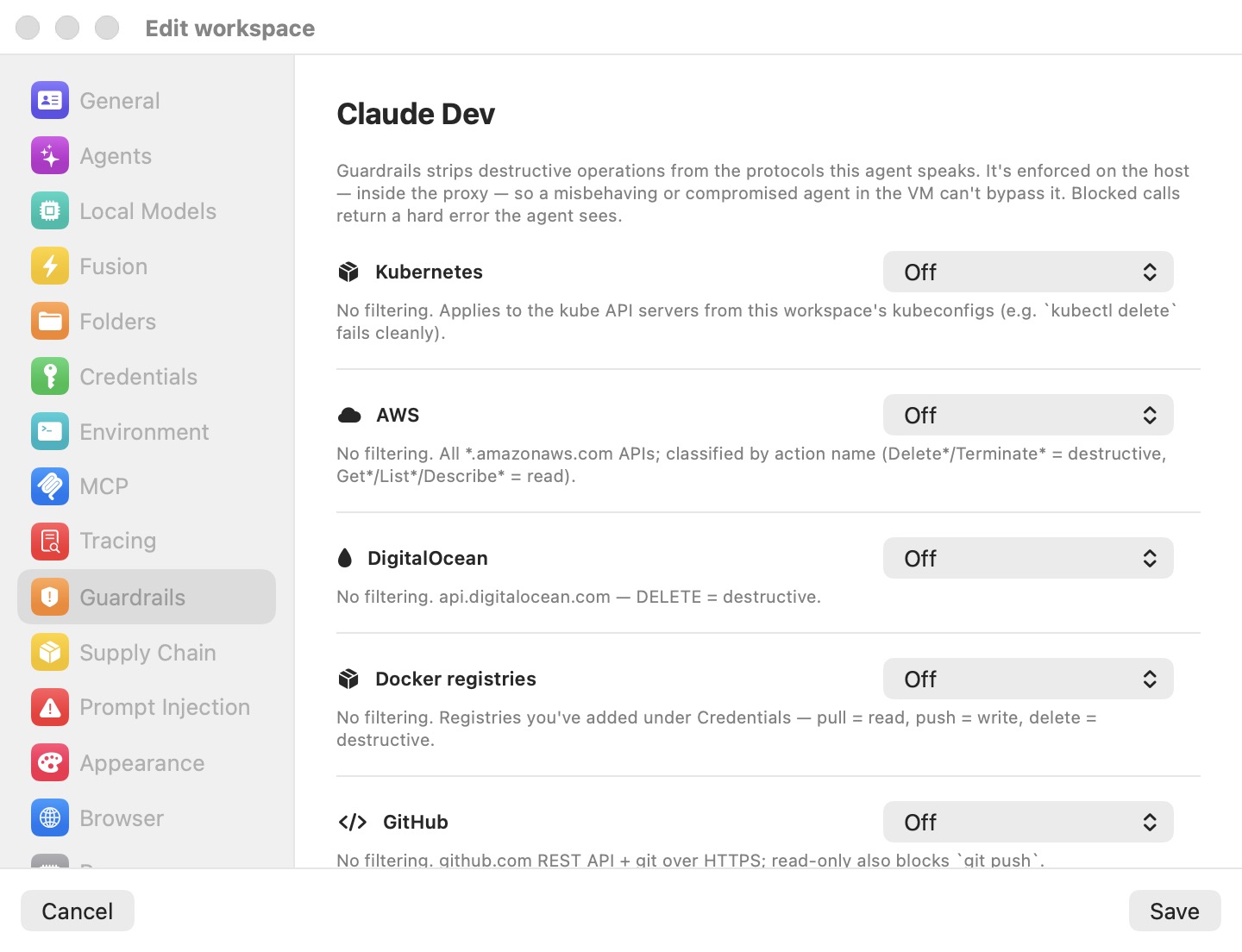
The pane has two parts: one row per credential, then Protections — the settings shared by both sandbox engines. (The outbound-connection rules that used to sit here moved to Sandbox Policy in 5.4.) Everything in it applies to a running machine as soon as you click Save — no restart. The deeper mechanics are in Prompt-Injection Detection & Guardrails.
Credential rows
The pane lists every credential configured in Credentials, in the same order. Each row shows the credential's name and hosts, a Require approval to use checkbox, and — where the service supports one — a write-policy picker. With no credentials, the pane shows No credentials to guard and points you to the Credentials pane.
Require approval to use (ask before use)
Off by default. When on, the first time the credential is used in a session the proxy pauses the request and asks, offering Allow for 5 minutes, Allow for 1 hour, Allow for the rest of the session, or Don't allow. Grants live in memory and end with the session; Window › Credential Approvals… lists the current ones. See Credentials & the Wire Boundary.
While a credential has a live grant, its row shows how long is left next to the checkbox — an orange countdown (4m, then 45s) for a timed grant, allowed this session for a rest-of-session one, and a red denied countdown (or denied this session) while a deny is in force. Right-click the row to Allow for 5 minutes, Allow for 1 hour or Allow for the rest of the session, to Deny for 5 minutes, Deny for 1 hour or Deny for the rest of the session (refused without asking), or Revoke — ask next time to clear either so the next use prompts again. A timed allow or deny starts from now, so a grant that's running low gets a fresh 5 minutes. These act on the running session at once; there's nothing to save. (The countdown appears in the workspace's own settings on the Mac running it, not in Preferences or on a remote client.)
Note: An automation that uses a credential with approval on can't run fully unattended: it pauses at the dialog until you answer on the Mac. The automation editor warns about this.
Write policy
A write-policy picker appears for:
- git forge tokens (GitHub, GitLab, Bitbucket)
- AWS credentials
- DigitalOcean tokens
- container registries
- Kubernetes contexts
- database endpoints (MongoDB, ClickHouse, Elasticsearch)
| Mode | Behavior |
|---|---|
| Off | No filtering. |
| Prompt before write | Reads pass. Each write pauses for a dialog showing the exact operation. |
| Block destructive | Deletes, drops and terminations are blocked; creates and updates pass. |
| Read-only | Every change is blocked; only reads pass. |
New machines use Prompt before write for every service (from the Defaults template). Machines created before Guardrails existed load as Off.
Note: A write policy is per service, not per credential, as the pane notes: "two credentials for the same service (e.g. two GitHub tokens) share one policy." Changing either row changes both.
How each service is classified
| Service | Scope | Classification |
|---|---|---|
| Kubernetes | The API servers in this machine's kubeconfigs | GET/HEAD/OPTIONS read; DELETE (including deletecollection) destructive; other verbs write. Blocked calls return a Kubernetes Status 403 that kubectl shows cleanly. |
| AWS | *.amazonaws.com | The action name (X-Amz-Target header or Action= parameter) by prefix: Delete*, Terminate*, Remove*, Purge*, Destroy*, Deregister*, Revoke* destructive; Get*, List*, Describe* and similar read. S3 and REST-style calls fall back to the HTTP method. Blocked calls return AccessDeniedException. |
| DigitalOcean | *.digitalocean.com | DELETE destructive; GET/HEAD read. |
| Container registries | Configured registries and Docker Hub | Pull read; push write; DELETE destructive. Blocked calls return a registry DENIED error. |
| GitHub / GitLab / Bitbucket | The forge's REST API and git over HTTPS | REST by method. git push is a write (blocked in Read-only, prompted in Prompt before write); git fetch is always a read. |
Database endpoints are classified by engine:
| Engine | Read | Write | Destructive |
|---|---|---|---|
| MongoDB (Atlas Data API) | find, findOne, aggregate | insert, update, replace | deleteOne, deleteMany |
| ClickHouse | SELECT, SHOW, DESCRIBE, EXPLAIN, WITH … | INSERT, CREATE, ALTER … | DROP, TRUNCATE, DELETE, and ALTER … DELETE / DROP COLUMN / DROP PARTITION / CLEAR |
| Elasticsearch | _search, _msearch, _count, _mget, _sql and other queries (even over POST) | _bulk, _update, indexing | DELETE, _delete_by_query |
An orange warning appears when a policy has nothing to apply to — a Kubernetes context without a kubeconfig, a database endpoint without a host.
Note: For ClickHouse, if no SQL text is visible in the request, Read-only blocks it (it can't be proven a read) while Block destructive lets it through.
The write dialog
In Prompt before write, a write pauses for Allow write on "scope" from workspace "name"?, showing the operation verbatim — the SQL statement, or METHOD /path. The choices:
- Allow for 15 minutes (default)
- Allow once — creates no grant, so the next write asks again.
- Allow for the rest of the session
- Don't allow — the agent gets the same error the blocking modes return. The refusal is remembered for 60 seconds so a retry loop doesn't re-prompt every second.
Grants are per machine and per scope: one Kubernetes API server, AWS as a whole, one registry, each forge, or one database host. Identical concurrent writes share one dialog. When the machine is used headless over SSH or the CLI, the same choices are asked inside the machine's tmux; no answer means deny.
Don't alert on credential exfiltration
When a credential is seen heading to a host it doesn't belong to, Bromure blocks the request, pauses the VM, and shows a compromise alert with Shut down, Block, Allow, and Save for Investigation. Allow trusts that destination for the rest of the session. See Credentials & the Wire Boundary.
Don't alert on credential exfiltration turns off that alert for this machine. The leak is still blocked and still recorded in the Security Timeline, as "blocked — exfiltration attempt (alerts off, VM not paused)" — only the interruption goes away. Applies live, no restart. Default: off.
Protections
The Protections section holds the settings that apply to a machine whichever sandbox engine it uses. Each applies to a running machine at once.
Tell the agent when policy blocks it
"The agent asks you instead of retrying or finding a way round." When the firewall, the OpenShell policy, the guest sandbox or a guardrail refuses something an agent tried, the agent is told what was blocked and why, and to ask you rather than retry or find another way round. Without it, an agent sees only a failed connection or "permission denied" and may keep trying. Claude Code reads the note right after the command that hit the block. Codex, Grok, Kimi and Oh My Pi get it typed in when their turn ends. Until you choose, it is on while the machine uses an OpenShell policy. See Telling the agent.
Agent watchdog
"Flags a session that behaves suspiciously; Quarantine also cuts its network and pauses it." The watchdog watches the session as a whole from outside the VM:
- bursts of blocked requests;
- credentials that don't belong;
- signs of tampering;
- new destinations once the session has settled;
- outbound volume far above the session's own baseline (counted at the network switch, independently of the proxy).
| Mode | When the session scores past the threshold within a minute |
|---|---|
| Off (default) | Nothing. |
| Alert | An Agent watchdog row in the Security Timeline ("drift detected"), also sent to your organization on an enrolled Mac. |
| Quarantine | The VM's network is cut and the VM paused within milliseconds. An alert, The agent watchdog quarantined this workspace, then lists what it saw. Shut down stops the machine; Keep quarantined resumes it with its network still cut, so you can look inside; Release restores the network. |
When the alert can't be shown on this Mac (a headless Mac, or a machine mirrored by a remote client), the question goes to the remote client, and no answer within three minutes counts as Keep quarantined.
Only allow credentials Bromure injects (strict mode)
"Blocks any credential Bromure didn't put there itself." With strict mode on, a request carrying a credential Bromure didn't inject is blocked and raises the compromise alert; that covers a key the agent found in a file, copied from a log, or brought in. Allow in the alert approves that credential for the session. Tokens a site issues inside the VM (a session cookie after a sign-in, for example) can still go back to that site.
Strict mode forces transparent interception and ignores the no-interception list. Raw TCP traffic can't be inspected. Every credential the machine configures needs a host filter first; the pane names the ones that don't have one. Off by default; your organization can require it.
Disable transparent interception
By default, the virtual switch diverts the VM's HTTP and HTTPS connections (ports 80 and 443) into Bromure's proxy at the network layer, so the proxy sees them even when a program ignores the proxy settings.
Turning on Disable transparent interception stops only that forced diversion. Programs that open raw connections, and apps that pin certificates, then reach the network — and the real server certificate — directly. The proxy itself stays on: HTTP_PROXY / HTTPS_PROXY remain set, so proxy-aware tools (apt, git, pip, curl, node…) and the agents' own API calls still go through Bromure and keep credential swapping, tracing and guardrails. Applies live, no restart. Not available while strict mode is on.
Use it for a machine with a client that breaks under interception. While it is on, traffic from programs that bypass the proxy settings is not seen by the firewall's web rules or the write policies.
Allow per-request insecure bypass (X-bromure-insecure)
A narrower escape hatch for self-signed or private-CA servers. When a request to such a host fails certificate validation, the agent can retry it with the header X-bromure-insecure: yes, and Bromure skips validating that server's certificate for that request. Interception, tracing and the leak guard stay on, and Bromure puts no real credential into such a request — only the VM's stand-ins go out. Every use is recorded in the Security Timeline.
On by default: it only acts when the VM explicitly sends the header. Turn it off to refuse the header outright.
What the agent sees when a call is blocked
A blocked call returns an ordinary error in the service's own format — a Kubernetes Status, an AWS AccessDeniedException, a registry DENIED — whose message ends "blocked by Bromure Guardrails". The agent sees a clean failure it can report, not a hung connection. (Supply-chain blocks use HTTP 451 instead, so the two are easy to tell apart — see Supply Chain.)
Limitations
- A force-push looks like a normal push on the wire, so Block destructive doesn't stop it; Read-only and Prompt before write do gate pushes. Deletions through the forge's REST API are caught.
- Kubernetes and registry policies only cover hosts from this machine's kubeconfigs and registries; a database policy needs the endpoint's host.
- Other hosts are governed by the Sandbox Policy's host, port and method rules, not by service-level classification.
Settings reference
| Setting | Type | Default |
|---|---|---|
| Require approval to use | Checkbox per credential | Off |
| Write policy | Off / Prompt before write / Block destructive / Read-only, per service | Prompt before write for new machines |
| Don't alert on credential exfiltration | Toggle | Off |
| Tell the agent when policy blocks it | Toggle | On while the machine uses an OpenShell policy |
| Agent watchdog | Off / Alert / Quarantine | Off |
| Only allow credentials Bromure injects (strict mode) | Toggle | Off |
| Disable transparent interception | Toggle | Off |
| Allow per-request insecure bypass (X-bromure-insecure) | Toggle | On |
Related chapters
- Credentials — the credentials these rows govern.
- Sandbox Policy — the machine's outbound rules or OpenShell policy.
- Prompt-Injection Detection & Guardrails — enforcement in depth.
- Security Overview & Timeline — every block and allow, per machine.
- Settings Reference — all panes at a glance.