Credentials
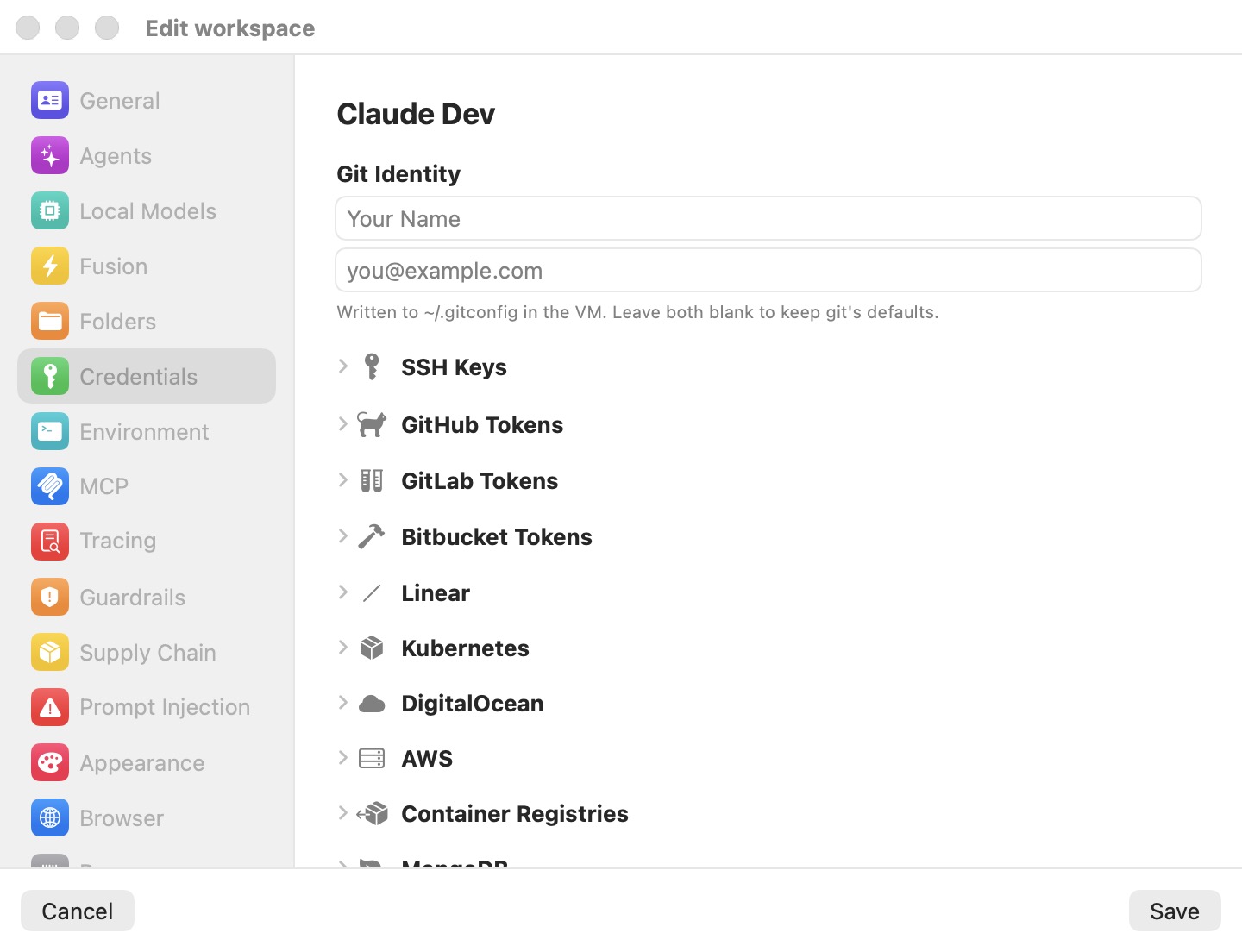
The Credentials pane is where you give a machine (a workspace, in the settings editor) the secrets its agent needs — git tokens, SSH keys, cloud credentials, database passwords — without those secrets ever entering the VM. Every value is stored encrypted on your Mac. Inside the VM the agent only sees a stand-in (for example brm_…); when a request leaves your Mac, the proxy replaces the stand-in with the real value, and only for the hosts that credential belongs to.
This page is the field-by-field reference. The mechanism — the wire boundary, stand-ins, host scoping, AWS re-signing, the compromise alert — is explained in Credentials & the Wire Boundary. Whether a credential needs your approval before use, and what writes it may make, are set in Guardrails.
Note: API keys and sign-ins for the coding agents' model providers (Anthropic, OpenAI, xAI, Moonshot, z.ai, Bedrock, OpenRouter, custom servers) are not set here. They live in Preferences › Models, or in a machine's own Models override.
Git Identity
The two fields at the top set the author identity written to ~/.gitconfig in the VM:
- user.name — placeholder Your Name.
- user.email — placeholder [email protected].
"Written to ~/.gitconfig in the VM. Leave both blank to keep git's defaults." These are not secrets and are not swapped. Changes apply to a running machine at Save.
Imported Config Files
If the first-run setup imported configuration files from your Mac into this machine, they appear under Imported Config Files: each as ~/<path>, with how many settings it holds, how many secrets were left out, and which settings were disabled. "Copied into the VM as-is. Secrets were left out — those come in as credentials above, so the VM only ever sees a fake." The minus button removes a file from the machine.
The credentials list
Below, the pane lists only the credentials this machine actually has, under category headers:
| Header | What appears under it |
|---|---|
| GIT | Personal access tokens for GitHub, GitLab, Bitbucket, or self-hosted forges. |
| CLOUD | AWS, DigitalOcean, Linear, Twilio, Kubernetes contexts, container registries. |
| DATABASES | MongoDB, ClickHouse and Elasticsearch endpoints. |
| SSH | The machine's own key and any keys you imported. |
| OTHER | "Other API key" swap rules. |
Each row shows an icon, a name, and the host or hosts the credential applies to. Its ⋯ menu (or a click on the row) offers Edit… and Remove. Nothing is removed from disk until you click Save.
An AGENTS group can also appear, on machines that still carry an agent API key of their own from before model providers moved to Models. Those rows have no Remove; their menu offers Edit in Models…, which opens Preferences › Models (in Preferences itself, or in a remote machine's editor, it switches to that editor's Models pane).
With no credentials, the pane shows No credentials yet — "Add an API key, token, or SSH key — or import an env file. Real values stay on your Mac; the VM only ever holds a fake."
Adding a credential
Add credential opens a list of credential types; each opens its own editor sheet, closed with Done:
| Type | Subtitle |
|---|---|
| Git token | Personal access token for GitHub, GitLab, or Bitbucket |
| SSH key | Import a private key, or use the per-workspace key |
| AWS credentials | Static IAM keys or SSO — SigV4-signed on the wire |
| DigitalOcean token | doctl / API personal access token |
| Linear API key | Linear personal API key |
| Twilio API key | Account/API-key SID + secret — HTTP Basic on the wire |
| Kubernetes | A cluster context (token, client cert, or exec plugin) |
| Container registry | Registry login for Docker Hub, ghcr.io, and others |
| Database | MongoDB Data API, ClickHouse, or Elasticsearch |
| Other API key | Any other token — you choose the env var and host(s) |
Agent API keys (Anthropic, OpenAI, xAI, Moonshot) are not in this list: they are set in Preferences › Models.
Importing an env file
Import env file… reads credentials out of an existing .env file or a ~/.bashrc. The parser reads KEY=VALUE and export KEY=VALUE lines, strips quotes and trailing # comments, and keeps the last assignment of a repeated name. It never runs a shell: a value that would need expansion ($VAR, $(…)) is skipped rather than imported wrong, so a real .bashrc is safe to use.
The variables appear in a review sheet, Import from filename, with every value masked.
Recognized variables map to a credential type:
| Variable(s) | Becomes |
|---|---|
GH_TOKEN, GITHUB_TOKEN | GitHub token (asks for a Git username) |
GITLAB_TOKEN, GLAB_TOKEN | GitLab token (asks for a Git username) |
AWS_ACCESS_KEY_ID, AWS_SECRET_ACCESS_KEY, AWS_SESSION_TOKEN | AWS static keys |
DIGITALOCEAN_ACCESS_TOKEN, DIGITALOCEAN_TOKEN, DO_TOKEN | DigitalOcean token |
LINEAR_API_KEY | Linear API key |
TWILIO_ACCOUNT_SID, TWILIO_API_KEY_SID, TWILIO_API_KEY | Twilio SID |
TWILIO_AUTH_TOKEN, TWILIO_API_SECRET, TWILIO_API_KEY_SECRET | Twilio secret |
ANTHROPIC_API_KEY, OPENAI_API_KEY, XAI_API_KEY, MOONSHOT_API_KEY, KIMI_API_KEY | The API key of the matching provider in the model settings: Anthropic, OpenAI, xAI or Moonshot |
Agent keys go where agents take their provider keys from. On this Mac they land in Preferences › Models, so every machine that inherits the global settings gets them, and they are saved as soon as you import, like any change on that board. For a remote machine edited from a mirror window, they go into that machine's own Models override and are saved with Save; in a remote's Preferences, into that Mac's global settings. A key is flagged Already configured when the provider already has one.
A variable that matches something the machine already has is flagged Already configured — check to overwrite. and left unticked, so a re-import never silently replaces a secret.
Unrecognized variables can be imported as Other API key entries. Each has a Host(s) field — the hosts the stand-in is swapped on, comma-separated; blank means any host. The variable name becomes both the entry's name and the variable the stand-in is exported under.
A value that is a 1Password reference (op://vault/item/field) is imported as an Other API key that stores the reference, not the secret (see Other API keys).
The button reads Import N credentials. Importing adds the selection to the pane; click Save to keep it.
SSH keys
Private keys never enter the VM: signatures are served by an ssh-agent on the Mac over a private virtual socket, so the VM can ask for a signature but can't read the key.
- The machine's own ed25519 key. New machines have Generate an ed25519 keypair ticked (unless the Defaults template already provides a key). Once a key exists, the editor shows its public key with Copy and Open GitHub keys page, and a Regenerate toggle. Right after a new key is generated, the app shows it so you can add it to GitHub.
- Imported SSH keys. Import… opens a file picker, then asks for a Label and, if the key is encrypted, a Passphrase (stored in the macOS Keychain). RSA, ed25519 and ecdsa keys are supported.
- Keys from a host agent. From host agent… lists the keys an ssh-agent on your Mac holds — for keys that can't be copied as a file, such as a YubiKey behind gpg-agent, Secretive or 1Password. Pick the agent's socket (empty means the app's
SSH_AUTH_SOCK; the menu offers the agents found on this Mac, e.g.~/.gnupg/S.gpg-agent.ssh), click Load, and tick the keys to add. Only those keys are shown to the machine.
SSH key changes apply when the machine restarts.
Git tokens (GitHub, GitLab, Bitbucket)
Split into GitHub, GitLab and Bitbucket groups. Add token adds a row with a Host, a Username, and a Personal access token (with a reveal button and a link to the forge's token page). The host can point at github.com, gitlab.com, or a self-hosted instance. The stand-in is written to ~/.git-credentials and into the gh / glab configuration; gh and glab also pick up GH_TOKEN / GITLAB_TOKEN.
Linear
One personal API key (placeholder shaped lin_api_…, with a link to Linear's API settings). Exported as LINEAR_API_KEY and swapped only on requests to linear.app and its subdomains. A Linear key is also what Linear-triggered automations need.
Twilio
"Account SID + Auth Token from console.twilio.com (or an API Key SID SK… + its secret)." Two fields:
- Account SID (AC…) or API Key SID (SK…) — the SID is an identifier that travels in request URLs, so it isn't treated as secret; the VM gets it as-is in
TWILIO_ACCOUNT_SID. - Auth Token / API Key secret — the VM gets a stand-in in
TWILIO_AUTH_TOKEN; the proxy puts the real one in on requests totwilio.com.
A button next to the secret opens the Twilio Console. The editor also has the Require approval to use checkbox, the same one Guardrails shows for every credential.
Kubernetes
One row per cluster context. Bromure writes a ~/.kube/config inside the VM that points kubectl at the proxy; the real identity stays on the Mac. Each context has a name, a Server URL, an optional CA cert (PEM), a Namespace, and an authentication method:
- Bearer token — swapped on the wire.
- Client certificate — the real certificate and key are used by the Mac for the upstream connection; the VM gets a throwaway one.
- Exec plugin — a Command, Args, and a Refresh interval (1–60 minutes). The plugin runs on the Mac and the fresh token is swapped in;
kubectlin the VM never runs it.
Import file… reads an existing kubeconfig into one row per context; Add context adds one by hand. Clusters you create with Bromure itself are handled separately — see Kubernetes Clusters & Registries. A context added or edited while the machine runs works at Save, its cluster's CA and client certificate included; the app still offers a restart.
DigitalOcean
One personal access token (placeholder shaped dop_v1_…). Exported as DIGITALOCEAN_ACCESS_TOKEN and written to doctl's configuration, so doctl auth init isn't needed. Swapped on requests to digitalocean.com, including the Basic-auth form docker login / doctl registry login use against registry.digitalocean.com.
AWS
For the aws CLI, the SDKs, terraform and similar tools. The real secret never reaches the VM: the Mac re-signs each request with the real key, and a request that bypasses the proxy is rejected by AWS (InvalidSignatureException). An Auth method control chooses:
- Static keys — Access key ID, Secret access key, an optional Session token ("Optional — STS only"), and a Default region, with Open IAM credentials page.
- SSO / Identity Center — grant access to your
~/.awsfolder, then pick an SSO profile from your~/.aws/config. Temporary credentials are fetched on the Mac, which runsaws sso loginin your browser when needed. (In the iPhone, iPad and Vision Pro client you type the profile name instead.)
A machine's AWS credentials also sign Amazon Bedrock requests when Bedrock is enabled in Models without a Bedrock API key. AWS changes apply when the machine restarts.
Container registries
Per-registry logins for docker pull / docker push. The VM's ~/.docker/config.json holds a stand-in, and the proxy swaps in the real password on requests to that registry. The Add menu offers Docker Hub (docker.io), GitHub Container Registry (ghcr.io), GitLab Container Registry (registry.gitlab.com), Quay (quay.io), Other host…, and Import config.json… (entries whose password lives in a credential helper or keychain are skipped and counted). Each row has a Host, a Username, and a Password or token.
Databases (MongoDB, ClickHouse, Elasticsearch)
One row per HTTPS endpoint, grouped by engine. Each has an optional Name, a Host (which also scopes the endpoint's write policy), an Authentication method — Username + password, API key, or Bearer token (MongoDB defaults to API key, the others to username + password) — a Username for password auth, the Secret, and Environment variable(s): the comma-separated names the stand-in is exported under. The stand-in is swapped wherever it appears — header, query string, or body.
Other API keys
For any service Bromure doesn't handle on its own. Each entry is a swap rule:
- Name — a label for you (placeholder "e.g. Stripe (sandbox)").
- Real secret — the key (placeholder
sk_live_…). You can paste a 1Password reference instead (op://vault/item/field): only the reference is stored, and Bromure fetches the secret with the 1PasswordopCLI at launch and refreshes it every 2 minutes. A Get 1Password CLI link helps if it isn't installed. - Environment variable — where the agent finds the stand-in (placeholder
STRIPE_API_KEY). Leave it blank to export nothing. - API host(s) (optional) — hostnames, comma-separated, no
https://or path. The real key is swapped in only on requests to these hosts and their subdomains. Blank allows any host.
Warning: An entry with no host is swapped in on any host, and it is not covered by the compromise alert — that is what "any host" means. To keep an unscoped secret under control, give it a host, or turn on Require approval to use for it in Guardrails.
OpenShell provider profiles
On a machine whose sandbox engine is OpenShell + Sentry, the pane ends with an OpenShell provider profiles section (on the Mac only).
Attach provider profile… imports an OpenShell provider profile (the YAML or JSON openshell profile export writes). A sheet asks for an Instance name (the profile's id by default) and a value for each of the profile's credentials (required ones are marked *); Attach adds them. Each value becomes a credential of this machine named instance · credential, bound to the profile's hosts and paths, under the environment variables the profile names. The profile's endpoints are added as a rule, so they're reachable. Bromure keeps the real values on the Mac and gives the VM stand-ins, as for any credential. The trash button detaches a profile and removes its credentials. A profile that declares no endpoints is refused, since its credentials would have nowhere to be used. Credentials that refresh or use a token_grant are used as the static value you enter.
Use OpenShell credential placeholders (off by default) makes the agent see openshell:resolve:env:NAME in its environment instead of Bromure's look-alike tokens, for the credentials this machine passes as environment variables — the way it would under OpenShell. The proxy swaps in the real value in request headers, and in request bodies or WebSocket messages only where an endpoint sets request_body_credential_rewrite or websocket_credential_rewrite. Each credential still works only on its own hosts. Credentials sent in another format (git and registry logins, subscription sign-ins) keep Bromure's stand-ins. Some tools check a token's format and may reject a placeholder. Takes effect at the next VM start.
When changes apply
Git identity, git tokens, Linear, Twilio, DigitalOcean, container registries, databases and other API keys apply to a running machine at Save. SSH keys and AWS credentials need a restart; the app offers one when you save. Kubernetes contexts work at Save, and the app offers a restart too. OpenShell credential placeholders take effect at the next VM start.
Everything in this pane is stored in the machine's encrypted secrets.enc, never in profile.json.
Settings reference
| Editor | What it holds |
|---|---|
| Git Identity | user.name / user.email for ~/.gitconfig; not secret. |
| SSH key | The machine's key and imported keys; served by the Mac's ssh-agent. |
| Git token | Per-host username and token for GitHub, GitLab, Bitbucket. |
| Linear API key | LINEAR_API_KEY, swapped on linear.app. |
| Twilio API key | TWILIO_ACCOUNT_SID as-is, TWILIO_AUTH_TOKEN as a stand-in, swapped on twilio.com. |
| Kubernetes | Contexts (token, client certificate, exec plugin). |
| DigitalOcean token | DIGITALOCEAN_ACCESS_TOKEN and doctl config. |
| AWS credentials | Static keys or SSO; the Mac re-signs requests. Also signs Bedrock. |
| Container registry | Per-registry logins; stand-in in ~/.docker/config.json. |
| Database | Per-endpoint secret exported under the variables you name. |
| Other API key | Secret or 1Password reference, variable, optional hosts. |
| Import env file… | Bulk import from .env or ~/.bashrc. |
Related chapters
- Credentials & the Wire Boundary — the security model behind this pane.
- Guardrails — approval and write policies for these credentials.
- Models and Models & Providers — model-provider keys and sign-ins.
- Settings Reference — all panes at a glance.