Fusion — the Multi-Model Panel
Different frontier models fail differently. One misses an edge case another catches; one hallucinates an API the other three refuse to invent. Fusion turns that diversity into a feature: when engaged, every question your Claude Code session asks is answered by several models at once, a judge model maps where the drafts agree, conflict, and individually shine, and a single synthesized answer — grounded in that analysis — is delivered back to Claude Code as if one model wrote it. The agent never knows a panel was convened.
Fusion runs entirely in the host-side proxy (see Concepts), so nothing changes inside the VM: no agent flags, no wrapper scripts, no visible latency source the agent could react to. It is configured per machine (a workspace, in the settings editor) in the Fusion settings pane, and engaged with the bolt button (⚡) in the toolbar while one of the machine's terminal tabs is on screen.
Note: Fusion is labeled BETA in the UI. It is a working prototype: the mechanism is stable, but the judge prompts, provider backends, and failure handling are still evolving. See Beta limitations before relying on it.
How Fusion works
Fusion intercepts the Claude Code session's traffic to Anthropic's /v1/messages endpoint. Each request is handled in stages:
- Leg A — Claude answers first. The guest's original request is sent to Anthropic unchanged (forced non-streaming so the full reply can be inspected). Your Claude Code session is always one leg of the fuse.
- Tool turns pass through. If Claude's reply is a tool call — the common case in agentic coding, where most turns are "read this file", "run this command" — it is forwarded to the agent verbatim and fusion is skipped for that turn. The agentic loop is never broken by a synthesized tool call.
- Text turns fan out. Only when Claude returns a plain-text answer does Fusion engage. Every other selected leg — Codex (OpenAI), Grok (xAI), Kimi Code (Moonshot AI), Oh My Pi, and optionally a local model — is asked the same question over the same flattened transcript.
- The judge maps the terrain. The judge model compares all drafts and emits a structured JSON analysis — consensus, conflicts, unique insights, blind spots, and a verdict — rather than prose commentary.
- The judge synthesizes. The same judge model then writes the definitive answer, grounded in the analysis it just produced.
- Delivery. The fused answer is streamed back to the in-VM agent in exactly the wire shape it asked for (Anthropic SSE or JSON). From Claude Code's perspective, one model answered.
Failure at any stage degrades gracefully rather than breaking the session: a leg whose credential can't be resolved, or that errors or times out, is silently dropped from the fuse. If fewer than two answers survive, Claude's own answer is returned unchanged.
Tool turns vs. text turns
The tool-turn/text-turn distinction is what makes Fusion safe for agentic work. Actions (tool calls) are executed exactly as Claude issued them; only answers — explanations, designs, reviews, plans — are fused. In a typical coding session most turns are actions, so Fusion's influence concentrates where model diversity matters most: the reasoning and conclusions, not the mechanical file edits.
Where each leg's identity comes from
Fusion has no credential UI of its own. Each leg uses the sign-in or API key already set up for that agent in the machine's effective model settings — Preferences › Models plus the machine's own Models override (see Models & Providers). When you change those settings, a running machine's Fusion setup is refreshed on the spot; if the change leaves fewer than two usable models, Fusion is disengaged.
- Subscription — the leg uses a live token from the host's subscription store (Claude, ChatGPT, Grok or Kimi); the host refreshes it as needed. Claude subscription tokens automatically receive the Claude Code identity system block and OAuth beta header Anthropic requires.
- API key — the leg uses the real API key from the host-side token swap map (the guest only ever saw a decoy; see Credentials).
- Oh My Pi — omp is API-key only and speaks whichever provider it's switched to, so its leg uses that provider's API key, with the model the Models settings pick for omp there (otherwise that provider's default leg model). Only Anthropic, OpenAI and xAI can be fused; omp on z.ai or a custom endpoint is not offered as a leg.
- Local model — the leg targets the machine's local engine: your custom server when one is configured, otherwise the Mac's on-device engine (see Models & Providers).
- Amazon Bedrock — a Claude Code session on Bedrock contributes only through the guest's own request; there is no separate Bedrock fusion leg.
A leg whose credential cannot be resolved is dropped with a log line, never with an error surfaced to the agent.
Requirements
Fusion needs at least two usable models:
- Your Claude Code session always counts as one leg, provided the Claude Code agent has a usable credential.
- Each additional cloud leg — Codex (OpenAI), Grok (xAI), Kimi Code (Moonshot AI) — needs a credential for that agent, set up in Preferences › Models or the machine's Models override. Until there is one, the row is greyed out with the hint — no cloud credential (set one up in Preferences › Models).
- The Oh My Pi leg needs omp switched to Anthropic, OpenAI or xAI, with an API key for that provider. Otherwise its row shows — needs an Anthropic, OpenAI or xAI API key for Oh My Pi (set it in Preferences › Models).
- The Local model leg needs a local model: an on-device model downloaded under On-device in Models, or a Custom server. Until then, its row shows — download one in Preferences › Models.
With fewer than two usable models selected, the pane shows the helper text "Pick at least two models to fuse — your Claude Code session counts as one, so add one more (a cloud agent or a local model)." and the bolt button stays disabled.
Configuring Fusion for a machine
Fusion is configured in the Fusion pane, under Models in the machine's settings (the yellow bolt icon; the pane is marked BETA). The field-by-field reference lives in Fusion settings; this section walks the workflow.
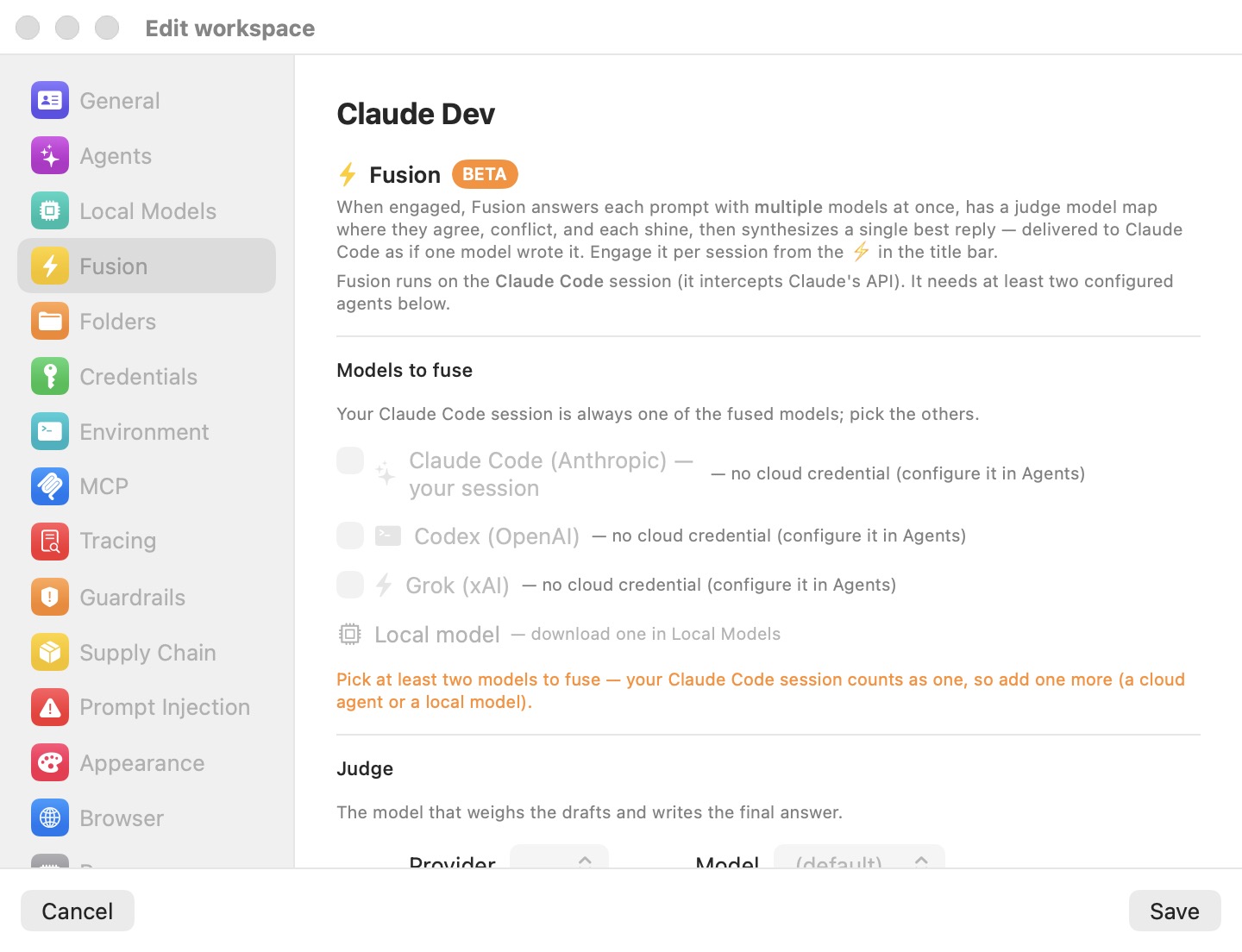
In the screenshot above, no provider is set up for the workspace, so every row under Models to fuse is greyed out and the orange helper text explains what is missing.
- Open the machine's settings (Settings… in the machine menu) and select the Fusion pane.
- Under Models to fuse, tick the agents whose answers you want in the panel. Claude Code (Anthropic) — your session is always one leg; add Codex (OpenAI), Grok (xAI), Kimi Code (Moonshot AI), Oh My Pi and/or Local model. The Local model row includes a picker of the available local models.
- Under Judge, pick the Provider and Model that will weigh the drafts and write the final answer. The Provider list offers every agent with a usable credential (the same test as the legs), plus Local when a local model is available. Cloud model lists are fetched live from the provider's
/v1/modelsendpoint and include a (default) entry; if the fetch fails, a small built-in list is offered instead. A local judge picks from the installed catalog models. - Click Save.
| Setting | Default | Notes |
|---|---|---|
| Models to fuse | None selected | Claude Code is always a leg; others need a credential (cloud) or a local model. |
| Judge → Provider | First usable provider | Local appears once a local model is available. |
| Judge → Model | (default) → claude-opus-4-8 | Cloud lists fetched live from /v1/models. |
When a leg's model is not pinned explicitly, the defaults are: Claude → claude-opus-4-8; Codex → gpt-5.5 on a subscription or gpt-5.5-2026-04-23 with an API key; Grok → grok-build; Kimi Code → kimi-k2.5; Oh My Pi → the default of the provider it speaks to (Claude's, Codex's API-key default, or Grok's). An Oh My Pi judge defaults to omp's leg model.
Tip: A local model makes a capable, zero-marginal-cost extra leg — and the judge itself can run locally, keeping the entire analysis and synthesis stage on your Mac. See Models & Providers.
Engaging Fusion on a machine
Configuring the pane only makes Fusion available. You engage it per machine, with the bolt button (⚡) in the main window's toolbar. The bolt appears only while one of the machine's terminal tabs is on screen — under Virtual Machines in the sidebar, or after pressing the Linux pill (⌥⌘U) in a session to jump to its terminal. It never appears in a chat.
| Bolt appearance | State | Tooltip |
|---|---|---|
| Hollow, disabled | Not available — fewer than two usable models | "Enable at least two models to use Fusion" |
| Filled, dark grey | Available, disengaged | "Fusion available — click to engage" |
| Filled, yellow | Engaged | "Fusion engaged — click to disengage" |
Click the bolt to toggle. Engaging it applies to the whole machine: every Claude Code session running on it is fused until you disengage it. A machine starts with Fusion disengaged — it is an explicit choice, never a silent default.
From the command line
With the app running, you can toggle Fusion on a running VM without touching the window:
bromure-cli vm fusion enable <vm>
bromure-cli vm fusion disable <vm>
<vm> is a VM id or a workspace name, and on/off/engage/disengage are accepted as aliases. The bromure-cli vm status output includes a fusion row reading engaged or available (off). These commands talk to the app's control API, so they require the app (or its agent) to be running; see CLI, API & MCP.
What Fusion costs
Fusion multiplies model usage, and you should engage it knowing the arithmetic. For every turn where Claude returns a plain-text answer:
- Each additional selected leg makes one full model call, receiving the same flattened transcript as context — so long conversations cost proportionally on every leg, every fused turn.
- The judge makes two more calls: one to produce the JSON analysis, one to write the synthesis. Both are capped at 4,096 output tokens.
With Codex, Grok and a local model selected alongside Claude, a single fused answer therefore costs up to five model calls beyond the Claude call you were already making; each further leg adds one more. Tool-call turns fan out to zero extra calls, which in practice keeps agentic sessions far cheaper than the worst case — most turns in a coding loop are tool calls.
How each leg is billed follows its credential: API-key legs bill per token, subscription legs draw on the subscription's quota, and a local leg costs only on-device compute (and battery, on a laptop). Each leg has a 600-second upstream timeout by default.
Fusion in the trace
Fusion is deliberately invisible to the agent but fully visible to you. Every upstream side call — each leg, the judge analysis, and the synthesis — is captured by the trace pipeline like any other AI exchange, subject to the machine's trace level (see Tracing).
Practical consequences:
- The Trace Inspector (Window menu → Trace Inspector…) lists the extra exchanges alongside the session's normal traffic, and renders captured requests and responses as parsed conversations — you can read exactly what each leg answered and what the judge concluded.
bromure-cli trace hostnamesshows that hosts such asapi.openai.comwere contacted from a session you may have thought was Anthropic-only. If your organization audits egress, expect fused sessions to show every selected provider's endpoints.- Fusion also logs verbosely to the app log (
~/Library/Logs/BromureAC/bromure-ac.log) with a[fusion]prefix — useful when diagnosing why a leg was dropped.
Note: If your data-handling rules restrict which providers may see your code, remember that every selected leg receives the full flattened transcript of the conversation. Select legs accordingly. When PII Protection is on for the machine, personal data is swapped for stand-ins before the fan-out, so every leg receives the stand-ins.
Environment overrides
A few defaults can be overridden with environment variables when launching the app — useful for experimentation, not intended as day-to-day configuration:
| Variable | Default | Effect |
|---|---|---|
BROMURE_FUSION_TIMEOUT | 600 | Per-leg upstream timeout, in seconds. |
BROMURE_FUSION_OPENAI_MAX_TOKENS | 128000 (GPT-5/o-series), 16384 (gpt-4o and earlier) | OpenAI leg completion-token cap. |
Beta limitations
Fusion is a beta feature with sharp edges worth knowing:
- Claude Code sessions only. Fusion intercepts Anthropic
/v1/messagesPOST requests. Sessions running Codex, Grok, Kimi or omp are not fused — those agents' traffic passes through normally. - Non-Claude legs answer without tools. Tool definitions are dropped for the Codex, Grok, Kimi Code, Oh My Pi and local legs; they answer as prose over a flattened transcript. Their drafts inform the synthesis but cannot themselves take actions.
- Best-effort subscription backends. The Codex-subscription leg rides the ChatGPT backend over WebSocket, and the Grok-subscription leg uses
cli-chat-proxy.grok.com— both undocumented interfaces. On any error the leg is dropped rather than failing the fuse. - Oh My Pi on three providers only. An Oh My Pi leg or judge works only while omp is switched to Anthropic, OpenAI or xAI with an API key; on z.ai or a custom endpoint it isn't offered.
- Silent degradation. Dropped legs and judge failures fall back to Claude's own answer (or a raw draft) without alerting the agent. The trace and the
[fusion]lines in the app log are the only places you'll see it happened. - Latency. A fused text turn waits for the slowest surviving leg, then two judge calls. Expect noticeably slower answer turns than a plain session; tool turns are unaffected.