Introduction
Bromure Agentic Coding is a macOS app that runs AI coding agents — Claude Code, Codex, Grok, Kimi Code, Oh My Pi, and ordinary shell tooling — inside hardware-virtualized Linux machines on your own Mac, built on Apple's Virtualization.framework. Each agent gets a full, persistent Ubuntu development environment, but your real credentials never enter it. Everything the agent sends to the outside world passes through one host-side gateway. That gateway enforces isolation, credential protection, supply-chain scanning, prompt-injection detection, personal-data protection, and audit tracing, and the agent cannot reach around it.
This manual documents Bromure Agentic Coding 5.0.0. The app's bundle ID is io.bromure.agentic-coding, its executable is bromure-ac, and its optional command-line tool is installed as bromure-cli. It requires macOS 14 (Sonoma) or later on Apple Silicon. Product details, screenshots, and downloads are at bromure.io.
What is Bromure Agentic Coding?
Coding agents are powerful and, by design, autonomous: they read files, run shell commands, install packages, and call APIs for you. Run one directly on your Mac and it inherits everything your shell has — your SSH keys, your ~/.aws credentials, your kubeconfig, your API tokens. One malicious dependency or one prompt-injected web page is then a single step away from all of them.
Bromure Agentic Coding changes that bargain. Agents run in machines: isolated Linux VMs, each with its own kernel, disk, MAC address, and network. (The settings editor calls a machine a workspace; the two words mean the same thing.) A machine keeps its state — cloned repositories, package caches, virtualenvs, shell history — so it works like a normal development box. But it holds only intentionally invalid fake credentials. The real values stay encrypted on the host and are put back on the wire, per destination, with your consent.
You don't work with machines most of the time; you work with sessions. A session is one conversation with one agent, in one folder, on one machine. When you open the app, the main window lists your sessions and shows the one you picked as a chat:
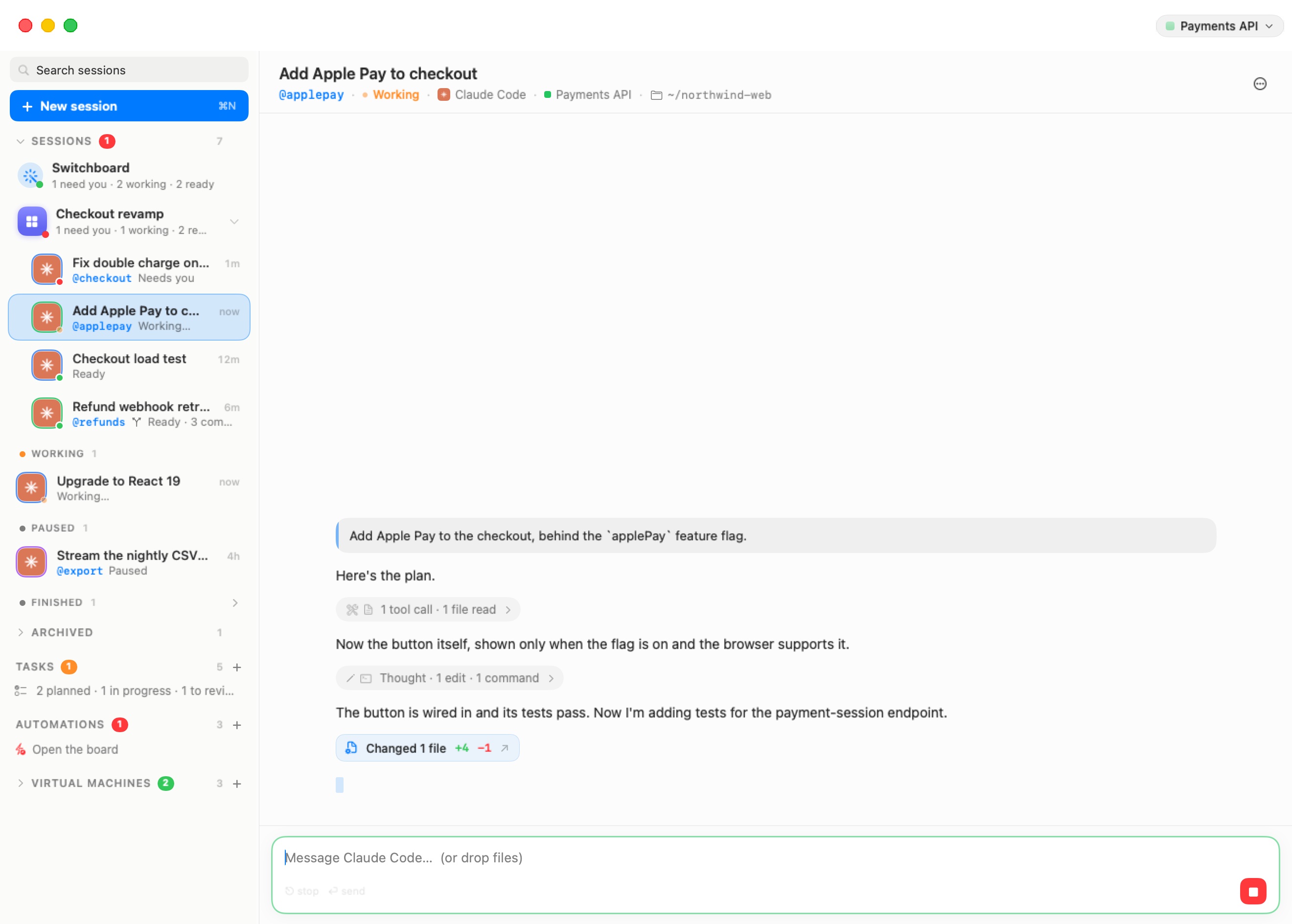
The sidebar, from top to bottom:
- Search sessions finds sessions by title and by what was said in them.
- New session ⌘N opens the new-session screen, where you pick an agent, a machine, and a folder, then type what you want done.
- Sessions lists your conversations, grouped by what they need from you: Needs you, Working, Ready, Paused, and Finished. The Switchboard row and your rooms sit at the top of the list, and sessions you put away go into the Archived fold.
- Tasks and Automations open the coding-task and automation boards.
- Virtual Machines is folded by default. It lists your machines, the Grid of terminals, and any Kubernetes clusters, registries, and messaging connector you run.
In the screenshot, the agent in "Add Apple Pay to checkout" is working. The chat shows what it has done so far as compact activity lines, sums up the turn's file changes (Changed 1 file +4 −1), and offers a red Stop button in the composer. The Sessions Home describes every part of this window.
Who it is for
Bromure Agentic Coding is built for three overlapping groups:
- Individual developers who want to run coding agents with real credentials — Anthropic, OpenAI, AWS, Kubernetes, GitHub — without handing those credentials to the agent. The agent can still deploy, push, and provision; a compromised session leaks nothing but decoys.
- Security-conscious teams who want every agent action to be visible: which model was called, which tools ran, which files were touched, which commands ran, and which credentials were used where. The encrypted local trace and the Security Timeline answer "what did the agent actually do?" after the fact.
- Platform and security engineering teams in organizations that need fleet-wide policy: enrolled installs stream session metadata to the organization's workspace, credentials can be issued to the app rather than to developers' shells, and off-boarding a machine is one control-plane action. See Enterprise.
You don't need to know anything about virtualization. On first launch a short wizard downloads a prebuilt, signed base image, offers to import the credentials you already have, and helps you sign in to your model providers. After that, you start a session and talk to the agent.
Two sibling apps
Bromure Agentic Coding ships from the same open-source repository as its sibling, Bromure (the web-browser app, sometimes called Bromure Web). Both use Apple's Virtualization.framework and share the same VM and image machinery, but they take opposite positions on VM lifetime:
| Bromure (Web) | Bromure Agentic Coding | |
|---|---|---|
| Purpose | Disposable browsing sessions | Sandboxed AI coding agents |
| Guest OS | Ubuntu + Chromium | Ubuntu 24.04 |
| VM lifetime | Destroyed when the window closes | Persistent — one VM per machine, state survives |
| What is protected | Everything: no data outlives the session | The secrets surface: real credentials never enter the VM |
| Bundle ID | io.bromure.app | io.bromure.agentic-coding |
The two approaches fit their jobs. Browsing needs no state, so Bromure Web destroys every VM when its window closes. Coding needs state — you want your clones, caches, and history tomorrow — so Bromure Agentic Coding keeps machines alive and instead controls what a machine can see and send. This manual covers Bromure Agentic Coding. Bromure Web comes up only where the two meet; for example, the embedded browser beside a session runs the same kind of disposable Ubuntu + Chromium VM that Bromure Web uses.
The single-boundary security model
The product's central idea is that every protection is enforced in one place: a host-side MITM proxy through which all outbound web traffic from a machine flows. The guest's HTTPS_PROXY points at it, and outbound connections to ports 80 and 443 are also diverted to it at the virtual network switch, so a tool that ignores the proxy variables still goes through it. Because the boundary lives on the host, code inside the VM — including a fully compromised agent — cannot turn it off, get around it, or lie to it.
At that boundary, three things happen to every request:
- TLS termination. The proxy terminates the machine's TLS using the Bromure root CA, a per-install certificate authority created at first launch. Its public certificate is installed in every machine's trust store at boot; its private key never leaves the host.
- Inspection and rewriting. The proxy inspects the request and applies policy: consent, scanning, detection, personal-data swapping, and tracing. Where a credential is involved, it swaps the fake value for the real one. Swaps cover bearer and
x-api-keyheaders, OAuth sign-ins, full AWS SigV4 re-signing, Kubernetes credentials, Docker registry auth, and SSH signatures through an ssh-agent bridge over vsock. - Re-encryption. The rewritten request goes to the real server over a normal TLS connection.
The credential side is strict by construction. The machine only ever holds fakes with realistic prefixes and lengths — for example ANTHROPIC_API_KEY=sk-ant-api03-brm-…, a fake AWS secret key, synthetic kubeconfig tokens. Swaps are scoped to the host a credential was registered for: a credential for api.anthropic.com is never injected toward a look-alike domain. And the design fails closed: if traffic somehow gets past the proxy, the only credential on the wire is a fake that no server accepts (AWS, for instance, returns InvalidSignatureException). Real values exist only in the host process, encrypted with AES-256-GCM, with the master key in the macOS Data Protection Keychain.
A compromise detector closes the loop. It scans every outbound request for any fake token registered for the machine. A fake headed to a host outside its scope is the signature of an exfiltration attempt, so the proxy refuses the swap and alerts you. Because only the fake leaked, the real credential never needs rotating.
Everything else plugs into the same boundary. Package downloads are scanned as they cross it, untrusted content coming back through it is checked for prompt injection, personal data is swapped out of AI requests before they leave, the audit trace records what crossed it, and Fusion, model routing, and remote access all work on it. One boundary, every control.
The main features
Each feature below has its own chapter; this section gives you the shape of each one.
Sessions, rooms, and branches
A session is a conversation with one agent. You start it from the new-session screen by choosing an agent, a machine, and where it works — a fresh folder, one of your folders, or a repository to check out — then typing what you want. The chat shows the agent's work as readable activity lines, cards for diffs, commands, to-do lists, tables, and diagrams, and a summary of the files each turn changed. When the agent asks you something, a question card appears in the chat and the session moves to Needs you in the sidebar. See Starting a Session and The Chat.
When several sessions work on the same thing, group them into a room: a grid of live chats side by side, with a composer that can send to any of them or to all at once. See Rooms. To try something without touching a session's folder, start a branch session on its own git worktree, review its changes with line comments, and merge it back. See Branches & Review.
Agents working together, and the Switchboard
Agents can hand work to each other. An agent can delegate a job to a new child session (on its own branch or on another machine) and hear back, or send a request to an existing session by its @nickname. Every message between agents is screened for prompt injection. See Agents Working Together.
The Switchboard is a session that keeps track of all the others: ask it what's going on, have it answer a waiting agent, or start new work. Each room can have its own Switchboard that sees only that room. The Messaging Connector lets you reach the Switchboard from Signal, WhatsApp, or Slack when you're away from the Mac. See Switchboard & Messaging.
Isolation
Every machine is its own persistent VM with its own kernel, virtual disks, MAC address, network, and proxy listener. A malicious package or a rogue agent process can wreck the machine — and only the machine. Your Mac, your other machines, and your files stay untouched, except folders you explicitly share. Machines start from a signed Ubuntu 24.04 base image through an APFS copy-on-write clone, so a new machine costs almost no disk space at first, and a suspended machine resumes from its memory snapshot in place. See Concepts & Architecture and Machines.
Credential protection and consent
Real credentials never enter the machine; the proxy swaps fakes for real values on the wire, as described above. On top of the swap, you can govern each use: a credential can require your consent per destination, grants carry a time limit (5 minutes, 1 hour, or the rest of the session), and read-only scoping is available. Signing in to a subscription (Claude, ChatGPT, Grok, or Kimi) happens on the host; the agent only ever sees a stand-in key. See Credentials & the Wire Boundary.
Supply-chain scanning
Package installs are the most common way hostile code gets into a development environment, so the proxy checks them as they are fetched. Four mechanisms combine: an age gate (brand-new package versions are held back), OSV vulnerability lookups, socket.dev behavioral analysis, and Depi. A blocked package never reaches the machine, and you can approve a bypass when you know what you're doing. See Supply-Chain Protection.
Prompt-injection detection and guardrails
Content the agent reads from the outside world — web pages, API responses, files — can carry instructions aimed at the agent rather than at you. Bromure Agentic Coding scans untrusted content crossing the boundary with two local classifier models, PromptGuard and ModernBERT, running on your Mac. You decide what happens to a detection, and you see the flagged text; the agent doesn't. Guardrails classify the agent's calls to Kubernetes, AWS, git forges, registries and databases as reads, writes and destructive operations, and can ask before, or block, the ones you choose. See Prompt-Injection Detection & Guardrails.
Sandbox policies, the guest sandbox, and the kernel sentry
Each machine picks a sandbox engine. The Bromure Firewall allows and denies connections by host, port, protocol, and even HTTP verb, so a machine can read an API without being allowed to write to it. OpenShell + Sentry runs an NVIDIA OpenShell policy instead: everything is denied unless a rule allows it, requests are inspected one by one, and inside the VM the agent can reach only the files and programs the policy lists. A kernel sentry reports every program, connection and refusal from inside the VM's kernel, so each connection can be traced back to the prompt and tool call that made it. When something is blocked, the agent is told why and asked to check with you, and the Sandbox drawer lets you allow it in one click. See Sandbox Policy, the Guest Sandbox & the Kernel Sentry.
PII protection
When turned on for a machine, PII protection swaps personal data — names, email addresses and phone numbers, card, bank and tax numbers, government IDs, and street addresses — for realistic stand-ins before the conversation leaves your Mac, and puts the real values back in the model's replies. Detection runs on your Mac with the built-in Rampart model. It is off by default. See PII Protection.
Tracing, audit, and the Security Timeline
Every session can be recorded as an encrypted trace: model calls (model, tokens, latency), tool calls, shell commands, file reads and writes, credential uses, and contacted domains. The Trace Inspector lets you replay what an agent did. The Security window (Window › Security…) has an Overview tab — what every security engine blocked, allowed, brokered, checked, and swapped (in the last 24 hours, by default), and which protections each machine has on — and a Timeline tab listing every decision, which you can filter by machine and period, export to CSV, or stream as OCSF logs to a SIEM. Timeline events are kept for 90 days by default. On enterprise-enrolled installs, session metadata also streams to the organization's workspace over mutual TLS — never raw prompts or model responses, and never secret values. Installs that aren't enrolled stream nothing, and a per-machine Private mode stops streaming entirely. See Tracing & Audit and Security Overview & Timeline.
Models and providers
One global Models board, in Preferences › Models, holds every model source you use: sign-ins and API keys for Anthropic, OpenAI, xAI, z.ai, and Moonshot, plus Amazon Bedrock, OpenRouter, a custom server (vLLM, Ollama, LM Studio, or any OpenAI-compatible server), and on-device models that run on your Mac with MLX. For each agent you can keep its provider's default model or pick another, including models from a different provider. A machine can inherit these settings or override them with its own. Changes apply live: only the affected agents restart, and they pick up their conversation where they left off. See Models & Providers.
Fusion
Because every model call crosses the proxy, the proxy can do more than pass it through. Fusion turns one request into a panel: several models answer, a judge model evaluates the candidates, and one combined answer goes back to the agent — on the wire, invisible to the agent, with no agent configuration needed. See Fusion.
Kubernetes clusters and registries
Bromure can run k3s Kubernetes clusters and a private container registry in their own VMs next to your machines, with storage, load balancing, optional cloud emulators, and per-machine access control. Agents can see and manage what their machine is allowed to use through a built-in infrastructure MCP server. See Kubernetes Clusters & Registries.
Remote access
Your sandbox is reachable from anywhere: from the app, from the command line, or over SSH. A second Mac running Bromure Agentic Coding — or an iPhone, iPad, or Apple Vision Pro running the Bromure Remote client — can mirror a remote instance over an SSH tunnel (Workspaces › Connect to Remote Bromure…), with its sessions, rooms, and Switchboard. From a mirror window, Preferences can edit the remote Mac's settings. Security doesn't weaken when you go remote: consent prompts for credential use, supply-chain bypasses, guardrail writes, and prompt-injection decisions are shown on the host side of the connection, where a compromised guest can neither see nor forge them, and a timeout or dismissal counts as a denial. See Remote Access & Clients.
Enterprise management
Organizations enroll installs with a bromure.io workspace using a six-word code (bromure-cli enroll, or bromure.io Enrollment… in the app). Enrollment gives the install a mutual-TLS certificate, turns on managed profiles pushed from the control plane, and starts the metadata stream described under tracing. Off-boarding is one control-plane action that revokes the install's certificate. The fleet-wide supply-chain inventory and token-usage rollups are Enterprise-tier features in Bromure Enterprise Manager. See Enterprise.
How it compares to other tools
The README's comparison matrix (compiled from each project's public documentation in June 2026) applies the same threat model to the tools people commonly use. Most tools pick one of five controls — isolation, keeping secrets out of the agent, scoping credential use, supply-chain scanning, prompt-injection detection — and stop there.
- Dev Containers (VS Code) isolate the toolchain, but the container shares the host kernel and the setup forwards your SSH agent and git credentials into the environment the agent runs in. There is no per-use credential scoping, registry scanning, or injection detection.
- nono is a kernel sandbox: syscall allow-lists with an approval flow, an egress filter, and an immutable local audit log. It blocks access to key files and proxies some credentials, but the agent has no kernel of its own, and package scanning and injection detection are out of scope.
- agent-vault (octokraft) pipes secrets into processes so there is no way to read the raw value, with per-secret time limits. But the agent runs directly on your machine — there is no isolation boundary at all.
- Agent Vault (Infisical) is an HTTP credential proxy: it attaches credentials on the wire so the agent never reads them, and it filters egress per endpoint. The agent, however, runs unboxed, and there is no scanning or detection.
- Docker Sandboxes (an experimental preview) come closest on isolation: a microVM with its own kernel, and a host proxy that injects credential headers so raw values stay out of the VM. The gap is governance: the brokered credential is attached to any outbound request the sandbox makes, so a malicious package installed inside can spend it against an allowed domain without ever seeing it — and nothing scans that package on the way in.
- Capsem is an air-gapped hardware VM with domain- and method/path-level egress rules and full HTTP-body request logging. But real API keys live inside the VM, which is exactly what must not be true when the workload is a possibly compromised agent.
No other tool in the matrix offers supply-chain scanning or prompt-injection detection. Bromure Agentic Coding enforces all five controls at its single proxy boundary, then adds what owning the wire makes possible: PII protection, the Fusion model panel, model routing across providers and your own hardware, and remote access from the app, the CLI, or SSH.
Comparison data ages quickly. A more detailed, current matrix is at bromure.io/en/feature-matrix, and the README invites corrections by issue if a row about another tool is out of date.
Requirements at a glance
| Requirement | Detail |
|---|---|
| macOS | 14 (Sonoma) or later |
| Hardware | Apple Silicon (M1 or newer). There is no Intel build — Virtualization.framework only supports ARM64 guests on Apple Silicon. |
| Disk | The Ubuntu base image is a 24 GB sparse disk that takes roughly 6–8 GB of real space; each machine adds a copy-on-write clone that grows with use. |
| Network | First launch downloads the prebuilt, signed base image from dl.bromure.io. If the download isn't available, the app can build the image locally instead (about 10 minutes). |
| Proprietary agents | Claude Code, Codex, Grok, Kimi Code, Oh My Pi, and the Google Cloud SDK can't ship inside the redistributable image. They are installed on your Mac, into your copy of the image, as signed setup steps. Running first-time setup is your consent to the baseline steps; steps published later ask for approval. |
Step-by-step instructions are in Installation & First Run.
License and authorship
The Bromure repository is open source under the MIT License (Copyright 2026 Renaud Deraison) and free to use. Authorship is credited to Renaud Deraison (prompting) and Claude + Opus 4.7 (implementation).
The two apps are open source, but the enterprise features — enrollment, managed profiles, the cloud event stream, and Bromure Enterprise Manager — depend on the hosted control plane at bromure.io, which is a commercial service. Nothing in the single-user experience depends on it: an install that isn't enrolled streams nothing anywhere, and every security feature works entirely on your Mac.
Getting help
- bromure.io — product documentation, screenshots, downloads, the technical whitepaper, and the detailed feature matrix.
- GitHub issues — bug reports, feature requests, and corrections to the comparison matrix go on the project's GitHub repository (linked from bromure.io).
- This manual — Troubleshooting collects diagnostic procedures and known issues; the Glossary defines every term used in these chapters.
How this manual is organized
Newcomers can read the manual front to back; after that, use it as a reference:
- Getting started — Installation & First Run covers installing the app and the onboarding wizard; the Quick Start takes you from the wizard to a finished task; Concepts & Architecture explains sessions, machines, rooms, and branches, and how the host, the guest, and the proxy fit together.
- Everyday use — The Sessions Home, Starting a Session, The Chat, Rooms, Branches & Review, Agents Working Together, Switchboard & Messaging, Machines, The Embedded Browser, Automations, and Coding Tasks cover what you do day to day.
- Settings reference — Settings Reference documents every pane of the settings editor and Preferences, one page per pane.
- Security & the wire boundary — Credentials, Supply-Chain Protection, Prompt-Injection Detection & Guardrails, PII Protection, Tracing & Audit, and Security Overview & Timeline explain each protection in full.
- Models & infrastructure — Fusion, Models & Providers, and Kubernetes Clusters & Registries.
- Beyond one Mac — Remote Access & Clients covers mirroring, the mobile and visionOS clients, the CLI, and SSH; Enterprise covers enrollment, fleet management, and the cloud event stream.
- Reference — CLI, API & MCP, Advanced, Troubleshooting, the Glossary, and the Appendix.
Continue with Installation & First Run.