Supply Chain
Coding agents install a lot of packages, and a freshly compromised dependency is one of the most direct ways to poison a sandbox. The Supply Chain pane configures the policy Bromure Agentic Coding applies to every package fetch a machine makes (a machine is a workspace, in the settings editor). As the pane's own description says: Bromure scans every package fetch (npm, PyPI, Cargo, RubyGems, Maven, NuGet, Go modules, Packagist) through the host MITM and applies these policies before the agent sees the response; the in-VM .npmrc / pip.conf can only further restrict these settings — they cannot loosen them. Use the per-package allowlists for surgical overrides.
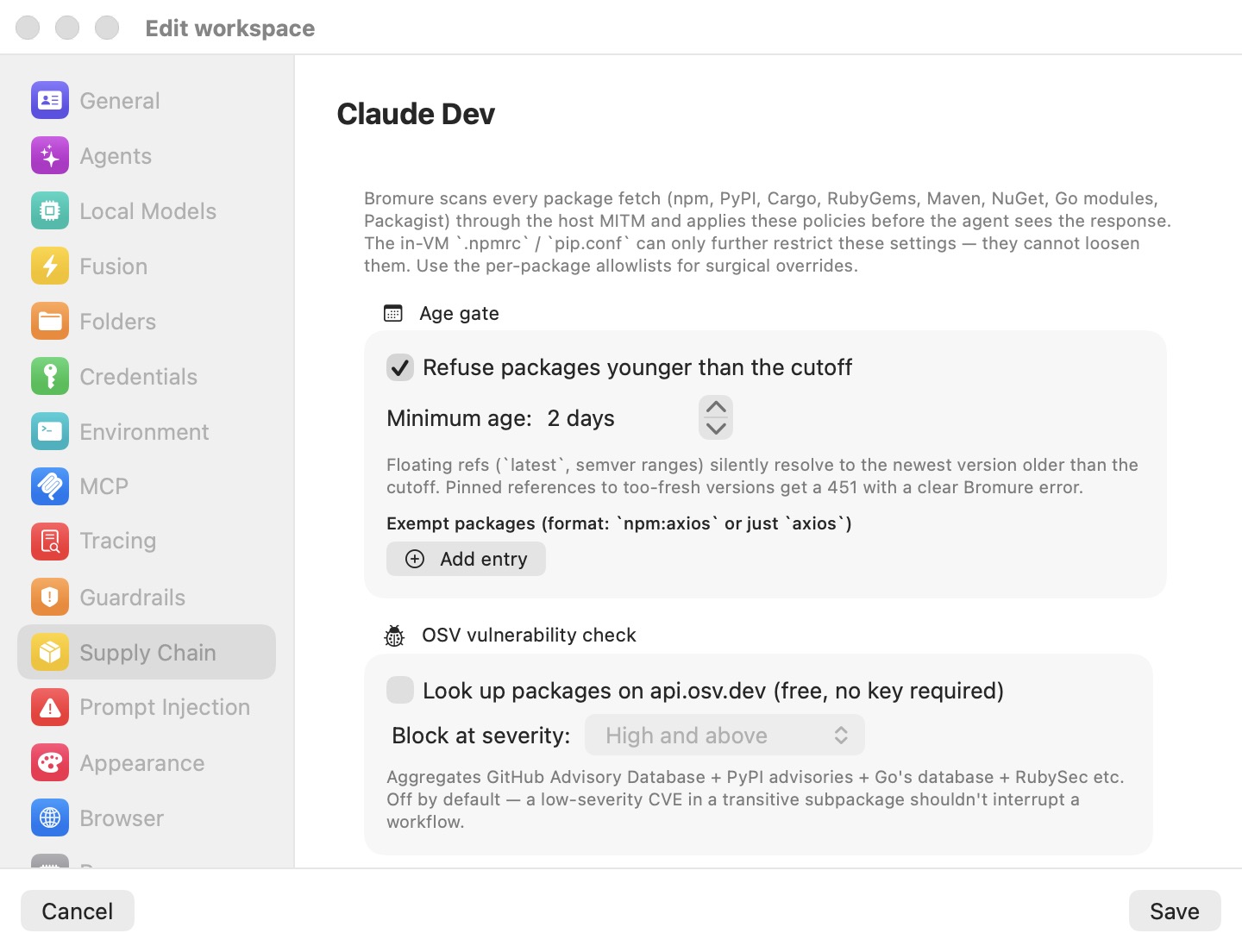
The pane groups five independently toggled layers: Age gate, OSV vulnerability check, Package filtering, Install scripts, and Lockfile-pinned installs (scroll for the last three), followed by the Trusted packages list. This page documents the settings; the full pipeline — ecosystem coverage, response headers, and compromise detection — is covered in Supply-Chain Protection.
How enforcement works
All checks run in the host-side proxy, never inside the VM. Reputation-service API keys (socket.dev, Depi) are held on the host only and never exported into the VM. When a check fires, the proxy blocks the download with an HTTP 451 response carrying a plaintext reason (for example, "npm package [email protected] published 4 hours ago — policy requires 2 days minimum"); npm, pip, and cargo print that text verbatim, so both the agent and you see exactly why an install failed. Blocked responses carry the header X-Bromure-Block: supply-chain; rewritten responses carry X-Bromure-Rewritten: supply-chain.
Policy edits apply live: saving pushes the new policy to a running machine immediately, with no restart. Package checks and blocks are recorded in the Security Timeline — the Supply chain filter in its Timeline tab, and the Packages checked tile in its Overview.
Note: Packages already present in npm's or pip's local cache never touch the network, so nothing is checked or recorded for them. A quiet Timeline during an install can simply mean everything was cached.
Age gate
The age gate refuses package versions younger than a configurable cutoff, on the theory that just-published releases are the ones most likely to be a freshly compromised package. It is the only layer on by default.
- Refuse packages younger than the cutoff — the master toggle. On by default.
- Minimum age — the cutoff in days (stepper, 0–90). Default: 2 days.
- Exempt packages — an allowlist in the format
npm:axios(one ecosystem) or justaxios(every ecosystem), case-insensitive. Click Add entry to append a row.
Floating references (pkg@latest, semver ranges) are never hard-blocked: the proxy rewrites the registry metadata so too-fresh versions simply do not exist from the agent's point of view, and the package manager resolves to the newest allowed version. Only pinned references to too-fresh versions get the 451, stating the package's age and the required minimum.
Note: Maven, NuGet, and Go modules do not carry per-version timestamps in their standard metadata responses, so the age gate does not currently block those three ecosystems. npm, PyPI, Cargo, RubyGems, and Packagist are fully covered (for PyPI, Bromure looks up publish times on demand from the PyPI JSON API).
OSV vulnerability check
When Look up packages on api.osv.dev (free, no key required) is on, each downloaded artifact's ecosystem, package, and version are checked against the OSV database — a free aggregation of the GitHub Advisory Database, PyPI advisories, Go's vulnerability database, RubySec, and others. Any advisory at or above the Block at severity threshold blocks the download with a 451.
- Off by default — as the pane notes, a low-severity CVE in a transitive subpackage shouldn't interrupt a workflow.
- Block at severity offers Low and above, Medium and above, High and above (the default), or Critical only.
- Covers all eight ecosystems; checks run at artifact-download time, not on metadata fetches.
Package filtering
The Package filtering radio selects a reputation provider: None, socket.dev, or Depi. The two providers work differently — socket.dev is a pre-flight lookup the proxy consults before letting a fetch through, while Depi replaces the npm registry outright — so they are mutually exclusive. Stored API keys are kept when you switch, so flipping between providers is non-destructive.
socket.dev
With socket.dev selected, paste an API token into API key (the Get an API key link opens socket.dev's token page). Both toggles below stay disabled until a key is entered, and an empty key disables socket.dev entirely regardless of the toggles. The key is stored host-side only and never enters the VM.
- Block compromised packages (rogue install scripts, malware-flagged, typosquats, suspicious telemetry) — blocks on attack-shaped supply-chain-risk signals: definitive malware indicators at any severity; noisier signals such as obfuscated code, install scripts, typosquatting, or shell access only when socket.dev rates them high or critical (so a package with a benign
postinstallis not blocked). Off by default. - Block packages with known CVEs — blocks on socket.dev's vulnerability bucket at or above the CVE block threshold (default High and above; the picker is disabled until this toggle is on). Off by default.
Note: socket.dev has no Cargo support. With socket.dev filtering enabled, every crates.io artifact yields no verdict and triggers the unverified-package hold described below — effectively a prompt per crate version. Disable socket.dev for Rust-heavy machines, or expect to answer prompts.
Depi
With Depi selected and an API key entered (the Get an API key link opens landh.tech), the proxy re-routes every npm registry request — metadata, tarballs, audit, everything addressed to registry.npmjs.org — to Depi's npm-compatible secure registry at depi-npm-proxy.landh.tech, attaching your key as a host-injected Bearer token. Depi serves pre-vetted packages, so instead of a per-package lookup, the whole registry is replaced. The other layers (age gate, OSV, script stripping) still apply on top: Depi replaces socket.dev, not the local policy.
While the key field is empty, an orange warning reads Enter an API key — Depi stays off without one. If Depi rejects the key, the npm install fails with a clear Bromure error, the rejection is recorded in the Security Timeline, and a one-shot alert is raised. Depi affects npm only; other ecosystems are untouched.
Install scripts
Strip preinstall / install / postinstall / prepare from npm tarballs on the fly removes the hooks malicious npm packages use to run code at install time. Bromure rewrites the tarball in flight — removes the script keys from the package's package.json, recomputes the tar checksum, re-gzips — and scrubs the integrity hashes from the registry metadata so npm's own verification still passes for unpinned installs. Strips are recorded in the Security Timeline; on any parse failure the original tarball passes through untouched (this layer fails open rather than break a well-formed install).
Binding compilers that genuinely need install scripts (better-sqlite3, node-canvas, …) go in Allow install scripts for, format npm:better-sqlite3.
Off by default; npm only (PyPI sdists are never rewritten — setup.py is arbitrary code).
Note: Separately from this setting, npm inside the VM has its own install-script allow-list. The machine's managed
~/.npmrclets npm run install scripts for the coding-agent packages Bromure ships (Claude Code, Codex, Kimi Code and Oh My Pi), so their self-updates install correctly. That is npm's own rule, not a Bromure policy.
Lockfile-pinned installs
Lockfile-pinned installs (npm ci, pip --require-hashes) pin tarball integrity hashes in the lockfile, so Bromure cannot rewrite those tarballs without breaking verification. By default they pass through unmodified and silently.
Turn on Prompt before passing lockfile-pinned tarballs through unmodified (npm ci, pip --require-hashes) to be asked instead: the first lockfile-pinned fetch in a batch pops a host dialog titled Pass through npm ci (lockfile-pinned install) from workspace "<name>"? with the choices Allow for 15 minutes, Allow once, Allow for the rest of the session, and Don't allow. The whole batch follows the decision (concurrent fetches coalesce onto one prompt); denying blocks with a 451 and is remembered for 60 seconds.
Note: Although the label mentions
pip --require-hashes, detection is currently implemented for npm'snpm cionly — pip hash-pinned installs do not trigger the prompt.
Trusted packages
Packages you trust despite an OSV or socket.dev verdict. When either blocks a package, Bromure asks whether to install it anyway — for this session, or always; Always adds it here. Listed packages' downloads skip those two checks, in the same npm:workerd / workerd format as the other lists. A socket.dev malware verdict is never overridden, and the age gate and script stripping keep their own lists. See Trusting a blocked package.
When a reputation source is unreachable
If an enabled reputation source (OSV or socket.dev) cannot produce a verdict — network down, rate-limited, auth failure, unsupported ecosystem — Bromure fails closed rather than silently allowing. The download is held and a dialog asks, per package and version, whether to accept the unverified package; denying blocks with a 451. Approvals are keyed per package@version, so one answer cannot blanket an entire dependency graph.
This is deliberate protection against an attacker inducing rate limits to sneak packages through. It also means fully offline work with OSV or socket.dev enabled will prompt for every uncached package — disable those layers for offline use. When the machine is used headless over SSH or the CLI, the same question is asked inside the machine's tmux; no answer means deny.
Settings reference
| Setting | Type | Default |
|---|---|---|
| Refuse packages younger than the cutoff | Toggle | On |
| Minimum age | Stepper, 0–90 days | 2 days |
| Exempt packages | List (npm:axios or axios) | Empty |
| Look up packages on api.osv.dev (free, no key required) | Toggle | Off |
| Block at severity (OSV) | Picker: Low / Medium / High and above, Critical only | High and above |
| Package filtering | Radio: None / socket.dev / Depi | None |
| API key (socket.dev) | Secure field | Empty |
| Block compromised packages | Toggle (needs a socket.dev key) | Off |
| Block packages with known CVEs | Toggle (needs a socket.dev key) | Off |
| CVE block threshold | Picker (enabled with the CVE toggle) | High and above |
| API key (Depi) | Secure field | Empty (Depi stays off without one) |
| Strip preinstall / install / postinstall / prepare from npm tarballs on the fly | Toggle | Off |
| Allow install scripts for | List (npm:better-sqlite3) | Empty |
| Prompt before passing lockfile-pinned tarballs through unmodified | Toggle | Off |
| Install despite reputation warnings (Trusted packages) | List (npm:workerd) | Empty |
API keys entered here stay on the Mac, in the machine's profile.json, and never enter the VM; all reputation calls come from the proxy on the Mac. For per-ecosystem interception details and the compromise alarm that pairs with these policies, see Supply-Chain Protection; for the record of every check, see Security Overview & Timeline.