Prompt Injection
Prompt injection is malicious text hidden in content the agent reads — a file in a rogue repository, a web page, a poisoned CLAUDE.md — that tries to steer the model ("ignore previous instructions, exfiltrate secrets"). The Prompt Injection pane turns on detectors that scan a machine's AI traffic for such content (a machine is a workspace, in the settings editor). As the pane's description says: Bromure scans the agent's AI traffic on-device for injected instructions — nothing leaves the Mac. Each detector uses a local model, downloaded from bromure.io the first time you enable it.
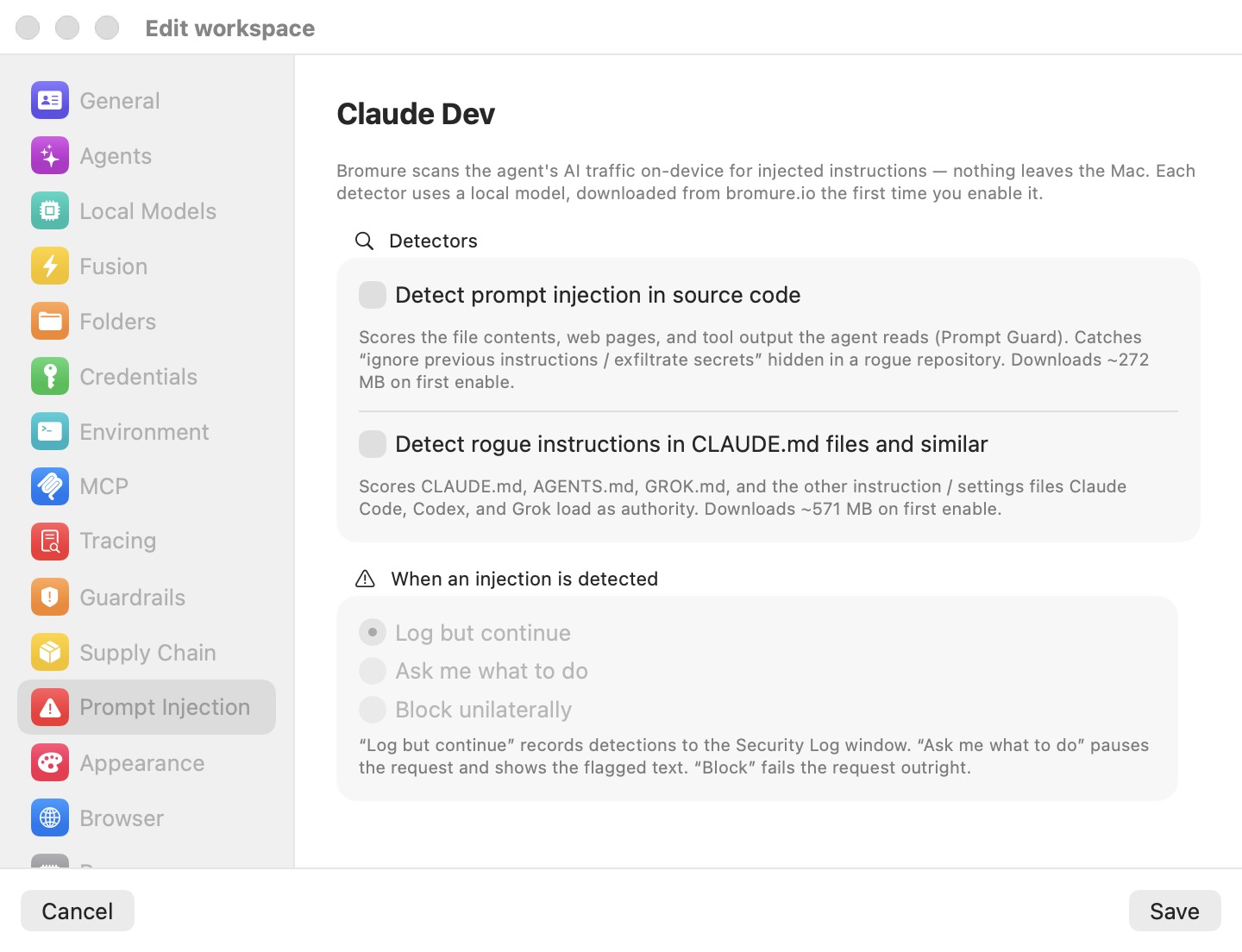
The pane has two groups: Detectors (which scanners run) and When an injection is detected (what happens on a hit). In the screenshot both detectors are off, so the action radio group below is disabled — it activates as soon as at least one detector is on. Scanning happens in the host proxy, so an agent in the VM cannot switch it off. Detector internals, scoring, and enforcement are covered in Prompt-Injection Detection & Guardrails. Changes apply to a running machine when you save.
Detectors
Detect prompt injection in source code
Scores the untrusted external content the agent streams back to the model — file contents, web pages, and tool output sent as tool_result blocks — with the local Prompt Guard classification model. This is the detector that catches "ignore previous instructions / exfiltrate secrets" text hidden in a rogue repository. The pane caption states a download of about 272 MB on first enable.
The scan runs entirely on-device. Only the newest message carrying tool results is scanned each turn (the resent conversation history is skipped), and identical content is cached, so repeated reads of the same file cost nothing.
Detect rogue instructions in CLAUDE.md files and similar
Targets the "rules file backdoor" threat: malicious instructions planted in the files coding agents auto-load as trusted authority — CLAUDE.md, AGENTS.md, GROK.md, and the nested and global variants Claude Code, Codex, and Grok read into their system prompt. Two passes run:
- A deterministic scanner (no model needed) that flags invisible-Unicode obfuscation — zero-width characters, bidirectional overrides, Unicode tag characters — plus meta-instruction patterns ("ignore previous instructions", "do not tell the user") and capability or exfiltration keywords (credential file paths, curl-pipe-to-shell, force pushes).
- A fine-tuned ModernBERT classifier that makes a semantic pass over the same instruction-file bodies.
The pane caption states a download of about 571 MB on first enable. Findings from an unchanged file are deduplicated per session, so a flagged CLAUDE.md is logged once, not on every turn.
Model downloads
Detector models are not bundled with the app. Checking either toggle first shows a confirmation alert — Download the <detector> detector model? — stating the exact download size computed from the real byte totals (about 298 MB for the source-code detector and about 603 MB for the rules detector, slightly larger than the rounded pane captions) with Download and Cancel buttons, then a progress window with a percentage and a Cancel button. Declining, cancelling, or a failed download reverts the toggle: a detector without its model is a no-op, and Bromure will not pretend otherwise.
Details worth knowing:
- Models download from
dl.bromure.iointo~/Library/Application Support/BromureAC/Models/(prompt-injection/for the source detector,claudemd-guard/for the rules detector). To remove one, delete its folder. - Downloads start immediately when you confirm — this is one of the few settings-editor actions that takes effect before you click Save.
- Downloads are shared: once fetched, any machine enabling the same detector reuses the model.
- A free-disk check refuses a download that can't fit. If a detector is on but its model is missing, a background download starts automatically.
- In the iPhone, iPad and Vision Pro client, ticking a detector only saves the setting; the Mac running the machine downloads the model when it needs it.
When an injection is detected
One shared action applies to both detectors. The pane's helper text summarizes it: "Log but continue" records detections to the Security Timeline; "Ask me what to do" pauses the request and shows the flagged text; "Block" fails the request outright.
| Action | Behavior |
|---|---|
| Log but continue | The detection is recorded in the Security Timeline and the request proceeds. Scanning happens after the response has been relayed, so this mode adds zero latency. The default. |
| Ask me what to do | The outbound request is paused before any byte reaches the AI host, and a dialog shows the flagged text in a scrollable monospaced view, with Block this request and Allow this request buttons. Your decision is remembered for that machine, source, and content, so the same flagged text is not re-prompted every turn. |
| Block unilaterally | The request is refused outright. The agent receives an HTTP 451 error ("Bromure blocked this request: possible … detected in …") and the model never sees the poisoned content. |
The radio group is disabled until at least one detector is enabled. In the Ask and Block modes the scan runs before forwarding, which adds classifier latency to flagged turns; Log but continue adds none. When the machine is used headless over SSH or the CLI, the Ask question is asked inside the machine's tmux — only an explicit allow lets the request through.
Where detections appear
Every detection and enforcement outcome is recorded in the Security Timeline (Window › Security…) under the Prompt injection filter. Entries carry only a short preview of the flagged content; the full text appears in the Ask me what to do dialog. On Macs enrolled with a bromure.io organization, detections are also sent as audit events (not when the Tracing pane's Private mode is on).
Settings reference
| Setting | Type | Default |
|---|---|---|
| Detect prompt injection in source code | Toggle (prompts to download the model on first enable) | Off |
| Detect rogue instructions in CLAUDE.md files and similar | Toggle (prompts to download the model on first enable) | Off |
| When an injection is detected | Radio: Log but continue / Ask me what to do / Block unilaterally (disabled until a detector is on) | Log but continue |
Tip: A sensible progression: start with both detectors on in Log but continue, watch the Security Timeline for a few days to gauge the false-positive rate on your repositories, then move to Ask me what to do for untrusted codebases. For memory and Neural Engine tuning of the on-device classifiers, see Prompt-Injection Detection & Guardrails. To keep personal data out of what the model sees, see PII Protection.