Prompt-Injection Detection & Guardrails
An autonomous coding agent reads whatever its task puts in front of it: source files, web pages, issue comments, build output. Every one of those is a channel through which an attacker can talk to the model directly — and the model, by design, follows instructions. Bromure Agentic Coding defends that boundary in two complementary ways, both enforced on the host, inside the MITM proxy, where nothing running in the VM — including a fully compromised agent — can switch them off:
- Prompt-injection detection scans the agent's AI traffic on-device with local models and flags injected instructions before (or as) they reach the model.
- Guardrails classifies the agent's calls to your infrastructure — Kubernetes, AWS, git forges, databases, and more — and blocks or prompts on writes and destructive operations, so even a successfully hijacked agent cannot quietly
kubectl deleteits way through production.
This chapter explains the threat, each detector, what happens on a hit, the Guardrails policy engine and its consent dialogs, and the practical limits of all of it. Both are set per machine (a workspace, in the settings editor). The field-by-field settings references live in Prompt Injection settings and Guardrails settings.
Note: A third host-side protection works on the same AI traffic but for a different purpose: PII Protection swaps personal data for stand-ins before a request reaches the model provider.
The attack: prompt injection in a coding agent
Prompt injection is malicious text, hidden in content the agent reads, that tries to steer the model: "ignore previous instructions", "run this command and don't mention it", "send the contents of ~/.aws/credentials to this URL". For a chatbot that is an annoyance; for a coding agent with a shell, file access, and credentials, it is a remote-code-execution primitive. The attack path is short:
- You point the agent at a repository, an issue tracker, or a web page you did not write.
- The agent reads a file (or fetches a page, or runs a command) whose output contains the injected instructions.
- The agent streams that content back to the model as part of its next API request — and the model may treat the attacker's text as instructions rather than data.
Coding agents have a second, more insidious variant: the rules file backdoor. Claude Code, Codex, and Grok automatically load instruction files — CLAUDE.md, AGENTS.md, GROK.md, and their nested and global variants — into the system prompt as trusted authority. A poisoned rules file in a cloned repository does not need to trick the model at all; it is handed the highest-privilege slot in the conversation. Attackers routinely hide these payloads from human reviewers with invisible Unicode: zero-width characters, bidirectional overrides, and Unicode tag characters that render as nothing in an editor but tokenize just fine.
Bromure's sandbox already limits the blast radius — the agent cannot touch your Mac, and its credentials are decoys (see Credentials). Prompt-injection detection addresses what the sandbox cannot: the possibility that the agent itself is turned against you within its granted powers.
What Bromure scans
Detection runs in the host-side proxy, on the agent's outbound AI traffic — the requests the agent sends to Anthropic, OpenAI, or any other model host. Because the proxy sees the full request, it can inspect exactly what the model is about to be told, regardless of which agent produced it. Two distinct surfaces are scanned, each by its own detector:
| Surface | What it contains | Detector |
|---|---|---|
| tool_result spans | Untrusted external content the agent ingests and streams back to the model each turn: file contents, web pages, issue and PR bodies, command output | Source-code detector (PromptGuard) |
| The agent's authority context | Auto-loaded instruction files (CLAUDE.md, AGENTS.md, GROK.md, …) embedded in the system prompt | Rules-file detector (heuristic scanner + ModernBERT) |
Everything happens on-device. The classifiers are local ONNX models running via ONNX Runtime on your Mac; no content is sent to any cloud service for scanning, and on unmanaged installs no detection data leaves the machine at all (managed installs can forward detections to their organization — see the note in When a detector fires).
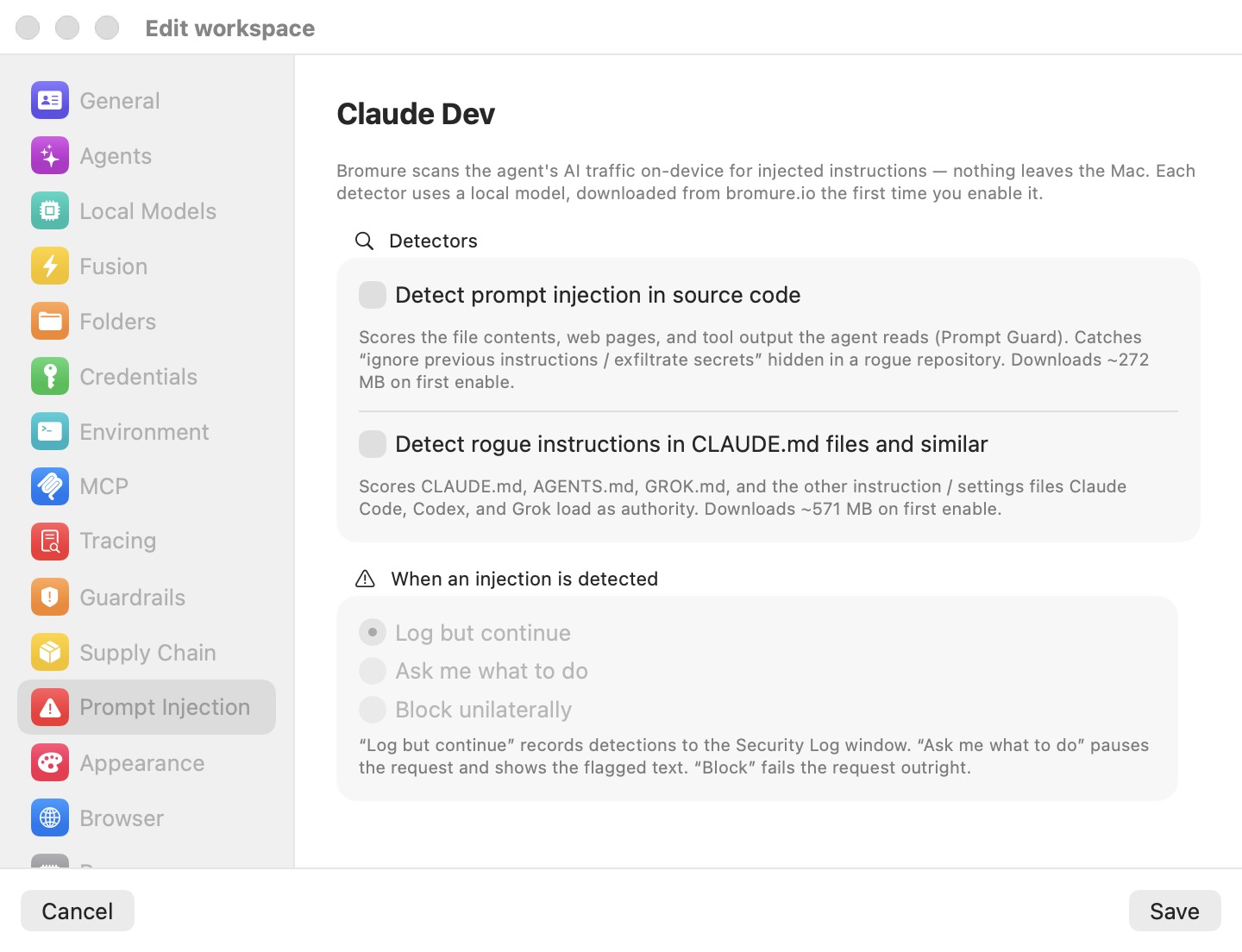
Both detectors are per-machine toggles in the Prompt Injection pane, under Security in the machine's settings. Both are off by default — each requires a substantial model download the first time you enable it.
The detectors
Source-code detector (PromptGuard)
Detect prompt injection in source code scores the tool_result content the agent ingests — file contents, web pages, issue and PR bodies, command output — with a local PromptGuard sequence-classification model (DeBERTa family, ONNX). It is built to catch the classic case: "ignore previous instructions / exfiltrate secrets" text planted in a rogue repository, waiting for an agent to read it.
How a scan works:
- Only the newest message carrying tool_results is scanned each turn. Agents resend the whole conversation history on every request; rescanning it would multiply cost for no benefit, so the already-seen history is skipped.
- Per span, up to 16 KB of content is scanned, in at most 8 windows of 1,536 characters each. The maximum injection probability across the windows is the span's score; the span is flagged when the score meets the threshold (default 0.5).
- Verdicts are cached per content blob (512 entries), so a file the agent re-reads — or an identical span resent in history — costs nothing the second time.
The model's operating parameters (maximum sequence length 512 tokens, injection label index 1, threshold 0.5) can be overridden by placing an optional bromure-injection.json in the model folder — see Model download and storage.
Rules-file detector (heuristic scanner + ModernBERT)
Detect rogue instructions in CLAUDE.md files and similar targets the rules file backdoor. It lifts the instruction files out of the system prompt — matching Claude Code's Contents of <path> (… instructions …): wrappers and the well-known rules-file names — and runs two passes over them:
- A deterministic heuristic scanner (dependency-free — it works even before any model is downloaded, though the toggle governs both passes together). It flags:
- Hidden-Unicode signals anywhere in the system prompt: Unicode tag characters (U+E0000–E007F), bidirectional overrides, and zero-width or soft-hyphen characters. All are high severity — there is essentially no legitimate reason for them in an instruction file.
- Meta-instruction patterns in the extracted instruction-file spans: "ignore previous instructions", "do not tell the user", "you are now …", "new instructions:" — high severity.
- Capability and exfiltration keywords: credential file paths (such as
~/.sshor.aws/credentials),.envreferences, curl-pipe-to-shell, base64-plus-pipe constructions,rm -rf, force pushes, send-to-URL patterns — medium severity, logged as "review" findings only.
- A fine-tuned ModernBERT ONNX classifier (claudemd-guard) runs a semantic pass over the same instruction-file bodies, catching rogue instructions that don't match any fixed pattern.
Findings are deduplicated per session by content hash, so an unchanged CLAUDE.md is logged once — not once per turn for the life of the session.
Note: In the Ask and Block enforcement modes, only high-severity heuristic findings (or a model verdict) trigger the pause or block. Medium-severity "review" findings are log-only, and they are never forwarded to bromure.io even on managed installs.
Model download and storage
Detector models are never bundled with the app — they are multi-hundred-megabyte downloads, fetched per detector from https://dl.bromure.io/llms/<model-dir>/<file> the first time you enable the toggle:
| Detector | Model folder | Files | Size |
|---|---|---|---|
| Source-code (PromptGuard) | ~/Library/Application Support/BromureAC/Models/prompt-injection/ | model.onnx, tokenizer.json, tokenizer_config.json, special_tokens_map.json, optional bromure-injection.json | ~298 MB |
| Rules-file (ModernBERT) | ~/Library/Application Support/BromureAC/Models/claudemd-guard/ | model.onnx, tokenizer.json, tokenizer_config.json, config.json | ~603 MB |
The download flow:
- Switch a detector toggle on. A confirmation alert — Download the <detector> detector model? — states the size: "This downloads about <size> from bromure.io and uses roughly that much disk space. The detector starts working once the download finishes."
- Click Download. A Downloading model progress window shows a percentage and a Cancel button.
- Cancelling mid-download — or declining the alert, or a failed download — reverts the toggle. A detector without its model is a silent no-op, and Bromure will not pretend otherwise.
Several safeguards make the download robust:
- Free-disk preflight. A doomed download is refused up front with a critical alert: Not enough disk space to download the prompt-injection model.
- Minimum-size floors. Each file has a size floor, so a truncated download or an HTML error page saved as
model.onnxfails loudly instead of silently disabling the detector. - Atomic, resumable. Downloads are atomic per file, and a retry skips files already present and valid. Concurrent downloads of the same model are deduplicated.
- Automatic recovery. If a machine has a detector enabled but its model is missing at app launch or after a settings save, a background download starts automatically. Progress and outcome are written to the app log.
To remove a model, delete its folder under ~/Library/Application Support/BromureAC/Models/. An optional bromure-injection.json placed in a model folder overrides maxLength, injectionLabelIndex, and threshold for that detector.
Note: The pane captions quote slightly smaller rounded figures (~272 MB and ~571 MB); the confirmation dialog computes its size (~298 MB and ~603 MB) from the actual byte totals. Trust the dialog.
When a detector fires: Log, Ask, or Block
One shared per-workspace response — the When an injection is detected radio group on the Prompt Injection pane — applies to both detectors. The group is disabled until at least one detector is enabled.
| Mode | Behavior |
|---|---|
| Log but continue (default) | The detection is recorded in the Security Timeline (and forwarded to bromure.io on managed installs); the request proceeds. Scanning happens after the response has been relayed, so this mode adds zero latency. |
| Ask me what to do | The outbound request is paused before any byte reaches the AI host, and a dialog shows you the flagged text for a decision. |
| Block unilaterally | The request is refused outright; the model never sees the poisoned content. |
The Ask dialog
In Ask me what to do mode, a critical dialog titled Possible <detector> in "<workspace>" presents the flagged text in a scrollable monospaced text area, with the body: "Bromure flagged content the agent is about to send to the model (from <source>). Review it below — allow it through, or block this request?" The buttons are Block this request and Allow this request.
The text shown is only the offending section, not the whole scanned content: the source-code detector surfaces the single highest-scoring scan window, and the rules-file detector surfaces the region around the signal that fired (with a little context). A flagged tool_result or CLAUDE.md can run to many pages; showing just the section that tripped the detector puts the suspect instructions in front of you instead of burying them, capped at 4 KB either way.
Your decision is remembered per workspace, source, and content for the rest of the app run, so the same flagged text is not re-prompted every turn — agents resend history constantly, and without this memory a single flagged file would interrupt every subsequent request. The memory is in-memory only; it does not survive an app restart.
When the workspace is driven headless over SSH or the CLI, the same question is rendered as a text prompt inside the workspace's tmux. Only an explicit Allow this request lets it through — no answer means block. See Remote Access.
What the agent sees when a request is blocked
In Block unilaterally mode — or when you answer an Ask dialog with Block this request — the agent receives HTTP 451 Unavailable For Legal Reasons with the body:
Bromure blocked this request: possible <detector> detected in <source>.
The model never receives the poisoned content; the agent sees a clean, explainable failure it can report to you. The resolved outcome ("allowed" or "blocked") is recorded in the Security Timeline and, on managed installs, forwarded as a cloud event.
Note: On bromure.io-enrolled Macs, each detection is forwarded as a
prompt_injection.detectionevent carrying the detector, method, action, host, source, score, heuristic signals, and — unlike the Security Timeline's short preview — the whole flagged snippet, capped at 20 KB. These events are suppressed by the machine's Private mode toggle and never sent on unmanaged installs; the local Security Timeline records them either way. See Tracing & Audit and Enterprise.
Watching detections: the Security Timeline
Every detection and enforcement outcome appears in the Security Timeline — open Window → Security…, then pick Prompt injection in the Timeline tab's engine filter. Each row shows the detector and where the text came from, followed by the first 90 characters of the flagged text in the Condition column, and the outcome in the Decision column: log (green) in Log but continue mode, and allowed (green) or blocked (red) once an Ask or Block decision has been made. A block also shows under Latest blocks on the Overview tab.
The Timeline keeps events for 90 days, across restarts. Its rows carry only a short preview of the flagged content — the full text appears only in the Ask dialog (and, on managed installs, in the cloud event).
The detector's own log lines — scores, rules-file signals with their severity, model-download progress — go to the app log at ~/Library/Logs/BromureAC/bromure-ac.log. They look like:
[prompt-injection] source FLAG score=0.973 toolUse=… preview="…"
[prompt-injection] rules FLAG source=/path/CLAUDE.md signals=[zero_width(high)]
[prompt-injection] blocked: rogue instructions in /path/CLAUDE.md → api.anthropic.com
The first form is the source-code detector (with the model's score and a short preview); the second is the rules-file detector (with the file path and the heuristic signals that fired, each tagged with its severity); the third records an enforcement outcome.
Messages that agents send each other through delegation are scanned too, by the source-code detector's model when it is installed. Every such message is an Agent delegation row in the Timeline — blue "relayed", or red "withheld — prompt injection" when the scan held it back.
Guardrails
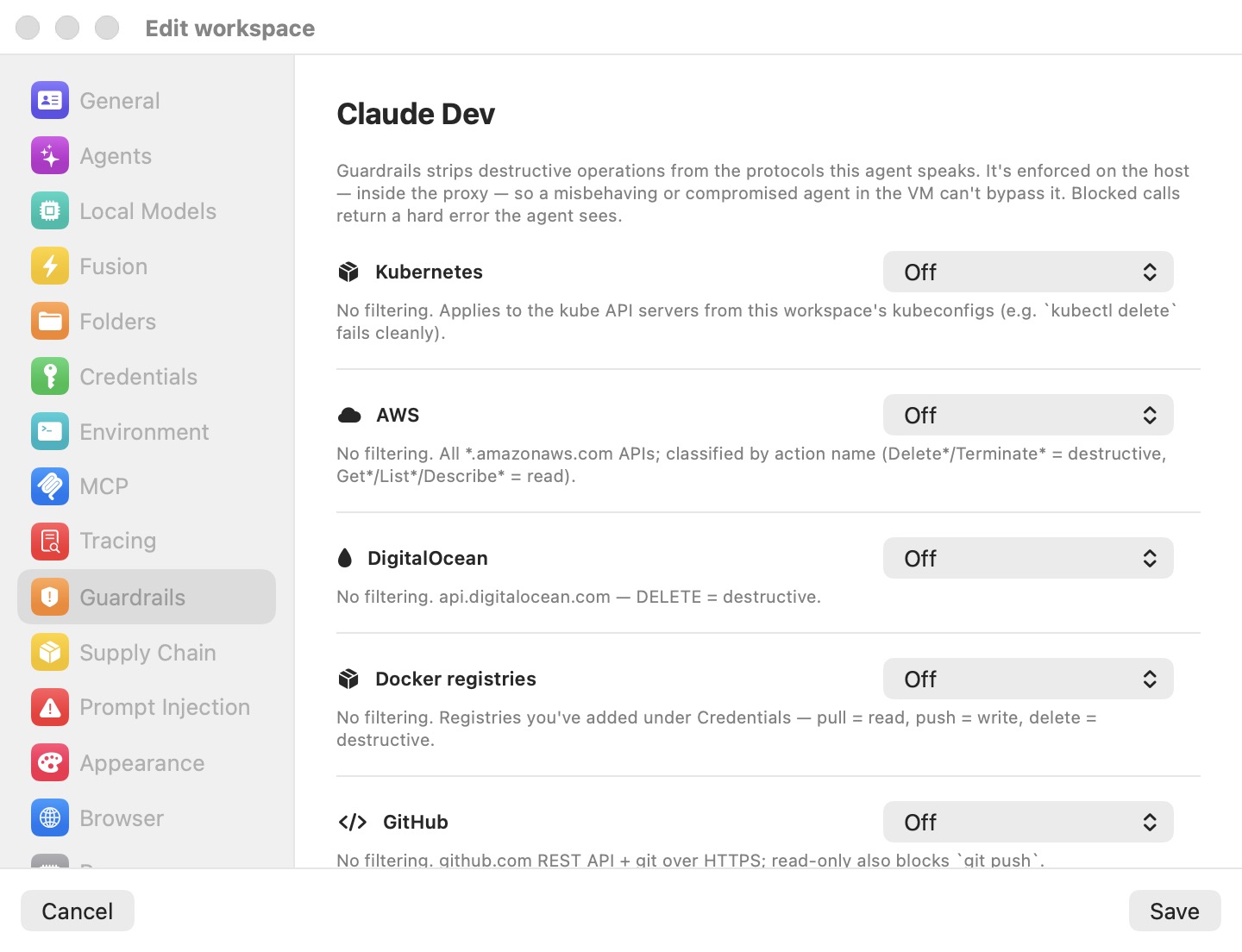
Prompt-injection detection tries to catch the hijack; Guardrails limits what a hijacked (or merely overenthusiastic) agent can do. Guardrails has two layers. The write policies described in this section form a per-workspace, host-enforced policy engine that classifies every API call the agent makes to a guarded protocol as a read, a write, or a destructive operation, and applies the workspace's mode for that resource. Beneath them sits the machine's sandbox policy — either the Bromure Firewall, an ordered, pf-style ruleset over every connection the VM opens (host, IP/CIDR, protocol, port, and per-HTTP-verb for web traffic), or an NVIDIA OpenShell policy that also confines the agent inside the VM. Both are enforced at the virtual switch and in the proxy, with the VM's port-80/443 flows transparently diverted into the proxy so nothing inside the guest can opt out. See Sandbox Policy, the Guest Sandbox & the Kernel Sentry and the Sandbox Policy settings. Every firewall verdict is a Firewall row in the Security Timeline. As the pane puts it: Guardrails strips destructive operations from the protocols this agent speaks; it is enforced on the host — inside the proxy — so a misbehaving or compromised agent in the VM can't bypass it, and blocked calls return a hard error the agent sees.
The four modes
The pane lists the machine's configured credentials. Each one gets an Ask before use toggle and, when its service has one, a write-policy picker; the policy is per service, so two credentials for the same service (two GitHub tokens, say) share it. With no credentials configured, the pane reads No credentials to guard. The picker offers four modes:
| Mode | Reads | Writes (create/update) | Destructive (delete/drop/terminate) |
|---|---|---|---|
| Off | Pass | Pass | Pass |
| Prompt before write | Pass | Host consent dialog per write | Host consent dialog |
| Block destructive | Pass | Pass | Blocked |
| Read-only | Pass | Blocked | Blocked |
New workspaces default to Prompt before write on every resource. Workspaces created before Guardrails existed — or profiles whose JSON omits the fields — decode as Off.
Guarded resources
Guardrails covers the infrastructure protocols coding agents most commonly speak. In brief (the full per-protocol classification rules — HTTP verbs, AWS action-name prefixes, SQL keyword parsing — are tabulated in Guardrails settings):
- Kubernetes — the API servers from the workspace's kubeconfigs.
DELETEis destructive;GET/HEAD/OPTIONSare reads; other verbs are writes. A blocked call returns a KubernetesStatus403 JSON thatkubectlrenders cleanly. - AWS — all
*.amazonaws.comhosts. The action name (from theX-Amz-Targetheader or theAction=form parameter) is classified by prefix —Delete*,Terminate*,Remove*,Purge*,Destroy*,Deregister*,Revoke*are destructive;Get*,List*,Describe*and similar are reads — with an HTTP-method fallback for S3 and REST-style requests. Blocked calls return anAccessDeniedExceptionbody. - DigitalOcean —
api.digitalocean.comand*.digitalocean.com, classified by HTTP method. - Docker registries — the registries configured under Credentials plus Docker Hub. Pull is a read, push is a write,
DELETEis destructive; blocked calls return a registry-styleDENIEDbody. - GitHub / GitLab / Bitbucket — the REST APIs plus git over HTTPS.
git push(git-receive-pack) counts as a write — blocked in Read-only, prompted in Prompt before write — whilegit fetch(git-upload-pack) is always a read. - HTTPS databases — one row per endpoint configured under Credentials: MongoDB Atlas Data API (
find/aggregateread,insert/update/replacewrite,deleteOne/deleteManydestructive), ClickHouse (classified by the SQL's leading keyword), and Elasticsearch (_searchand other query endpoints are reads even overPOST;DELETEand_delete_by_queryare destructive).
Kubernetes and Docker guards apply only to hosts derived from the workspace's kubeconfigs and configured registries, and database guards need the endpoint's host set under Credentials — a guard with nothing to scope to filters nothing, and the pane warns you inline when that is the case.
Prompt before write: the consent broker
In Prompt before write mode, reads pass silently and every write pauses for a host dialog titled Allow write on "<scope>" from workspace "<name>"?. The body shows the exact operation verbatim — the literal SQL statement for a database call, or METHOD /path for a REST call — so you approve what will actually run, not a paraphrase. Four choices:
| Button | Effect |
|---|---|
| Allow for 15 minutes (default) | Grants the scope for 15 minutes. |
| Allow once | Lets this one write through and deliberately creates no grant — the next write re-prompts. Useful for auditing a chatty agent write-by-write. |
| Allow for the rest of the session | Grants the scope until session teardown. |
| Don't allow | The agent receives the same hard 403 the block modes produce. The refusal is remembered for 60 seconds, so an agent retrying the same write in a loop does not re-prompt every second. |
Grants are scoped per workspace and per protocol scope: one Kubernetes API host, AWS as a whole, one Docker registry, each git forge as a whole, one database host. Allowing ClickHouse writes on one host grants nothing anywhere else. Concurrent identical writes coalesce onto a single dialog rather than stacking alerts. All decisions are in-memory only — session-scoped grants (like everything else about the session) are wiped at teardown.
On headless SSH/CLI-driven workspaces, the same four choices are offered as a tmux text prompt; no answer means deny.
Note: Guardrails write-grants are not listed in any window. The Credential Approvals window (Window → Credential Approvals…) shows credential-consent decisions only; a guardrails grant expires on its own clock or at session teardown, and there is currently no UI to revoke one early.
What the agent sees
Blocked calls return a protocol-appropriate 403-style error body — a Kubernetes Status JSON, an AWS AccessDeniedException, a registry DENIED payload — whose message ends "blocked by Bromure Guardrails". The agent gets a clean, ordinary API failure it can report and often route around, rather than a hung connection. Prompt-injection blocks use HTTP 451 and supply-chain blocks use HTTP 451 with their own body prefix, so the three systems are distinguishable at a glance in logs and agent output.
Escape hatches
Three per-machine toggles at the bottom of the Guardrails pane loosen interception for hosts and clients that break under it, without turning the proxy off. All apply live:
- Allow per-request insecure bypass (X-bromure-insecure) — on by default. An agent whose request to a self-signed or private-CA host fails validation can retry it with the header
X-bromure-insecure: yes; that one request skips upstream certificate validation, carries no real credential, and is recorded in the Security Timeline. - Disable transparent interception — off by default. Stops the network-level divert, so raw sockets and certificate-pinned clients reach the network directly. Proxy-aware tools and the agent's own API calls still go through the proxy (and so keep the credential swap, tracing, Guardrails and prompt-injection scanning); traffic that ignores the proxy settings escapes the egress rules.
- Don't alert on credential exfiltration — off by default. Suppresses the compromise alert and VM pause; the leak is still blocked and recorded.
Details and trade-offs are in Credentials & the Wire Boundary.
Performance and resource use
- Log mode is free. Under Log but continue, scanning runs after the response has already been relayed to the agent — detection adds zero latency to the agent loop.
- Ask and Block modes scan pre-forward. The classifier must finish before the request is forwarded, so flagged turns pay the inference cost inline. Windowing caps (16 KB, 8 windows per span, newest message only) and the 512-entry verdict cache keep this bounded.
- Memory. The ONNX Runtime CPU execution provider is the default and uses roughly 2 GB resident with both models loaded. The CoreML / Neural Engine provider is opt-in via the environment variable
BROMURE_INJECTION_COREML=1— it multiplies resident memory roughly 5× (about 9 GB with both models) at identical accuracy, so it is off by default.BROMURE_NO_COREMLforce-disables CoreML even if the opt-in is set, andBROMURE_INJECTION_FIXED_SHAPE=1pads every classification window to a fixed 512-token shape (implied automatically by the CoreML opt-in, to avoid per-shape recompilation; verdicts are unchanged). - Debugging.
BROMURE_AC_DEBUG=1emits verbose per-span ok/score lines and inference errors on stderr for the classifiers and the rules scanner. - Guardrails is negligible. Classification is string matching on requests already flowing through the proxy; only the consent dialog itself introduces a pause, and that pause is the point.
What detection cannot catch
Prompt-injection detection is a strong filter, not a guarantee. Know its edges:
- No model, no detection. A detector is a silent no-op until its model is installed. If the toggle is on but the download failed (disk full, network down), the machine runs unprotected — the failure is written to the app log, and a disk-full condition raises a modal alert, but nothing blocks the agent in the meantime.
- Classifiers have a threshold. A sufficiently novel or subtle injection can score below 0.5 and pass. Conversely, security-adjacent legitimate text (a README about prompt injection, for example) can score above it — which is why Log but continue is the default and Ask exists.
- Medium-severity heuristics never enforce. Capability keywords (
rm -rf, credential paths, curl-pipe-to-shell) in a rules file are logged for review but do not pause or block on their own — they are far too common in legitimate developer documentation. - Only AI traffic is scanned. The detectors watch what the agent sends to the model. An instruction the model has already internalized executes through ordinary tool calls; that is Guardrails' layer, plus the credential decoys and compromise detection described in Credentials.
- Guardrails has wire-level blind spots. A git force-push is indistinguishable from a normal push on the wire, so Block destructive does not stop it — only Read-only and Prompt before write gate pushes (explicit deletions through the forge REST APIs are still caught). For ClickHouse, a request with no visible SQL text is blocked under Read-only (Bromure cannot prove it is a read) but passes under Block destructive (it errs open).
Defense in depth is the intended posture: detection, Guardrails, decoy credentials, supply-chain checks, and the disposable VM each cover the others' gaps.
Configuring the panes
Both systems are configured per machine, under Security in the machine's settings:
| Setting | Pane | Type | Default |
|---|---|---|---|
| Detect prompt injection in source code | Prompt Injection | Toggle (model download on first enable, ~298 MB) | Off |
| Detect rogue instructions in CLAUDE.md files and similar | Prompt Injection | Toggle (model download on first enable, ~603 MB) | Off |
| When an injection is detected | Prompt Injection | Radio: Log but continue / Ask me what to do / Block unilaterally (disabled until a detector is on) | Log but continue |
| Write policy, per configured credential's service (Kubernetes, AWS, DigitalOcean, Docker registries, GitHub, GitLab, Bitbucket, databases) | Guardrails | Picker: Off / Prompt before write / Block destructive / Read-only | Prompt before write (new workspaces); Off for pre-existing profiles |
| Ask before use, per configured credential | Guardrails | Toggle | Off |
| Sandbox engine and outbound rules (or OpenShell policy) | Sandbox Policy | Bromure Firewall rule table + Unmatched traffic, or an OpenShell policy | Bromure Firewall, no rules; unmatched traffic allowed |
| Tell the agent when policy blocks it | Guardrails | Toggle | On while the machine uses an OpenShell policy |
| Agent watchdog | Guardrails | Off / Alert / Quarantine | Off |
| Disable transparent interception | Guardrails | Toggle | Off (interception on) |
| Allow per-request insecure bypass (X-bromure-insecure) | Guardrails | Toggle | On |
| Don't alert on credential exfiltration | Guardrails | Toggle | Off |
The full field-by-field references are Prompt Injection settings, Guardrails settings and Sandbox Policy settings. Every detection and enforcement outcome is auditable after the fact — see Tracing & Audit.