Models
Which model providers you use, how you sign in to them, and which model each coding agent runs are set once for the whole Mac, in Preferences › Models. Every machine (a workspace, in the settings editor) inherits that global board. The machine editor's Models pane is where one machine departs from it — its own API key for a provider, a provider it must not use, its own model for an agent — or, if you need to, where it gets a setup of its own.
This page covers the per-machine pane. The global board — providers, sign-ins, Bedrock, OpenRouter, custom servers, on-device models, the agents column and its sizes — is documented in Models & Providers.
Preferences › Models: the global board
In Preferences (the Defaults template), the Models pane is the global board itself: Providers on the left, Agents on the right, with the heading "Register a source on the left. Each agent runs its provider’s default model unless you pick one on the right."
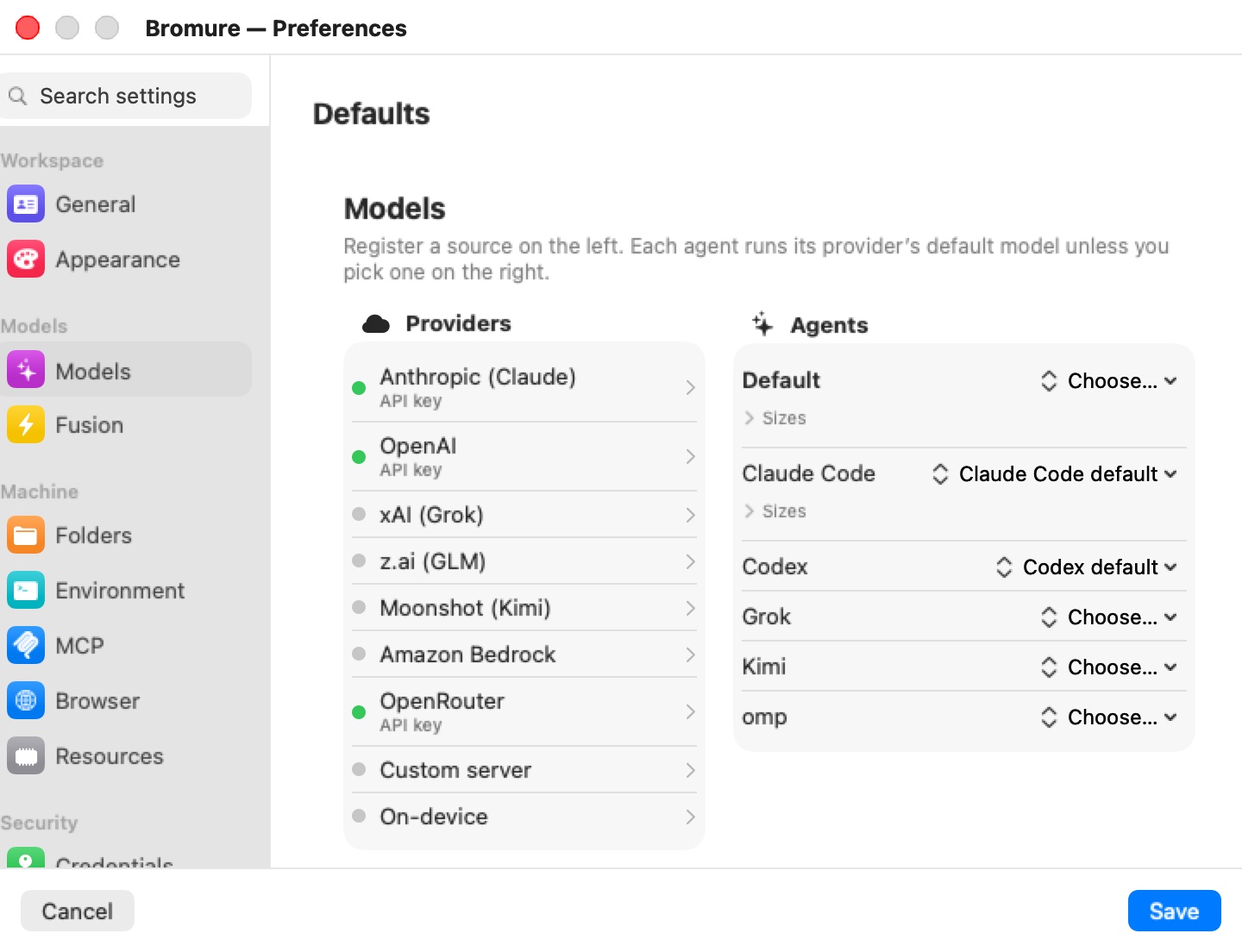
Unlike the rest of Preferences, this board saves as you edit — there is nothing to confirm with Save, and Cancel does not undo it. A sign-in made here is always shared by every machine. Changes reach running machines straight away: only the agents whose provider, credential, or model changed are restarted, and they resume their conversation; the VM itself does not restart.
When Settings for: points Preferences at a remote Mac, the board you see is that Mac's, edited as a draft and sent on Save. See Settings Reference.
A machine's Models pane
In a machine's editor, the pane opens with one switch.
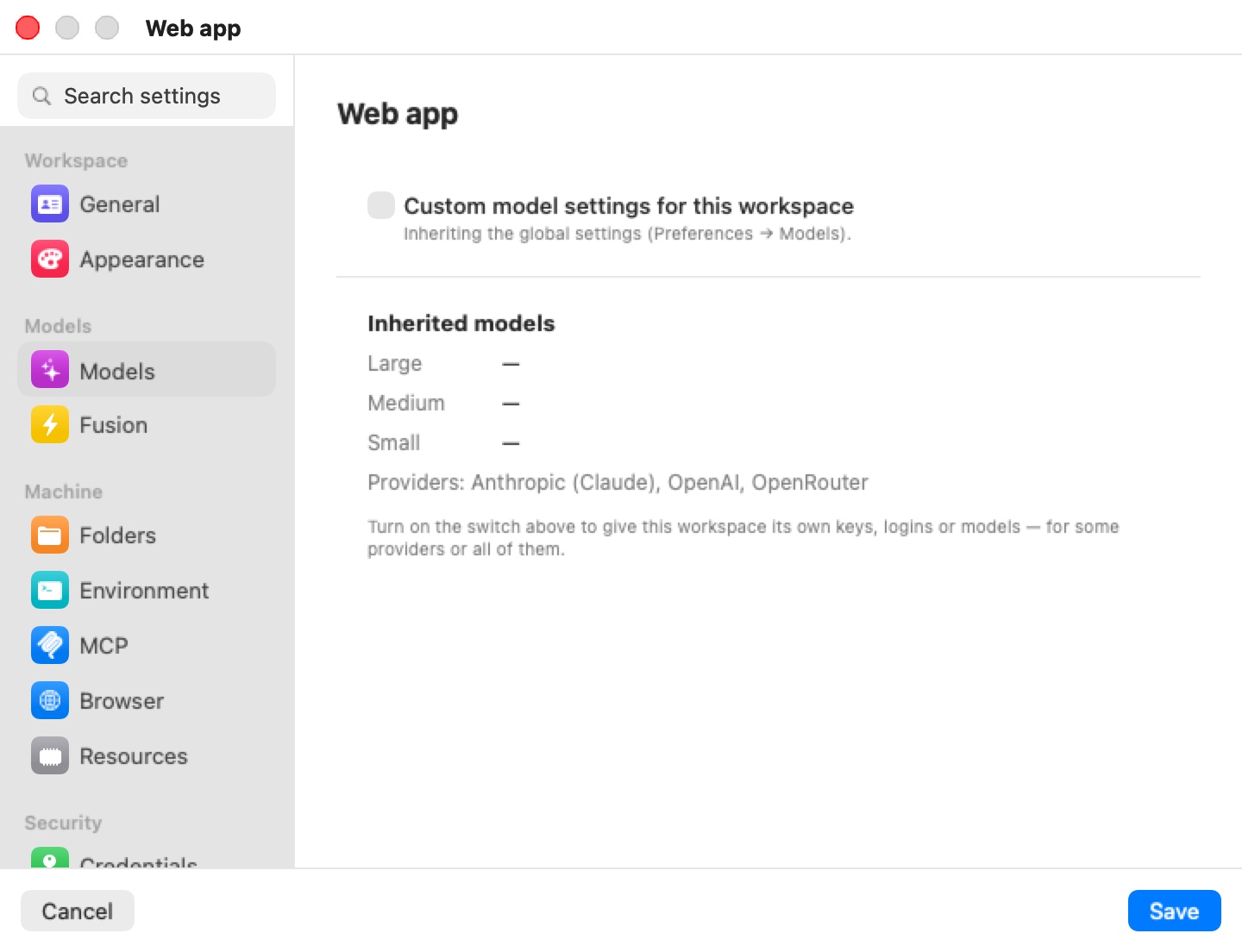
Custom model settings for this workspace — off
Off is the default: "Inheriting the global settings (Preferences → Models)." Below the switch, Inherited models summarizes what the machine gets — the model chosen for the Large, Medium and Small sizes (a dash where the global board leaves it to the provider's default) and the list of configured Providers — with the reminder "Turn on the switch above to give this workspace its own keys, logins or models — for some providers or all of them."
Custom model settings — on
Turning the switch on reveals the full board, scoped to this machine, and a choice of two modes:
| Mode | Caption | What it does |
|---|---|---|
| Inherit, with changes | "Starts from the global settings; only what you set below is different here." | The default when you turn the switch on. Everything you don't touch keeps following Preferences, including later changes made there. |
| Standalone | "This workspace has its own providers, logins and model choices below — the global settings are ignored." | The machine gets a complete setup of its own, copied from what it was using at that moment. Later changes to Preferences don't reach it. |
Switching from Standalone back to Inherit, with changes starts again from an empty set of changes.
Inherit, with changes
In this mode, each source on the left tells you where it comes from:
- An inherited provider says Inherited from Preferences → Models (API key | subscription | AWS credentials). and offers Don't use in this workspace — "or override it below". Typing a key in its popover (under "Override for this workspace:") gives the machine its own.
- A provider the machine has its own credential for says This workspace's own credential., with Use the global provider to drop it and inherit again.
- A provider you switched off says Not used in this workspace — the global settings have it., with Use the global provider to bring it back.
- The Custom server works the same way: inherited ("Editing it below makes it this workspace's own."), the machine's own (This workspace's own server., with Use the global server), or switched off for this machine.
In the Agents column, a model this machine inherits shows · inherited after its name. Picking a model sets it for this machine only; the reset button next to an explicit pick ("Inherit the global setting") returns that agent or size to the global choice.
Tip: Common uses for the override: a client project that must bill to the client's own API key; a machine that must never reach a cloud provider (switch the providers off and leave only a custom server or on-device model); or a machine that tries a different model for one agent while the rest of your machines stay as they are.
Signing in from a machine
A provider that supports subscriptions (Anthropic, OpenAI, xAI and Moonshot) offers Sign in with provider in its popover. When you sign in from a machine's editor, the app asks Share with every workspace? when the sign-in completes:
- Every workspace — the sign-in becomes the shared one, and replaces any per-machine sign-in to that provider.
- Just this workspace — the sign-in belongs to this machine only, and takes precedence over the shared one there.
A sign-in made from Preferences is always shared. See Credentials & the Wire Boundary for how sign-ins are held on the Mac and never enter the VM.
When changes apply
The machine's override is part of the machine's settings, so it applies when you click Save. On a running machine, agents affected by the change are restarted with their conversation resumed; the VM keeps running.
Secrets entered in the override — API keys, the custom server's key — are stored in the machine's encrypted secrets.enc, not in profile.json.
Limits
- The Models pane is not available in the iPhone, iPad or Vision Pro client.
- A subscription can only power its own provider's agent: a Claude subscription runs Claude Code, not Codex.
- Local-model limits (one engine, one generation at a time, OpenAI-compatible custom servers only) are described in Models & Providers.
Related chapters
- Models & Providers — the global board in full: providers, sign-ins, Bedrock, OpenRouter, custom servers, on-device models, and agent model picks.
- Fusion — using several models together on one Claude Code session.
- Credentials — AWS credentials, which also sign Amazon Bedrock requests.
- Settings Reference — all panes at a glance.