Supply-Chain Protection
An autonomous coding agent installs packages constantly — scaffolding a project pulls in hundreds of dependencies without a human ever reading a name, let alone a changelog. That makes the package registry the single widest channel for hostile code to enter the sandbox: a typosquatted name, a freshly hijacked release, or a malicious postinstall script runs with the agent's full permissions the moment npm install finishes. Bromure Agentic Coding treats every package fetch as untrusted input and applies a per-machine policy to it on the host, before a single byte reaches the VM.
This chapter explains what is intercepted, each check in the pipeline, what happens when a check fires, and how to read the results in the Security Timeline. Supply-chain policy is set per machine (a workspace, in the settings editor). The field-by-field settings reference for the pane lives in Supply Chain settings.
Why package installs are the attack surface
The sandbox already contains the agent: it cannot touch your Mac, and its credentials are decoys (see Credentials). What the sandbox cannot do by itself is judge the provenance of code the agent pulls in. Supply-chain attacks exploit exactly that gap:
- Fresh-release hijacks. A maintainer's account is compromised and a malicious version is published. These versions are typically detected and yanked within hours to days — which is why the age gate refuses versions younger than a cutoff.
- Known-vulnerable versions. The agent resolves a dependency to a version with a published advisory. The OSV check catches these.
- Malware, typosquats, and rogue install scripts. Packages built to be malicious from the start. The socket.dev and Depi providers flag or filter these, and install-script stripping removes the most common execution vector outright.
Enforcement is host-side by design. The proxy applies policy to the response before the agent sees it, so nothing running inside the VM — including a fully compromised agent — can loosen the rules. The in-VM .npmrc and pip.conf can only further restrict what the proxy already served, never widen it. Reputation-service API keys (socket.dev, Depi) are held on the host only and are never exported into the VM.
How interception works
Every network request the VM makes passes through the host-side MITM proxy (see Concepts). The proxy recognizes requests to the major package registries and classifies each one:
- Metadata — a package's version listing (an npm packument, PyPI's JSON API or
/simple/index, a Cargo sparse-index entry, and so on). The age gate operates here, by rewriting the listing. - Artifact — the downloadable file for one specific version: an npm
.tgz, a Python wheel or sdist, a.crate,.gem,.nupkg, or Go module.zip. OSV lookups, socket.dev checks, script stripping, and hard blocks all happen at artifact-fetch time. - Passthrough — everything else on those hosts (search, authentication). Untouched.
Every package fetch is classified and recorded in the Security Timeline, whatever the policy; the checks themselves run only for the layers you enable. There is nothing to install or configure inside the VM.
Note: Packages already present in npm's or pip's local cache never hit the network, so nothing is checked — or recorded — for them. A quiet Timeline during an install can simply mean everything came from cache.
Verdicts: allow, rewrite, block, hold
Supply-chain layers are individual on/off toggles, each with a fixed action — there is no global block/warn/allow mode for this pane. (The three-way log/ask/block radio you may know from Prompt Injection, and the enforcement modes in Guardrails, are separate systems.) Every fetch ends in one of four outcomes:
| Outcome | What happens | Visible marker |
|---|---|---|
| Allowed | The response passes through untouched. | Green checked / downloaded row in the Security Timeline. |
| Rewritten | The proxy modified the response: too-fresh versions removed from metadata, or install scripts stripped from a tarball. The package manager proceeds normally. | X-Bromure-Rewritten: supply-chain response header; blue row in the Timeline. |
| Blocked | The download is refused with an HTTP 451 ("Unavailable For Legal Reasons") response. | X-Bromure-Block: supply-chain header; red row in the Timeline. |
| Held for consent | The download pauses while Bromure asks you — for lockfile-pinned pass-throughs, for packages no enabled reputation source could vet, and for packages OSV or socket.dev flagged (see Trusting a blocked package). Denying converts the hold into a 451 block. | A system consent alert; the decision is logged. |
A 451 block carries a plaintext body that begins with Bromure Supply-Chain Security blocked this request: followed by the exact reason, for example:
Bromure Supply-Chain Security blocked this request: npm package [email protected]
published 4 hours ago — policy requires 2 days minimum
npm, pip, cargo, and the other package managers print that body verbatim in their error output, so both the agent and you see precisely why an install failed — and the agent can often route around it on its own (for example, by pinning an older version). The 451 status was chosen deliberately so supply-chain blocks are distinguishable at a glance from the 403s that Guardrails uses.
Coverage by ecosystem
The proxy intercepts eight package ecosystems. Not every check supports every ecosystem:
| Ecosystem | Intercepted hosts | Age gate | OSV | socket.dev | Depi | Script strip |
|---|---|---|---|---|---|---|
| npm | registry.npmjs.org, *.npmjs.org | Yes | Yes | Yes | Yes | Yes |
| PyPI | pypi.org, files.pythonhosted.org | Yes | Yes | Yes | — | — |
| Cargo | crates.io, static.crates.io, index.crates.io | Yes | Yes | No | — | — |
| RubyGems | rubygems.org | Yes | Yes | Yes | — | — |
| Maven Central | repo1.maven.org, repo.maven.apache.org, search.maven.org | No | Yes | Yes | — | — |
| NuGet | api.nuget.org, *.nuget.org | No | Yes | Yes | — | — |
| Go modules | proxy.golang.org | No | Yes | Yes | — | — |
| Packagist | repo.packagist.org, packagist.org | Yes | Yes | Yes | — | — |
Two gaps worth knowing about:
- Age gate — Maven, NuGet, Go. These three ecosystems do not carry per-version publish timestamps in their standard metadata responses, so their metadata passes through unfiltered and the artifact backstop has no data to act on. The age gate effectively does not block them today; npm, PyPI, Cargo, RubyGems, and Packagist are fully covered.
- socket.dev — Cargo. socket.dev has no Cargo support. With socket.dev filtering enabled, every
crates.ioartifact yields no verdict and therefore triggers the unverified-package consent prompt (see Offline and degraded behavior). If your machine does heavy Rust work, either answer the prompts or pick a different provider.
The age gate
The age gate refuses package versions younger than a configurable number of days, on the theory that a freshly published release is the one most likely to be a just-hijacked package — malicious versions are usually reported and yanked quickly, and waiting out that window costs almost nothing for regular development. It is the only layer enabled by default, with a 2-day minimum.
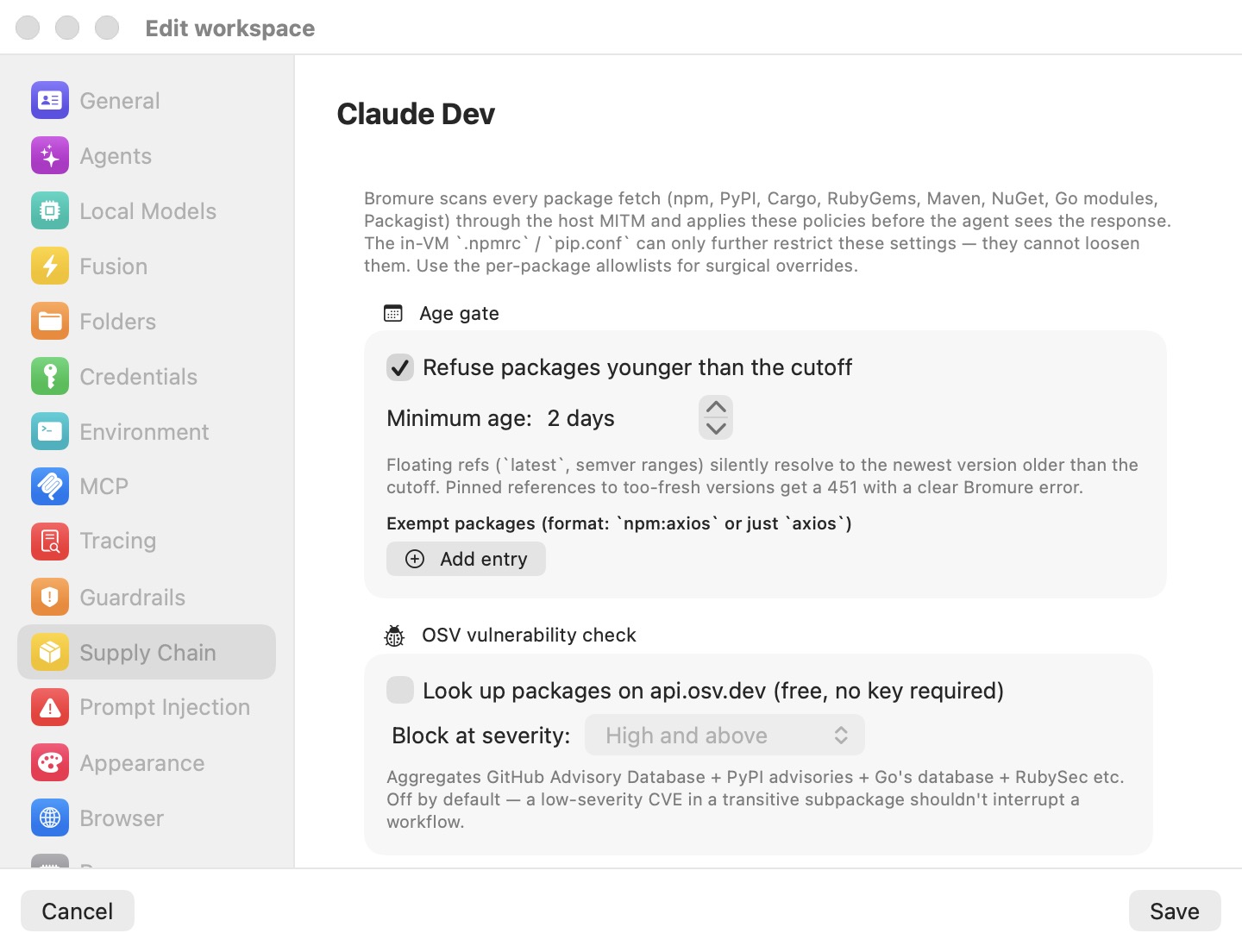
It works through two cooperating mechanisms:
- Metadata rewriting. The proxy strips too-fresh versions out of the registry's version listing and re-aims
latestand other dist-tags at the newest surviving version. Floating references —pkg@latest, semver ranges — are therefore never hard-blocked: the package manager silently resolves to the newest version old enough to pass. From the agent's point of view, versions younger than the cutoff simply do not exist yet. - Artifact-fetch backstop. Every per-version publish time the proxy sees in metadata is cached in memory (up to 50,000 entries). If the agent then requests a pinned, too-fresh version directly, the fetch is blocked with a 451 that states the package's actual age and the required minimum. For pip — whose default PEP 503 HTML index carries no timestamps — Bromure performs an on-demand lookup of
https://pypi.org/pypi/<pkg>/<version>/jsonto obtain the publish time.
To configure it, open the machine's Supply Chain pane and use the Age gate group:
- Toggle Refuse packages younger than the cutoff.
- Set Minimum age: with the stepper (0–90 days).
- If a specific package must be installable immediately — for example, your own team publishes it — add it under Exempt packages with the Add entry button. Entries use the allowlist format:
npm:axiosscopes the exemption to one ecosystem, a bareaxiosmatches the package name in every ecosystem. Matching is case-insensitive.
Tip: npm metadata requests are silently upgraded to the full packument so the gate can see publish times — you do not need to do anything for npm's abbreviated metadata format.
OSV vulnerability check
The OSV check looks up each downloaded artifact's ecosystem, package, and version on api.osv.dev — the free Open Source Vulnerabilities database, which aggregates the GitHub Advisory Database, PyPI advisories, Go's vulnerability database, RubySec, and others. If any advisory for that exact version is at or above your chosen severity, the download is blocked with a 451. It covers all eight ecosystems and requires no API key.
Severity is taken from the GHSA label when the advisory has one; otherwise Bromure computes the CVSS v3 base score from the advisory's vector string.
In the OSV vulnerability check group:
- Toggle Look up packages on api.osv.dev (free, no key required).
- Pick Block at severity: — Low and above, Medium and above, High and above, or Critical only.
The check is off by default, and the severity threshold defaults to High and above — as the pane itself notes, a low-severity CVE in a transitive subpackage should not interrupt a workflow. Lookups run only on artifact downloads (not metadata fetches), results are cached in memory for the app run, at most 16 lookups run in parallel, and transient network errors are retried up to 5 times with backoff. If OSV cannot be reached at all, the package is held for your consent rather than silently allowed — see Offline and degraded behavior.
Package filtering: socket.dev and Depi
The Package filtering group selects a reputation provider through a mutually exclusive radio: None, socket.dev, or Depi. The two providers work in fundamentally different ways — socket.dev is a pre-flight lookup the proxy consults before letting a fetch through; Depi replaces the npm registry outright. Only one can be active at a time by design (running both would double-filter every install), and selecting None disables both while keeping any stored keys. Whichever provider you choose, the other layers in this chapter — age gate, OSV, script stripping — still apply on top.
The default is None. Workspaces created before the radio existed that already have a socket.dev key are automatically inferred as socket.dev.
socket.dev
socket.dev is a commercial package-reputation service. With socket.dev selected and an API key entered, the proxy checks each artifact download against socket.dev's issue API before serving it. It supports npm, PyPI, Go, Maven, RubyGems, NuGet, and Packagist — but not Cargo (see Coverage by ecosystem).
You bring your own key: click Get an API key next to the API key: field (it opens socket.dev/dashboard/settings/api-tokens), create a token, and paste it into the secure field. Both block toggles stay disabled until a key is entered, and an empty key disables socket.dev entirely regardless of the toggles. The key is stored host-side in the workspace's profile.json and never enters the VM; all lookups originate from your Mac.
Two independent blocks are available:
- Block compromised packages (rogue install scripts, malware-flagged, typosquats, suspicious telemetry) — fires on socket.dev's attack-shaped supply-chain-risk issues. Definitive malware signals (malware, known malware, GPT-detected malware, troll packages, compromised SSH keys) block at any severity. Noisier attack-shaped signals — obfuscated code, suspicious strings, install scripts, typosquatting, shell access, unusual HTTPS use — block only when socket.dev rates them high or critical, so a package with a benign
postinstalldoes not get caught. Pure quality and attribute signals (new author, environment-variable reads, network access, telemetry) deliberately never block. - Block packages with known CVEs — fires on socket.dev's vulnerability bucket at or above the CVE block threshold: picker (same four levels as OSV; default High and above).
Both blocks are off by default. Results are cached for the app run, at most 16 calls run in parallel, and transient failures are retried 5 times with backoff. Authentication errors are written to the app log with the HTTP status and a preview of the response body.
Note: If you enable OSV and socket.dev's CVE block together, both will check every artifact — that is allowed (they are different layers), just redundant for CVE coverage. Many users pair socket.dev's compromised-package block with the free OSV check instead.
Depi
Depi is a drop-in secure npm registry by Lupin & Holmes (landh.tech) that serves pre-vetted packages. Instead of looking packages up, Bromure re-routes every npm registry request — metadata, tarballs, audit, anything addressed to registry.npmjs.org or *.npmjs.org — to Depi's npm-compatible filtering registry at depi-npm-proxy.landh.tech:443, attaching your key as an Authorization: Bearer header and stripping any Authorization header the guest sent. Depi rewrites tarball URLs in its packuments to point at itself, so those follow-up fetches get the key injected host-side too.
To enable it, select Depi in the radio and paste your key into the API key: secure field (Get an API key opens landh.tech). While the field is empty, an orange warning reads Enter an API key — Depi stays off without one. Each re-routed request is written to the app log:
[depi] GET registry.npmjs.org/… → https://depi-npm-proxy.landh.tech
Error handling is explicit rather than silent:
- 401 (key rejected). Bromure substitutes a clear plaintext error that npm prints ("Bromure: the Depi registry rejected the configured API key…", with the header
X-Bromure-Block: depi-auth), logs it, and raises a one-shot GUI alert per workspace-and-key combination: "Depi rejected your API key". Headless SSH/TUI sessions do not get the GUI alert; they rely on the log line and the rewritten npm error. - 403 (package blocked by Depi, or key not authorized for it). Logged and passed through unchanged, so npm reports Depi's own refusal text.
Depi affects npm only — the other seven ecosystems are untouched by it. Depi replaces socket.dev in the radio, not your local policy: the age gate, OSV check, and script stripping still run on what Depi serves.
Install-script stripping
npm's preinstall, install, postinstall, and prepare hooks run arbitrary code at install time and are the workhorse of real-world npm malware. With Strip preinstall / install / postinstall / prepare from npm tarballs on the fly enabled (in the Install scripts group), the proxy rewrites each npm tarball in flight: it gunzips the .tgz, locates the top-level package/package.json, removes those four script keys, recomputes the tar header checksum, and re-gzips.
Because the tarball bytes change, the proxy also scrubs dist.integrity and dist.shasum from the package's registry metadata, so npm computes the hash itself from the stripped tarball and its verification still passes for unpinned installs. Each strip is logged ("stripped install scripts from" the package and version, shown in orange); tarballs that were inspected and found clean are tagged with the X-Bromure-Rewritten: supply-chain header only. On any parse failure the original tarball passes through untouched — this layer fails open, because it must never brick a well-formed install.
Some packages genuinely need install scripts — native binding compilers such as better-sqlite3 or node-canvas. Add those to Allow install scripts for (format npm:better-sqlite3) and they keep their hooks.
Note: This proxy layer is separate from npm's own install-script policy inside the VM. Recent npm versions run install scripts only for packages on an
allow-scriptslist, so Bromure's managed~/.npmrcin every machine allows them for exactly the agent CLIs it ships —@anthropic-ai/claude-code,@openai/codex,@moonshot-ai/kimi-codeand@oh-my-pi/pi-coding-agent— so that an agent updating itself withnpm install -ggets its native binary. Every other package follows npm's default. If you turn on script stripping here, add those packages to Allow install scripts for as well, or the agents' self-updates lose their install step.
The toggle is off by default, and two limits apply:
- npm only. PyPI sdists are not rewritten —
setup.pyis arbitrary code, so stripping is not feasible there. - Unpinned installs only. A tarball whose integrity hash is pinned in
package-lock.jsoncannot be rewritten without failing verification. That case is governed by the next layer.
Lockfile-pinned installs
A lockfile-pinned install — npm ci — pins every tarball's integrity hash in the lockfile. Bromure cannot rewrite those tarballs without breaking hash verification, so its only options are to pass them through unmodified or to block them. By default they pass through silently.
If you want a say, enable Prompt before passing lockfile-pinned tarballs through unmodified (npm ci, pip --require-hashes) in the Lockfile-pinned installs group. The first lockfile-pinned fetch in a batch (detected for npm via the npm-command: ci request header) then pops a host consent dialog titled Pass through npm ci (lockfile-pinned install) from workspace "…"? with the buttons Allow for 15 minutes, Allow once, Allow for the rest of the session, and Don't allow. The whole burst of concurrent fetches coalesces onto that one prompt and follows your decision; denying blocks the fetch with a 451 and the denial is remembered for 60 seconds so retries do not re-prompt.
Note: Despite the UI label mentioning
pip --require-hashes, detection is currently implemented only for npm'snpm-command: ciheader — pip hash-pinned installs do not trigger the prompt. (They are also never rewritten, since PyPI artifacts are never modified.)
Trusting a blocked package
A reputation verdict is not always right for you: socket.dev flags workerd for its install script, yet it is Cloudflare's runtime, which your project may need. Rather than a silent 451, an OSV or socket.dev block on a package download holds it and asks: Install … from workspace "…" despite its supply-chain warning?, quoting the reason. The choices are:
| Choice | Effect |
|---|---|
| Allow … for this session | Installs it, and any other version of that package, until the app quits. |
| Always allow … in this workspace | Installs it, and adds it to the workspace's Trusted packages list, so later downloads skip the OSV and socket.dev checks for it — for as long as it stays on the list. |
| Don't allow …, and don't ask again this session | Keeps the 451; the same install stays blocked without asking again until the app quits. |
| Not now | Keeps the 451 for now; asked again after a minute. No answer means this. |
A socket.dev malware verdict (malware, known malware, GPT-detected malware, troll package, compromised SSH key) is never offered for override and is never covered by the list: those downloads are always blocked. The age gate keeps its own Exempt packages list, and install-script stripping its Allow install scripts for list — trusting a package here does not exempt it from either.
You can also add a package after the fact: a blocked row in the Security Timeline offers Allow… → Always Allow … in This Workspace, and the list itself is in the Supply Chain pane under Trusted packages (format npm:workerd). Changes apply to a running machine at once.
Consent prompts and grants
All supply-chain ask-the-user paths — the lockfile pass-through and the unverified-package hold described below — go through a shared consent broker with burst coalescing: concurrent requests for the same scope wait on a single dialog instead of stacking alerts. The lockfile pass-through offers these four decisions (the unverified-package hold has its own, per package — see Offline and degraded behavior):
| Decision | Effect |
|---|---|
| Don't allow | Blocks with a 451; remembered for 60 seconds, auto-denying immediate retries. |
| Allow once | Lets this one request (or coalesced burst) through. |
| Allow for 15 minutes | Grants the scope for 15 minutes. |
| Allow for the rest of the session | Grants the scope until the app quits. |
Active grants and denies are listed as Supply chain decisions — separate from guardrail decisions — in the approvals UI (the Window → Credential Approvals… area), where you can revoke a grant early. Grants are in-memory only and do not survive an app restart.
In remote SSH/CLI sessions there is no GUI dialog: the same question is rendered as a chooser inside the machine's tmux. No answer means deny. See Remote Access.
Configuring the policy
Supply-chain policy is configured per machine, in the Supply Chain pane under Security in the machine's settings. The full field-by-field reference is in Supply Chain settings; the defaults at a glance:
| Setting | Default |
|---|---|
| Refuse packages younger than the cutoff (age gate) | On, Minimum age: 2 days, no exemptions |
| Look up packages on api.osv.dev (free, no key required) | Off; Block at severity: High and above |
| Package filtering | None (no socket.dev or Depi key) |
| Block compromised packages / Block packages with known CVEs (socket.dev) | Off; CVE block threshold: High and above |
| Strip preinstall / install / postinstall / prepare from npm tarballs on the fly | Off, empty allowlist |
| Prompt before passing lockfile-pinned tarballs through unmodified | Off (silent pass-through) |
Three operational details:
-
Edits apply live. Saving the settings pushes the new policy to running sessions immediately — the proxy reads it per request, so no VM restart is ever needed. Each new or changed policy is confirmed with a one-line summary in the app log, for example:
[supply-chain] policy engaged for 1a2b3c4d: age-gate=2d osv=high socket.dev=compromised+cve=high strip-scriptsMisconfigurations are called out right in that summary:
socket.dev=key-set-but-no-togglemeans a key is entered but neither block is enabled, anddepi=selected-but-no-keymeans Depi is chosen but off for lack of a key. -
Where it is stored. The policy lives in the workspace's
profile.jsonunder~/Library/Application Support/BromureAC/profiles/<id>/(only non-default fields are written). The socket.dev and Depi API keys are stored there too — host-side only, shown as secure fields in the UI, and never copied into the VM. There are no supply-chain-specific environment variables or launch arguments. -
Remote configuration. The SSH/TUI remote menu exposes the same Supply Chain pane with the same fields, so a headless instance can be configured without the GUI. See Remote Access.
Watching installs in the Security Timeline
Everything the supply-chain pipeline decides is visible in the Security Timeline — open Window → Security… or search for it with ⌘K. The Packages checked tile on its Overview tab counts the last 24 hours of package fetches; click it, or pick Supply chain in the Timeline tab's engine filter, to see them one per row.
Each row names the package in its Condition column (npm · [email protected]) and says what happened in its Decision column, colour-coded:
| Decision | Colour | Meaning |
|---|---|---|
| checked | Green | A package's version listing was fetched and passed. |
| downloaded | Green | A package artifact was fetched and passed. |
| checked — versions newer than the cooldown hidden | Blue | The age gate rewrote a version listing. This is the gate doing its normal job, not a block. |
| install scripts stripped | Blue | Install hooks were removed from an npm tarball. |
| blocked — … | Red | The fetch was refused with a 451; the reason follows the dash (for example blocked — known malware). A block you may override has an Allow… button at the end of the row. |
| downloaded — allowed by you despite: … | Blue | A package OSV or socket.dev flagged, installed because you allowed it (the prompt, or Trusted packages). |
Package fetches are always recorded, whether or not any supply-chain layer is on — enforcement follows the policy, recording does not. apt installs are recorded too: every .deb fetched from an Ubuntu or Debian archive pool appears as an apt row. They are observed only; none of the checks in this chapter apply to them.
To see it in action: open the Timeline, run any install inside a session (npm install, pip install, cargo add, gem install, apt install, …), and watch the rows arrive. Events are kept on disk for 90 days and survive app restarts; Clear only hides the current rows from the window. Export… saves what the tab shows as a CSV file.
Note: The Timeline records decisions, not every step. The detailed pipeline lines — each outbound lookup, the "policy engaged" summaries, Depi re-routes, API errors — go to the app log at
~/Library/Logs/BromureAC/bromure-ac.log(and to the app's stderr when it is launched from a terminal).
Offline and degraded behavior
The pipeline's reputation checks depend on outbound calls from your Mac (never from the VM): api.osv.dev for OSV, api.socket.dev for socket.dev, pypi.org for the PyPI publish-time backstop, and depi-npm-proxy.landh.tech for Depi. When an enabled source cannot produce a verdict — network down after retries, HTTP error, rate-limiting, an auth failure, or an unsupported ecosystem — Bromure fails closed rather than silently allowing.
The download pauses and an unverified-package hold asks you, in a panel titled Install package version from workspace "…" without a reputation check?. It says why there is no verdict — socket.dev didn't answer, refused the API key (check it in the workspace's Supply Chain settings), is rate-limiting the key, hasn't finished analysing that version yet, or doesn't know the version (it may be very new) — and that installing means accepting a package that was not checked against your configured reputation sources. The choices:
- Allow package version — this version installs, and won't ask again for the rest of the session.
- Allow all unverified packages for 15 minutes — this one and every other package of the workspace that gets no verdict in the next 15 minutes.
- Don't allow unverified packages for the rest of the session — this one and every later one are refused without asking.
- Don't allow package version — refused (with a 451). No answer before the countdown ends, Esc, or closing the panel means the same.
One question is on screen per workspace at a time: when a uv sync or an npm install hits several unverified packages, they are asked one after another (the panel says how many are waiting), and an answer for all of them settles the rest at once.
This is deliberate protection: without it, an attacker who can induce rate-limiting on the reputation service could sneak packages through unchecked. The practical consequences:
- Working fully offline with OSV or socket.dev enabled means a prompt for every uncached package. Disable those layers for offline stints — the age gate keeps working from already-cached metadata without connectivity.
- socket.dev plus Cargo means a prompt for every crate, since socket.dev cannot vet Cargo at all (grants are per package@version, so a session grant only covers that one crate version).
- The PyPI publish-time backstop is the one exception: on a pure network error it fails open for that fetch (the failure is not cached, so the lookup is retried next time). The age gate's metadata rewriting is unaffected.
Compromise detection
Supply-chain checks reduce the odds of hostile code entering the sandbox; compromise detection catches the moment hostile code that did get in tries to act. It is part of the credential system rather than the package pipeline — the full picture of decoy credentials and the token swap is in Credentials — but its alarm is documented here because a poisoned package is its most likely trigger.
Every outgoing request from the VM is scanned in a single pass for the decoy ("fake") tokens the credential-swap layer minted. A fake scoped to one host (say, github.com) appearing in a request bound for any other host is the signature of credential exfiltration. When that happens:
- The proxy blocks the request with a 451 — the destination never receives a byte.
- The VM is paused instantly. If the machine was running in the background, it is brought on screen first. The frozen frame tints red.
- A critical alert appears, titled This environment may have been compromised, explaining that Bromure detected an outbound attempt to leak a session credential from the named machine to a host it was not minted for and that the VM has been paused — with a detail line per leak: a token preview (like
sk-a…f9q3), the credential's name, the host it was minted for, and the host it was observed heading to.
The alert offers four responses:
- Shut down (the default) — stops the VM and marks the machine compromised.
- Block — stops just this request and resumes the VM; the detector re-fires if the agent tries again.
- Allow — trusts the observed host for the rest of this session: the credential is swapped in and sent there, and requests to it stop being flagged. Use it only for a destination you recognize.
- Save for Investigation — you pick a folder; Bromure exports
disk.img(a copy of the VM system disk),home.tar.gz(the machine's home directory), andshares/<name>.tar.gzfor each shared folder, then shuts down and marks the machine compromised. RAM state is discarded.
Only Shut down answers to Return; the other three need an explicit click. A remote client that mirrors the machine gets Shut down, Block and Allow. The full description, including the per-session allowlist behind Allow, is in Credentials.
A machine marked compromised refuses to boot again until you explicitly wipe it, and the wipe flow warns that shared folders are not wiped — they may still hold contaminated files, so review them by hand.
Detection is always on for credentials that declare a host scope. Manual credentials without a pinned host ("any host") can never trigger it, and Claude/Codex tokens use a relaxed same-registered-domain match (a token minted for api.anthropic.com seen on another anthropic.com host does not alarm). Only one alert shows at a time; repeat events while it is open are dropped. A machine can suppress the alert and the pause with Don't alert on credential exfiltration in its Guardrails pane; the leak is still blocked and still appears as a red Credential brokering row in the Security Timeline (see Escape hatches).
Enterprise visibility
For machines on a Mac enrolled with bromure.io, every metadata and artifact fetch also emits a supply_chain.fetch event to the enterprise event stream, carrying the ecosystem, package, version, request kind, outcome (allowed, rewritten, blocked, or stripped), and the reason kind (age_gate, osv, socket_compromised, socket_cve, verify_unavailable, lockfile_denied, scripts_stripped). Enrollment alone gives administrators organization-wide package-download visibility — an inventory of everything every agent installed — even on machines with every enforcement layer switched off.
How enrollment works, and what administrators see on the other end, is covered in Enterprise.