Coding Tasks
The coding board turns a written task into merged code with as little ceremony as you want: write what you need, either Plan First — split it into reviewable phases with an interactive planning agent — or Start it straight away, watch the agent work in its own git worktree, review the diff with line-anchored comments, and land it — the agent that wrote the change merges it (or opens the pull request) once you approve. Every stage is a column; every task sits in one of them.
In the sidebar, the Coding Tasks section sits just below Sessions, above Automations and Virtual Machines. Its header shows how many tasks are open, an orange badge counting tasks waiting in Review, a red badge when an agent needs your input, and a + for a new task. Under it, one line summarizes the board (2 planned · 1 in progress · 1 to review), or reads No open tasks when the board is empty. Click the section title (Open Coding Tasks (⇧⌘T)) or that line to open the board titled Coding Tasks; you can also press ⇧⌘T (Workspaces › Tasks) or choose Coding Tasks in the ⌘K palette.
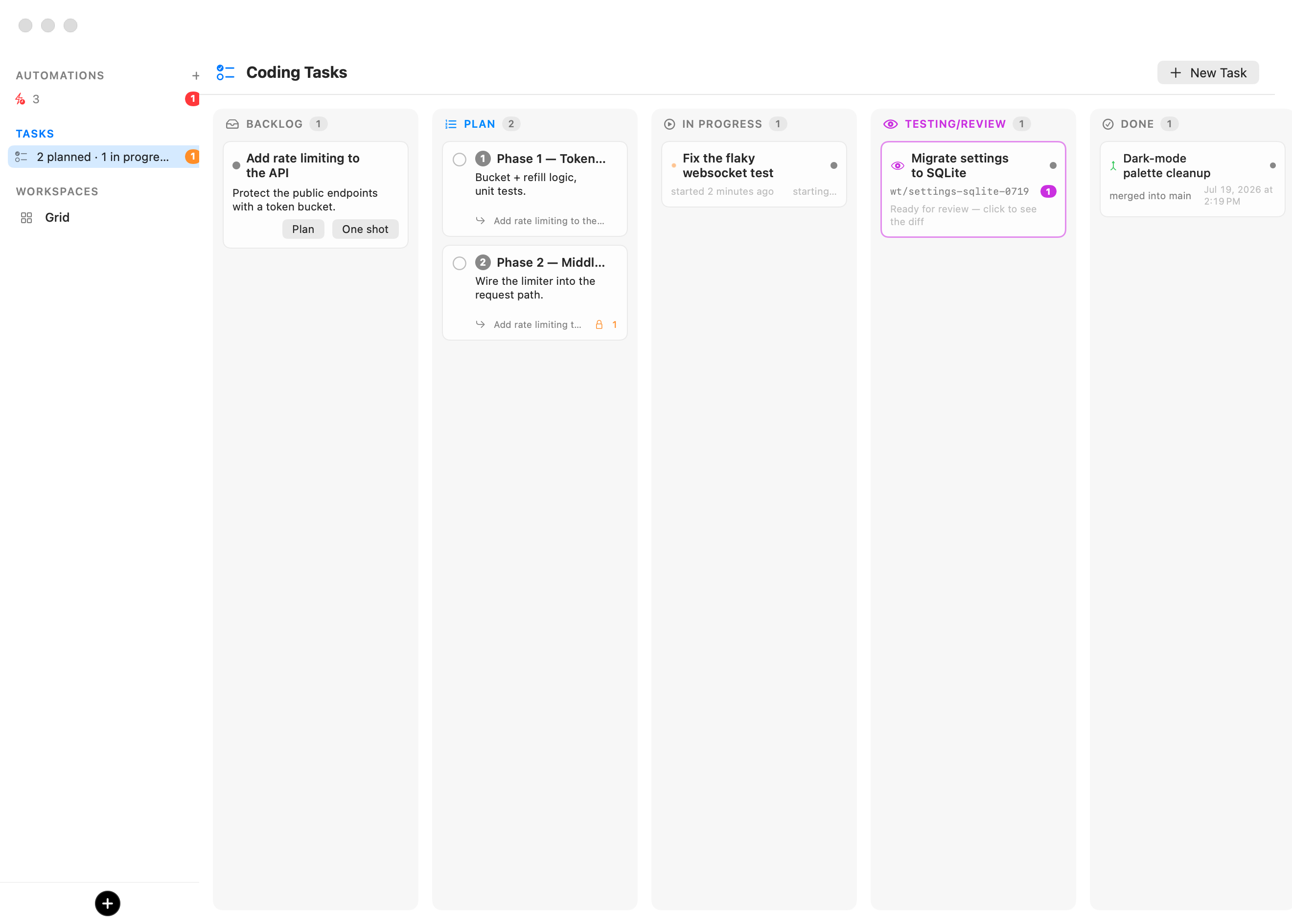
| Column | What sits there |
|---|---|
| Backlog | Tasks you have written but not started. Each offers Plan First and Start, and can be assigned to a session or a room. |
| Plan | Phases a planner agent filed from a task — numbered, dependency-aware, multi-selectable. |
| In Progress | Tasks and phases an agent is actively working on, each in its own worktree and each shown as a session in the sidebar. |
| Review | Finished work waiting on you: clicking a task opens the review window with the branch's diff. A task being landed stays here until the change is in. |
| Done | Each task says how it got there: Merged into branch, PR #N opened, Marked done by you, or Closed without merging. |
Everything on this page works identically from a remote rich client — the board, the planning window, and the review window all mirror over the control API.
Writing a task
New Task at the top of the board, the + on the sidebar's Coding Tasks header, or clicking a Backlog task opens the editor:
- Title and a description written in Markdown, with a Write / Preview toggle. The description becomes the agent's prompt, so write it like one.
- Workspace and Agent — the task runs on the chosen machine (a workspace, in the settings editor) with one of the agents available on it.
- Start the agent in — a folder inside the machine. When it is a git repository of its own, the task runs in a fresh worktree and branch there.
- Create folder & git repo if needed — for greenfield work: starting or planning first runs
mkdir+git init(with an empty root commit) when the folder is not already its own repository. Leave it off for a folder inside an existing repo. - When approved — how the task leaves Review: Workspace default (the machine's choice, itself defaulting to Preferences — see General), Merge into the branch, or Open a pull request.
A new task starts on the workspace and folder you used last.
A task in the Backlog offers two buttons:
- Start sends the task to In Progress: a new agent does the whole thing autonomously in a fresh worktree and hands you the diff in Review. (It is unavailable while the task is being planned.)
- Plan First opens a planning session first.
Start checks before anything moves: the machine is booted if needed, then the folder must exist and be a git repository of its own (or Create folder & git repo if needed must be on). While it checks, the task stays in its column with a Starting… spinner; it moves to In Progress only once the agent can really start. A task that can't start stays where it was and shows why in red — a missing folder, a folder that isn't a repository — so the board (and GET /tasks) never shows a task In Progress that isn't running.
Each Backlog task also shows who picks it up: Assign opens the choice (a new agent, the Switchboard, a session, or a room) and the task then reads Assigned to name; Unassign takes it off that queue. New tasks: Unassigned at the top of the board sets who new tasks are assigned to as you create them.
Planning
Plan First launches a visible, interactive planning session and opens its window — a native conversation view, no terminal required. The session opens on your task; the agent explores the repository read-only, narrates what it finds, and asks questions when the task leaves real choices open.
Questions arrive as a tabbed card — one tab per question, exactly mirroring the picker the agent shows in its own session. Answers are collected locally and stay editable until you press Submit, which sends the whole set at once; a mis-click is never final. You can also type free-form answers in the composer at the bottom of the window, or press Open Terminal to watch the raw session.
When the agent has what it needs, it files the plan onto the board — ordered phases in the Plan column, each roughly one reviewable pull request of work, with dependencies between them — and records a plan overview. The window then shows Plan is ready with the phase count and a Close button, the planning session's tab closes itself and its session is archived, and the task leaves the Backlog (its phases supersede it; remove them all and it returns).
Planning is watched: if the machine reboots, the agent is quit, or the session dies before phases are filed, the task's spinner ends with a specific reason — click Plan First to retry — instead of spinning forever.
The Plan column
Phases are numbered in plan order and carry:
- A dependency badge (a lock with phase numbers) when the phase needs earlier phases Done first.
- A queued badge when you started it before its dependencies finished — it starts automatically the moment they are all Done.
- Their parent task's name.
Select multiple phases with the checkboxes and the selection bar appears: Start N Selected starts each of them (dependency-gated phases queue), Clear drops the selection, and Remove removes the whole selection behind one confirmation. Editing a phase shows its Depends on list — every sibling phase with a checkbox, so dependencies can be reworked by hand.
Phases run fully autonomously — no interactive input is expected once started.
In Progress
A started task boots the machine if needed, creates a fresh worktree of the repository, and launches the agent with the task's description as its prompt. The agent appears as a session in the sidebar like any other, so you can follow it in the chat. The task shows its agent's state in the same words as the session's row in the sidebar — Working, Needs you in red when the agent is blocked on a question, Ready when the agent is waiting at its prompt without having handed the task over, Paused when its session is asleep — plus when it started. Clicking it (Open the task's live session) puts that session on the stage; a session that is gone offers Restart Session, and a task whose repository or branch disappeared offers Start Over (a fresh run on a new branch). An agent that dies as it starts — a missing command, a bad flag — is caught within seconds: the task says so in red, with the agent's exit status, and offers Restart Session. When a message for the agent finds text already sitting in its input box, Bromure doesn't type onto it: the message waits for the box to clear, and if it doesn't, the task says so in red. The sidebar's Tasks badge counts these so you never miss one.
Hovering an In Progress task shows a ✓ Done button (Mark Done, after a confirmation: nothing is merged and the branch is kept). Right-click it for Open Session, Restart Session, Move to Review, Mark Done, Stop & Return to Backlog (the agent stops; its worktree and branch stay in the workspace, the task goes back to the Backlog), Stop & Discard Branch and Remove Task Only. Dragging a Backlog task or a phase onto In Progress starts it. A task handed to a session or a room offers Open Session and Stop & Return to Backlog instead.
When the agent reports done, the task moves to Review. Its session stays open: review comments you send back reach the same conversation, and when you approve the task the same agent lands it. The session is archived once the task lands, is marked done or discarded — or after about two hours in Review with nothing happening, in which case a send-back or a landing resumes the agent's conversation in a fresh tab. If the agent crashes instead, the task turns red rather than pretending to work.
Review
A task in Review shows its branch, its review comments, and where it stands: Ready to land, Landing — agent is merging into branch… (with the agent's latest line), or Needs you — reason in red (two lines on the card, all of it on hover) with Retry and Open Session buttons. A task that produced no code reads No code changes — read the report. Hover a task for ✓ Done; drag it onto Done to mark it done. Click it to open the review window — the same window used to review a session's changes, titled Review — <task>, with the task's own buttons.
Under the window's header, a summary says where the branch stands: Kimi Code worked on wt/fix-login in Web app · ~/app · 3 commits · 4 files (+120 −7) vs main · main moved 2 commits since · main checkout clean · remote: origin.
The window shows the branch's diff, read live from the machine (so the machine must be running), with per-file expanders, added and removed line counts, the commits and working-tree status, and the plan the agent recorded, if any. A picker at the top chooses what the diff is compared against:
| Choice | Shows |
|---|---|
| Since <parent> (default) | Everything the branch changed since it left its parent branch, committed or not. |
| Uncommitted | Only edits not committed yet, new files included. |
| Last commit | The last commit alone. |
Review it like a pull request:
- Mark files as looked at. Each file has a Viewed mark (Mark as looked at — it folds away until it changes again). A viewed file folds away, and unfolds again by itself if its diff changes.
- Comment. Hover a line and click the margin bubble (Comment on this line) to comment on that exact line, use Comment on this file on a file header, or type in the composer at the bottom for a comment on the whole change. In the composer, ⏎ adds the comment, ⌥⏎ inserts a new line and ⇧⌘⏎ sends everything back. Draft comments can be removed before you send them.
- Send back. The send button reads Send Back (N). It delivers every draft comment to the agent in one message — formatted as In
foo.js, line 196: use a different method — and moves the task back to In Progress for another round, in the same conversation, worktree and branch (⇧⌘⏎). - Land it. The main button follows the task's When approved choice: Merge into branch or Open Pull Request (offered only when the repository has a remote). Its menu holds the other one, Squash & Merge into branch, Merge into Another Branch…, and Keep Branch — Mark Done. Each opens a confirmation that says exactly what will happen (see Landing), with a Keep branch option.
- Mark Done — done without merging, after a confirmation that the branch is kept.
- More — Open Session, View Transcript, and Discard Branch… (deletes the branch and its checkout; the task goes to Done as closed without merging, its transcript kept).
- Open Terminal jumps to the task's session on the machine.
A task that produced no code — no branch, a branch with no change against its target, or a delegated delivery without a worktree — shows the agent's final report instead of git: its primary button is Mark Done, next to View Transcript and Send Back.
A task done by a session or a room that already opened a pull request offers View Pull Request #N and Mark Merged (once it is merged on the forge).
Right-click a task in Review for Review Changes, Open Session, Retry Landing (when it needs you), Mark Done, Merge into branch… (opens the review on its Merge confirmation), Back to In Progress, Discard Branch… and Remove Task Only. Discarding, or marking a task done, says how many review comments that never reached the agent go with it.
Right-click a Done task for Read Transcript, Open Session while its session is still alive, Open Pull Request when it has one, and Remove Task. Every card's menu is also its VoiceOver menu (VO-Shift-M) and its list of actions; VoiceOver reads a card as its title and state.
Landing
Approving a merge lands the change without you resolving anything by hand:
- Fast path. When the branch is strictly ahead of its target, its checkout has nothing uncommitted, and the target's checkout is clean, Bromure merges it itself — a fast-forward where the target is checked out, or a direct update of the branch when it isn't checked out anywhere. It never merges into a checkout that is on another branch.
- The agent lands it. Otherwise the agent that wrote the change does it, in its own session — typed into its live conversation, or that conversation resumed: it commits anything left, rebases onto the latest target (resolving conflicts keeping both sides' intent), runs the project's quick checks and fixes what its change broke, fast-forwards the target, and reports back. It never touches uncommitted changes in the target's checkout. A pull-request landing pushes the branch and runs
gh pr createwith a summary and a test plan instead. - Verified. The task goes Done only once Bromure sees the change in the target's history. A landing the agent reports but Bromure can't check (a machine it can't reach) is recorded as reported by the agent, not verified.
- Needs you. If the agent reports it is blocked, stops without landing, or hasn't finished after 20 minutes, the task turns red with the reason; the review window offers Open Session, Retry and Cancel Landing.
Afterwards the branch and its checkout are removed (unless you kept them) and the session is archived. Tasks handed to a session or a room land the same way: the assignee gets the landing request on the same delegation and reports with deliver.
Tip: You don't need a task to review an agent's work. Every session with a folder has Review Changes in its menu and in ⌘K, and the chat's Changed N files line opens the same window for that turn. See Branches & Review.
Removing tasks
Every task grows a ✕ on hover (Remove Task), behind a confirmation. For a task In Progress the dialog offers Stop & Discard Branch, which tears everything down, or Remove Task Only, which leaves the session and checkout untouched on the machine; for a task in Review it offers Discard Branch or Remove Task Only. A Backlog task's menu has Remove Task.
Storage and API
Tasks persist in one file next to the machine store, with atomic writes and ISO-8601 dates:
~/Library/Application Support/BromureAC/tasks.json
The whole board is mirrored on the app's control socket for rich clients and scripts:
| Endpoint | Purpose |
|---|---|
GET /tasks | List every task. |
POST /tasks | Create or update (upsert) a task document. |
POST /tasks/<id>/start | Start it (worktree + agent). The checks run first: the task stays in its column with startingAt set, then moves to inProgress — or keeps its column with lastError set when it can't start. |
POST /tasks/<id>/plan | Launch the planning session. |
POST /tasks/<id>/comment | Add a review comment (text, optional file and line). |
POST /tasks/<id>/send-back | Deliver unsent comments and return the task to In Progress. |
POST /tasks/<id>/land | Land it: mode (merge, squash or pr), optional target and keepBranch. /merge and /open-pr are aliases. |
POST /tasks/<id>/retry-landing, /cancel-landing | Retry a stuck landing, or give it up. |
POST /tasks/<id>/mark-done | Done as it stands (nothing merged, branch kept). |
POST /tasks/<id>/mark-merged | Done as merged elsewhere (a pull request merged on the forge). |
POST /tasks/<id>/close-no-merge | Discard: delete the branch and its checkout, Done as closed without merging. |
POST /tasks/<id>/stop | Stop the agent and return the task to the Backlog (worktree kept). |
POST /tasks/<id>/to-testing, /to-in-progress | Move it to Review or In Progress by hand. |
POST /tasks/<id>/destroy | Stop the agent, delete the worktree and branch, remove the task. |
DELETE /tasks/<id> | Remove the task only. |
Under the hood, the planning and task agents talk back to the board through a per-session board MCP server (vsock, host-side): board_get_task, board_set_plan, board_create_subtasks, board_ready_for_review and board_report_landing are how phases get filed, how a finished task announces itself, and how a landing reports merged, pr_opened or blocked — no polling, no scraping. The tools are wired automatically for every supported agent: Claude Code loads a per-branch MCP config, Codex gets per-invocation mcp_servers overrides, and Grok reads a project-scoped .grok/settings.json written into the session's checkout (and excluded from its diff).