Tracing
Every request a machine makes (a machine is a workspace, in the settings editor) — agent traffic to model providers, package downloads, calls to your infrastructure — passes through Bromure's proxy on the Mac. The Tracing pane sets how much of that traffic is recorded for this machine, from nothing to full request and response bodies. Everything recorded stays on your Mac, encrypted, and is browsable in the Trace Inspector or with bromure-cli trace.
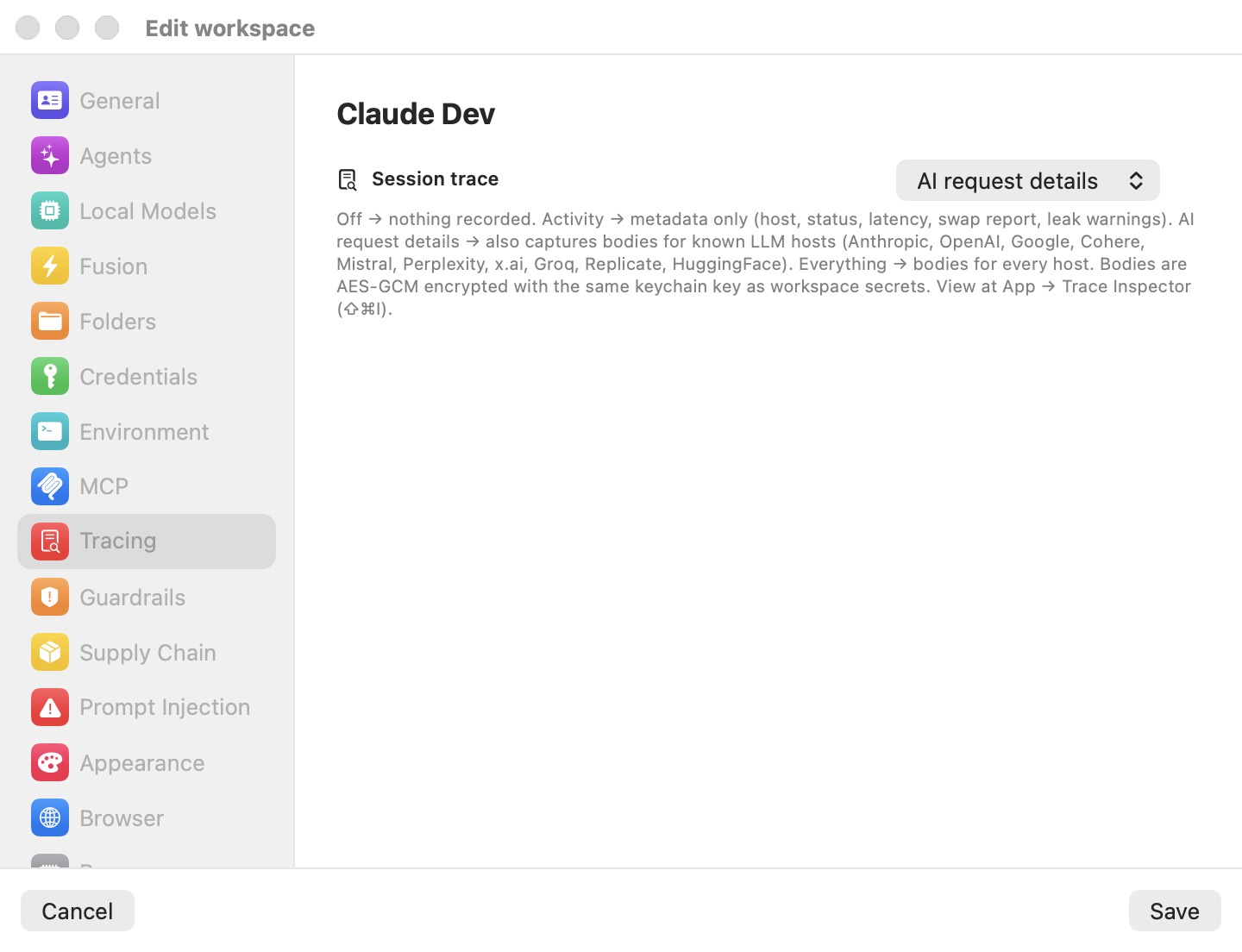
The trace level is only about recorded traffic. The Security Timeline — what the security engines blocked, allowed, swapped or flagged — is always recorded, whatever you set here. See Security Overview & Timeline.
Session trace
| Level | What is recorded |
|---|---|
| Off | Nothing. |
| Activity only | One metadata record per request: time, host, method, path, status, sizes, latency, the token-swap report, and credential-leak warnings. No bodies. |
| AI request details | Everything in Activity only, plus full request and response bodies for known model-provider hosts (Anthropic, OpenAI, Google, Cohere, Mistral, Perplexity, x.ai, Groq, Replicate, HuggingFace). |
| Everything | Bodies for every host. Fills disk fastest. |
New machines record at AI request details (from the Defaults template), so agent conversations can be audited from the start. The level changes on a running machine as soon as you save.
Tip: Activity only gives you the audit trail — which hosts were contacted, whether credentials were swapped or leaked — without keeping prompts and replies on disk.
How traces are stored
Metadata goes to ~/Library/Application Support/BromureAC/traces/YYYY-MM-DD/<sessionID>.jsonl, one JSON line per request. Bodies go next to it, in a per-session folder, encrypted with the same Keychain-held key that protects machine secrets.
Before anything is written, sensitive headers (Authorization, Proxy-Authorization, Cookie, Set-Cookie, x-amz-security-token, api-key, and any header ending in -api-key) are replaced with <redacted>, and swaps and suspected leaks are recorded as first/last-character previews only — real secrets never enter a trace.
Bodies are capped at 100 MB per session (oldest bodies go first; metadata is kept) and the traces folder at 5 GB (oldest days go first).
Warning: At AI request details and Everything, the full text of AI exchanges is on disk — encrypted, but present.
Private mode
The Private mode switch appears only on Macs enrolled with a bromure.io organization. When on, this machine's sessions stop sending session metadata (tools, files, commands, token usage) to your organization — "neither the title-bar indicator nor the admin's session list will see anything from this workspace." Local tracing is unaffected. On a Mac that isn't enrolled the switch is hidden, since nothing is sent. Default: off. See Enterprise — Enrollment & Fleet.
Subscription token swap
When an agent signed in with a subscription runs, the proxy can keep the real Claude or Codex sign-in tokens on the Mac and give the VM stand-ins — the same swap used for API keys. After it has asked you once for this machine, the pane shows a row per provider:
- Claude subscription token swap
- Codex subscription token swap
Each reads Active ("The proxy is keeping the real OAuth tokens on this Mac and serving fakes inside the VM.") or Declined, with Forget swap (re-prompt next session) or Re-enable prompt to reset it; the proxy then asks again. The rows are hidden until the proxy has asked.
Viewing what was recorded
- Trace Inspector — Window › Trace Inspector… (⇧⌘I), or Inspect Trace in a machine's machine menu. A live, filterable list of recorded exchanges with swap and leak badges; captured AI exchanges render as a conversation.
- Command line — with the app running,
bromure-cli trace ls,trace summary,trace hostnames,trace leaks, andtrace clear.
Both are covered in Tracing & Audit.
Security history (Preferences only)
In Preferences › Tracing (this Mac's own Preferences, not a machine's settings or a remote Mac's), Security history sets how the Security window keeps and shows its events:
- Keep events for — 7 days, 30 days, 90 days (default), 180 days, 1 year or Forever. "Events older than this are deleted from this Mac." A change applies at once.
- Security window opens on — Last hour, Last 24 hours (default), Last 7 days, Last 30 days or All history. The Overview counts that period, and the Timeline opens on it.
Settings reference
| Setting | Type | Default |
|---|---|---|
| Session trace | Off / Activity only / AI request details / Everything | AI request details for new machines |
| Private mode | Switch (enrolled Macs only) | Off |
| Claude subscription token swap | Status and reset (after the first prompt) | Hidden |
| Codex subscription token swap | Status and reset (after the first prompt) | Hidden |
| Keep events for (Preferences) | 7 days … Forever | 90 days |
| Security window opens on (Preferences) | Last hour … All history | Last 24 hours |
Related chapters
- Tracing & Audit — the Trace Inspector, levels, and the trace CLI.
- Security Overview & Timeline — the always-on record of security decisions.
- Settings Reference — all panes at a glance.