CLI, API & MCP
Everything the app does can also be driven without its window. The app binary — bromure-ac, inside Bromure Agentic Coding.app/Contents/MacOS/ — is also a multi-command CLI, an HTTP control plane, an MCP server for outside AI tools, and an AppleScript target. Inside every VM, a set of built-in MCP servers gives the agents their own view of Bromure. This chapter is the reference for all of them.
The surfaces, from the outside in:
- The
bromure-clicommand line — a Docker/kubectl-style CLI for machines, VMs, terminals, commands, traces, models, remote access, and enrollment. - The control plane — the same operations as JSON over HTTP, on an owner-only Unix socket and, optionally, on a loopback TCP port.
- The AC MCP server (
bromure-ac mcp) — lets an AI tool on your Mac (Claude Code, Claude Desktop) manage the app. - The in-guest MCP servers — built into every VM: the browser, automations, infrastructure, delegation, and, for specific sessions, the task board and the Switchboard.
- AppleScript — the Bromure AC Suite dictionary.
Throughout this chapter, and in the CLI, a machine is called a workspace (its name in the settings editor and in the command line). Sessions in the sense of agent conversations are reached through the /agent-sessions routes; the older /sessions routes and the session wording in the CLI and AppleScript refer to a machine's window.
The control plane: socket and API
Every surface speaks HTTP to the running app over one of two transports:
| Transport | Where | Access gate | On by default |
|---|---|---|---|
| Control socket | ~/Library/Application Support/BromureAC/control.sock (Unix domain, HTTP/1.1) | File permissions — the socket is mode 0600, owner-only. Reaching the file is the authorization, Docker-socket style. | Yes, whenever the app or a headless agent is running |
| Automation API | 127.0.0.1:9223 (TCP) | Loopback only by default; most control routes additionally require the BROMURE_DEBUG_CLAUDE environment variable, and some are never served over TCP (see Authentication model) | No — opt-in in Preferences › Automation |
The CLI never talks to a VM directly. Each subcommand is a thin HTTP client over the control socket, so the same commands work locally and — when the socket is tunneled over SSH — against a remote instance from a rich client. If no agent is running when you invoke a command that needs one, the CLI autostarts a windowless background agent (bromure-ac run --headless) and waits up to 40 seconds for it to answer /health. Read-only commands (vm ls, describe, trace …) do not autostart; they print No bromure-ac agent running. instead.
Note: The control socket is always available while the app runs and is independent of the Enable automation server switch. That switch only governs the TCP listener on port 9223. You do not need to enable the automation API to use the CLI.
The bromure-cli command line
You can call the binary by its full bundle path, but the short name is more convenient. Choose Bromure Agentic Coding › Install Command-Line Tool… in the app menu. The alert Install the “bromure-cli” command-line tool? explains that it creates a symlink at /usr/local/bin/bromure-cli and needs your admin password once; click Install (or Cancel). On success, Command-line tool installed tells you to run bromure-cli --help. The app never offers this at launch any more — the menu item is the only way in, and you can run it again at any time (for example after moving the app).
The same binary behaves differently depending on the name it is called by:
- As
bromure-cliit hides the app-internal commands — image management (init,info,reset, and the publish-pipeline tools), themcpserver, and the GUIrundefault — and exposes only the terminal-facing groups (Workspaces, Tracing, Local inference, Enterprise features,remote). A barebromure-cliprints help instead of launching the app. - As
bromure-ac(the binary inside the app bundle) everything is available and the default subcommand isrun, which launches the GUI.
The examples below use bromure-cli; use the full …/MacOS/bromure-ac path for the commands only it exposes.
Commands accept a workspace id, a short-id prefix, or its name wherever a workspace argument is shown. The vm and workspaces command groups are aliases for each other. What a machine is, and how it relates to sessions, is covered in Machines.
The app and the background agent
| Synopsis | What it does |
|---|---|
bromure-ac run [--headless] | Default (hidden) subcommand — launch the GUI. --headless runs a window-less menu-bar accessory agent; this is what the CLI autostarts to serve the control socket. |
Image management
The base image is installed once. These commands exist only under the bromure-ac name.
| Synopsis | What it does |
|---|---|
bromure-ac init [--build-local] | Install the Ubuntu base image: download the prebuilt image, falling back to a local build on download failure. --build-local forces the local build. |
bromure-ac info | Print the base-image version, virtual size, on-disk size, and path. |
bromure-ac reset [--yes] | Delete the base image (disk, EFI vars, version stamp, state) so the next init starts fresh; confirms unless --yes. |
bromure-ac init-foss-image --output <dir> | Publish pipeline only — build the redistributable free-software-only base image into <dir>. |
bromure-ac verify-image --disk <path> [--timeout 300] | Publish pipeline only — boot a disposable clone headless and require the serial login prompt within the timeout. |
Note: If no base image exists, launching the GUI routes you into the onboarding wizard, which installs the image in place — see Installation.
Workspace and VM control
This is the core group. vm run is deliberately Docker-shaped: it boots a workspace and hands your terminal to the guest's shared bromure tmux session.
| Synopsis | What it does |
|---|---|
bromure-cli vm ls | List every workspace with live state (off / suspended / booting / running), uptime, window attach state, tmux tabs as a tree (* marks the active tab), and running Docker containers. |
bromure-cli vm run [<workspace>] [-v <dir>]… [--name N --tool T --auth A --api-key K] [--memory GB] [-d] [--rm] | Start a workspace's VM, or create a throwaway one on the fly. Default: attach your terminal to the guest tmux. |
bromure-cli vm attach <vm> [<tab#> | containers:<name> [-- <shell>]] [-w] | Attach the terminal to the VM's tmux (optionally jumping to a tab), docker exec -it into a running container (default shell bash), or open/reattach the GUI window with -w/--window. |
bromure-cli vm exec <vm> [-i] [-t] [--timeout 600] -- <command…> | Run a command inside the VM (kubectl-style, after --). -it opens an interactive pty; omit the command with -it for a shell. Guest exit codes propagate. |
bromure-cli vm kill <vm> [--suspend] | Stop a VM: graceful shutdown, or suspend (RAM saved to disk) with --suspend. |
bromure-cli vm reboot <workspace> [--hard] | Reboot a running workspace in place; graceful by default, --hard tears it down immediately. |
bromure-cli vm describe <workspace> | Print the workspace's settings plus live runtime details when running (state, IP, vCPUs, Fusion state, disk usage from guest df, tabs, containers, memory in use). |
bromure-cli vm ports <workspace> (or vm <workspace> -L) | Show a running workspace's listening ports (live ss as root): PORT, PROTO, ADDRESS, PROCESS, with loopback-only binds marked. |
bromure-cli vm fsck <workspace> [--repair] [--home] | Check a stopped workspace's system disk — or its home image with --home — from the Mac, with no VM and no extra tools. --repair replays the filesystem journal and clears a stale error flag. See Checking a disk from the command line. |
bromure-cli workspaces create [--name N] [--tool T] [--auth A] [--api-key K] [--memory GB] [--color C] [-v <dir>]… [--generate-ssh] [--from-json <file|->] | Create a workspace headlessly. --from-json applies a full profile JSON document (flags override matching fields); --generate-ssh mints a host-side SSH key and prints the public key. |
bromure-cli workspaces edit <workspace> [--from-json <file|->] | Fetch the workspace's full config, open it in $VISUAL/$EDITOR (vi fallback), and save changes back. Secrets show blank — leave blank to keep, type to replace. Deleting a key in the editor clears that field. --from-json applies a document non-interactively; it may be partial — an absent key keeps its value, an explicit null clears it. |
bromure-cli workspaces rm <workspace> [-f] | Delete a workspace and ALL its data (disk + home) after a y/N confirmation, skipped with -f. |
bromure-cli workspaces ssh-keygen <workspace> | Generate a fresh host-side SSH key for the workspace and print the public key for your Git host. |
A few operational details worth knowing:
vm runflags.--tooltakes an agent id:claude,codex,grok,kimi, oromp.--authistoken,subscription,bedrock, orlocal. An unrecognized value is an error that lists the valid values, for exampleInvalid --tool “gpt” — expected one of: claude | codex | grok | kimi | omp.;workspaces createchecks--tooland--auththe same way.-v/--volume <hostdir>mounts a host folder at~/<basename>in the guest (repeatable, up to 8).-d/--detachboots the VM and returns instead of attaching.--rmdeletes the workspace and its disk when the VM stops. Detach from an attached tmux withCtrl-b d— that leaves the VM running.- Agents come from Models. The tool and auth flags only seed a new workspace. Which model and provider each agent actually uses comes from Preferences › Models and the workspace's own Models pane — see Models & Providers.
- TTY-aware. The Docker-style default of handing the terminal to tmux applies only on a real terminal; piped or scripted invocations behave as if you passed
-d. workspaces createvalues. Colors areblue,red,green,orange,purple,pink,teal, orgray.- Blank-keep on edit.
workspaces editexports the whole config with secrets blanked; a saved-back document with a blank secret keeps the stored value, so a round-trip can never wipe your keys. An unchanged buffer saves nothing; invalid JSON aborts. - Exec waits.
vm execwaits up to 10 seconds for the guest shell agent; a502means the VM may not be running or the name did not match. Approval prompts that fire during an attached session are rendered on your terminal (see Consent over attached terminals), never inside the guest.
Checking a disk from the command line
vm fsck is the scriptable twin of the ext4 browser's Run fsck… and of the Repair Disk button the app shows when a boot stops on filesystem errors. It uses Bromure's own ext4 checker, so nothing needs to be installed.
bromure-cli vm kill "Web app"            # the workspace must be stopped
bromure-cli vm fsck "Web app"            # check the system disk, report only
bromure-cli vm fsck "Web app" --repair   # replay the journal, clear the error flag
bromure-cli vm fsck "Web app" --home     # check the home image instead
It refuses to run while the workspace is running. The output ends with one of these summaries: "Filesystem is clean.", "Filesystem repaired; it is now consistent.", or "Filesystem has errors this checker cannot repair." A check without --repair that finds problems suggests re-running with --repair. The command exits with status 4 while errors remain. The checker's scope and limits are described in Advanced.
Models, routing, and Fusion
Model and provider settings are covered in Models & Providers and multi-model synthesis in Fusion; the CLI toggles are:
| Synopsis | What it does |
|---|---|
bromure-cli model catalog|ls|pull|use|rm … | Manage on-device MLX models — browse the curated catalog (with RAM-fit and tool-calling badges), download with live progress, set the active model for a running VM's workspace, remove. |
bromure-cli vm fusion enable|disable <vm> | Engage or disengage Fusion on a running VM. Requires the workspace to have two or more models configured. on/engage and off/disengage are accepted as synonyms. |
bromure-cli vm routing cloud|local <vm> | Set the LLM backend routing for a running VM: the agents' cloud providers, or the local model. |
Trace inspection
These read the per-workspace proxy traces. They return nothing unless the workspace has tracing enabled — see Tracing settings — and the full story is in Tracing & Audit.
| Synopsis | What it does |
|---|---|
bromure-cli trace ls [workspace] [--limit 50] | List recent requests: TIME / HOST / METHOD / STATUS / REQ / RESP / LAT / FLAGS (flags include swap×N, LEAK×N, conv). |
bromure-cli trace summary [workspace] | Aggregate totals, status classes, swap/leak/conversation counts, and top hosts. |
bromure-cli trace hostnames [workspace] | List distinct hosts and their request counts. |
bromure-cli trace leaks [workspace] | Show requests with suspected credential leaks (header, preview, suspicion). |
bromure-cli trace clear [-f] | Wipe in-memory and on-disk trace history after a y/N confirmation. |
Remote access
The optional SSH front door is disabled by default and documented fully in Remote Access & Clients. All operations go through the running app over the control socket.
| Synopsis | What it does |
|---|---|
bromure-cli remote [status] | Default subcommand — print enabled/running state, bind and port, auth methods, host-key fingerprint, login user, a ready-made connect line, and authorized keys. |
bromure-cli remote enable [--port 2222] [--bind 0.0.0.0] [--[no-]password] [--[no-]pubkey] | Enable the SSH server. At least one auth method must remain on. |
bromure-cli remote disable | Turn the SSH server off. |
bromure-cli remote key add <key|path> / key [ls] / key rm <index|fingerprint> | Manage authorized public keys (ls is the default). |
Enterprise enrollment
CLI counterparts of the Log in to bromure.io… sheet, for scripted device provisioning. See Enterprise.
| Synopsis | What it does |
|---|---|
bromure-cli enroll --code <6-word-code> [--server-url URL] [--device-name NAME] | Enroll this Mac with a bromure.io workspace using an admin-minted code. Server defaults to $BROMURE_MANAGED_URL or https://bromure.io/api; device name defaults to the Mac's hostname. |
bromure-cli unenroll [--force] | Sign out of the enrolled workspace (y/N unless --force). |
bromure-cli enrollment-status | Print enrollment state (workspace, user, install id, device, server, enrolled date, bearer/leaf-cert presence). "not enrolled" exits 0 so automation does not treat it as a failure. |
Integration and internal commands
| Synopsis | What it does |
|---|---|
bromure-ac mcp [--debug] [--api-url http://127.0.0.1:9223] | Run the AC MCP server on stdio for AI tools. See The AC MCP server. |
__remote-menu, __attach-window, __fatclient…, __forward…, __dial, __tunnel-helper | Internal entry points (the SSH ForceCommand TUI, terminal byte pump, and rich-client tunnel helpers). Not for interactive use. |
The remote TUI (__remote-menu)
When SSH remote access is enabled, every remote login is forced (via ForceCommand) into a hand-rolled ANSI terminal UI rather than a shell — an alternate-screen, 256-color menu driven by arrow keys and digits that works over any SSH PTY (use ssh -t). It mirrors the CLI as menus:
- Workspaces — create with a single-screen form (Name, Tool, Auth, API key, Memory, Color, Folders, Generate SSH, Full settings…, Create), per-workspace actions (Attach, New tab, Describe, Configure…, Fusion, Routing, Worktrees…, Reboot…, Suspend, Kill for running workspaces; Start, Describe, Configure…, Delete for off ones), and a raw table view. Configure… offers the settings editor's panes as text forms; its Models form is read-only (the server's providers, and whether the workspace overrides them), since models are chosen in the app.
- Models — installed models and the download catalog; picking an uninstalled model offers to
model pullit inline with live progress. - Trace — Summary / Hostnames / Leaks / Recent / Clear.
While you are attached to a workspace's tmux, a magic keychord (default Ctrl-], shown in the banner) pops a host-drawn controller overlay: a tab tree, New tab, Worktrees…, Fusion, Routing, Edit settings…, Reboot…, Suspend, Disconnect. The guest never sees the trigger key — override it with the remote/overlay-key file or $BROMURE_OVERLAY_KEY. Ctrl-b d disconnects from tmux back to the menu. The remote TUI works on machines and their terminals; agent sessions, rooms and the Switchboard are reached from the rich client instead. The full remote story is in Remote Access & Clients.
The loopback automation API
The control plane can also be exposed as JSON over HTTP on TCP, for scripting from any language. It is off by default.
Enabling it
Open Preferences… › Automation (⌘,) — the Automation API & MCP server pane.
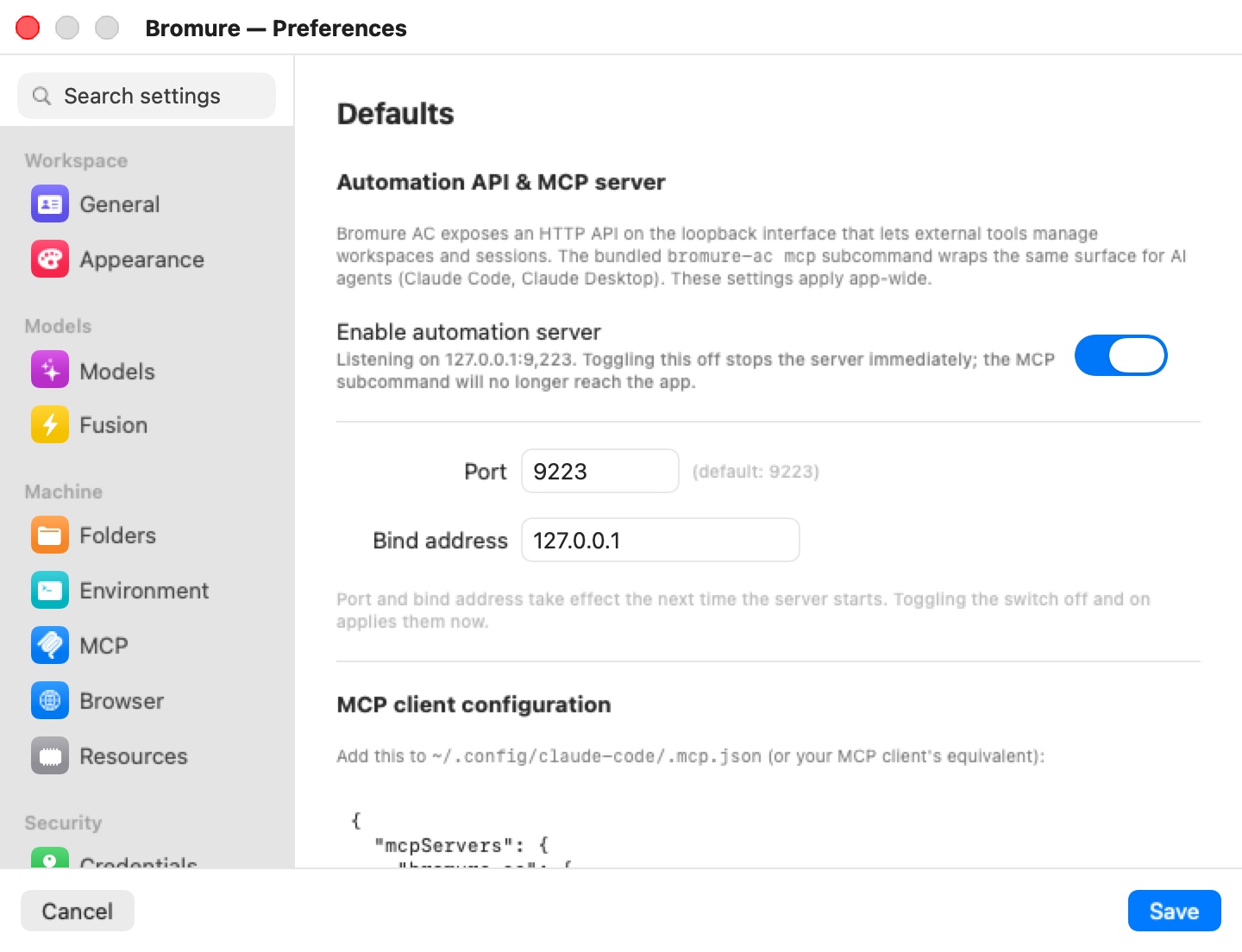
- Turn on Enable automation server. When it is on, the pane reads Listening on 127.0.0.1:9223; turning it off stops the server immediately.
- Optionally set Port (captioned (default: 9223)) and Bind address (default
127.0.0.1). Port and bind address take effect the next time the server starts — toggle the switch off and on to apply them now.
You can also flip the switch without the GUI:
defaults write io.bromure.agentic-coding automation.enabled -bool true
Warning: Setting Bind address to anything other than
127.0.0.1exposes the API — and the MCP server it backs — to the network, and the pane warns Non-loopback bind exposes the API to the network. The MCP server has no auth. There is no authentication on the TCP listener beyond the loopback boundary and theBROMURE_DEBUG_CLAUDEgate below. Leave the bind address on loopback unless you have a specific, trusted reason not to.
Authentication model
The TCP listener and the control socket serve the same routes, but with different access:
| Route group | Control socket | Automation API (TCP loopback) |
|---|---|---|
GET /health, GET /profiles, GET /vms, GET/POST /sessions | Allowed | Allowed |
Workspace creation and editing (POST /profiles, /profiles/<id>…), VM control and exec (POST /vms, /vms/<id>/…), /trace, /app/state, /preferences, /models/settings, agent sessions, rooms, delegations, tasks, automations, clusters and registries | Allowed | Requires BROMURE_DEBUG_CLAUDE on the app |
/state, /state/subscribe, /remote…, /grid-layout, /workspaces, /subscriptions/…, /models/<action>, /connector | Allowed | Never — control-socket only |
In other words: the control socket is the full-access, owner-only path; the TCP API opens the safe read subset on loopback and gates everything else behind the debug flag. Path segments are single percent-encoded (so workspace names with spaces work).
Endpoints for scripting
The most useful routes:
| Endpoint | Purpose |
|---|---|
GET /health | Liveness plus debugEnabled. |
GET /state | One-shot mirror snapshot: workspaces, VMs, grid layout, automations, pendingPrompts, and more. |
GET /state/subscribe | The push form of /state: the connection stays open and a fresh snapshot is streamed whenever the state changes. Rich clients use it instead of polling. |
GET /vms / POST /vms | List running VMs; boot a VM from a workspace reference or an inline spec plus mounts (what vm run calls). |
POST /vms/<id>/exec | Run a command in a VM; interactive hijacks the connection into a raw framed pty stream. |
GET /profiles / POST /profiles | List workspaces; create one from a JSON document. |
GET / PUT /preferences | Read or replace the Preferences Defaults template (secrets blanked on read, kept when left blank on write). This is what a rich client's Preferences window edits on a remote host. |
GET / PUT /models/settings | Read or replace the global model settings (Preferences › Models), with keys redacted. |
POST /subscriptions/register / POST /subscriptions/forget | Start a provider sign-in on this host for a client ({"provider": …, "profileId": …}; the sign-in URL comes back through /state), or forget a stored sign-in. |
POST /agent-sessions/start | Start an agent session (profile, tool, optional folder, repository or opening message). |
POST /agent-sessions/<id>/<action> | Act on a session: send, keys, resume, close, rename, nickname, archive, unarchive, delete, review, and the branch actions (worktree, branch-merge, branch-pr, branch-discard, branch-keep, branch-decline). |
GET /agent-sessions/<id>/transcript, GET /agent-sessions/<id>/pending | A session's conversation (base64 JSONL), and what it is waiting on (a question and its options). |
POST /agent-sessions/switchboard | Start or show the Switchboard. |
POST /agent-rooms/create|move|group, POST /agent-rooms/<id>/rename|color|layout|archive|unarchive|ungroup|delete|switchboard | Create and edit rooms. |
POST /delegations/request, POST /delegations/<id>/<action>, GET /delegations/<id>/file | Cross-host delegation: one host's session asks a session on another, then sends, answers, steers, closes or cancels, and fetches attached files. |
GET / POST /tasks, /tasks/<id>/… | Read and drive the Coding Tasks board. |
GET / POST /k8s, /k8s/<id>/<action>, POST /registries, /registries/<id>/<action> | Create and drive Kubernetes clusters and registries. |
GET /automations / POST /automations/<id>/run | Read and drive scheduled automations (see Controlling automations over the API). |
POST /prompts/<id>/answer | Answer a queued lifecycle prompt (see Answering pending prompts). |
Because the control socket path contains spaces, capture it in a variable first:
SOCK="$HOME/Library/Application Support/BromureAC/control.sock"

# Full mirror snapshot (control socket only)
curl --unix-socket "$SOCK" http://localhost/state

# List running VMs
curl --unix-socket "$SOCK" http://localhost/vms

# Boot a workspace by name
curl --unix-socket "$SOCK" -X POST http://localhost/vms \
  -d '{"profile":"Web app"}'

# Answer a queued lifecycle prompt with one of its offered button labels
curl --unix-socket "$SOCK" -X POST http://localhost/prompts/PROMPT_ID/answer \
  -d '{"choice":"Not Now"}'
The safe subset works over the TCP API once you have enabled it — for example, listing workspaces and opening a machine's window needs no debug flag:
curl http://127.0.0.1:9223/profiles
curl -X POST http://127.0.0.1:9223/sessions -d '{"profile":"Web app"}'
Note: The control-plane routes are an integration surface shared with the rich client, not a versioned public API; their request and response shapes can change between releases. The CLI commands above are the stable way to script Bromure. Debug-only routes, environment variables, and file locations are catalogued in the Appendix.
The AC MCP server (bromure-ac mcp)
bromure-ac mcp runs a stdio JSON-RPC MCP server (server name bromure-ac) that lets an AI tool on your Mac manage the app. It wraps the automation HTTP API and AppleScript, so enable the automation server first — the listing and window tools call the HTTP API at --api-url (default http://127.0.0.1:9223). It is not available under the bromure-cli name.
The tools it exposes:
bromure_ac_list_profiles,bromure_ac_list_sessionsbromure_ac_open_session(opens a workspace's window; waits up to 30 seconds),bromure_ac_close_sessionbromure_ac_get_profile,bromure_ac_set_profile(atomic JSON replace, id preserved)bromure_ac_get_profile_setting,bromure_ac_set_profile_setting
With --debug (and BROMURE_DEBUG_CLAUDE set on the app) it adds bromure_ac_app_state, bromure_ac_vm_exec, bromure_ac_vm_read_file, and bromure_ac_vm_write_file.
To wire it into Claude Code, add the following to ~/.config/claude-code/.mcp.json (or your client's equivalent). This is the exact snippet the MCP client configuration section of the Automation pane shows:
{
  "mcpServers": {
    "bromure-ac": {
      "command": "/Applications/Bromure Agentic Coding.app/Contents/MacOS/bromure-ac",
      "args": ["mcp"]
    }
  }
}
Note: The
get/setprofile tools shell out toosascript(AppleScript against the running app), so the GUI app must be running and macOS may prompt once for Automation permission. Profile JSON travels with secrets blanked unlessBROMURE_DEBUG_CLAUDEis set.
MCP servers inside the VMs
Separately from the AC MCP server, Bromure gives the agents inside every VM a set of built-in MCP servers — no configuration needed. Each is a small Python stdio shim staged read-only into the guest under /mnt/bromure-meta/; the shim dials the host over vsock and reconnects forever on drops, so the agent never loses its tools. The host serves the tools, and every call is checked there: an agent can only see and act on what its own machine and session are entitled to.
| vsock port | Server | Who gets it | Tools |
|---|---|---|---|
| 5830 | browser | Every agent | The 23 browser_* tools that drive the machine's embedded Chromium (see below). |
| 5831 | task board | Only agents running a coding task | board_get_task, board_set_plan, board_create_subtasks, board_set_dependencies, board_ready_for_review, board_report_landing. |
| 5832 | plan stream | Coding-task planning runs | Not an MCP server: the channel over which a task's planning run streams its plan to the board. |
| 5833 | automations | Every agent | automation_list, automation_get, automation_create, automation_update, automation_delete, automation_run — limited to the automations of the agent's own machine. See Automations. |
| 5834 | infrastructure | Every agent | infrastructure_overview, cluster_status, cluster_create, cluster_start, registry_status, registry_create, registry_start — limited to the clusters and registries the machine has access to. See Kubernetes Clusters & Registries. |
| 5835 | delegation | Every agent session | delegate, request, list_peers, list_delegations, read_inbox, wait, ask, report, deliver, answer, steer, close_delegation, cancel, worktree_create, worktree_status, worktree_merge. The shim tells the host which tmux window it runs in, so an agent can't claim to be another session. See Agents Working Together. |
| 5836 | switchboard | Only the Switchboard session | list_sessions, read_session, pending_question, list_workspaces, next_events, send_to_session, answer_question, press_keys, start_session, resume_session, message_user, archive_session. |
The browser, automations, infrastructure and delegation servers are written into each agent's own MCP configuration alongside the servers you add in the machine's MCP pane (MCP settings). The task-board and Switchboard servers are passed only to the runs that need them.
The browser server
The browser server drives the machine's embedded Chromium, which runs in its own disposable VM. Its 23 tools cover navigation and inspection — browser_navigate, browser_new_tab, browser_list_tabs, browser_activate_tab, browser_close_tab, browser_back, browser_forward, browser_reload, browser_screenshot (with a full-page option), browser_evaluate, browser_get_text, browser_get_html, browser_get_links, browser_click, browser_fill, browser_type, browser_press_key, browser_wait_for, browser_network, browser_network_summary, browser_clear_network, browser_console, and browser_pick_element (an interactive 60-second element picker).
A tool call against a closed browser opens it and waits for the cold boot. Because the browser is a separate VM, the server's instructions tell agents to reach a dev server on their machine by the machine's LAN IP (hostname -I), never localhost. The full story is in The Embedded Browser.
Note: On a rich client, the agents' browser-MCP stream can be carried over the SSH connection so a remote agent drives the browser pane you see locally. See Remote Access & Clients.
OAuth for MCP servers you add
HTTP MCP servers you add in the editor can authenticate through the host-side OAuth broker: it performs RFC 8414 discovery and RFC 7591 dynamic client registration (as Bromure AC), runs a PKCE authorization-code flow in your system browser, and serves the callback on a loopback listener (ports 28500–28599). The success page reads Authorized — You can close this tab and return to Bromure AC. The whole flow runs on the host, so the VM never sees real OAuth credentials.
AppleScript (Bromure AC Suite)
A scripting dictionary, the Bromure AC Suite, is another automation surface — useful for orchestration and for screenshot tooling that needs window IDs. Target application "Bromure Agentic Coding" from Script Editor or osascript. It covers:
- Profiles —
list profiles,create ac profile <name> [color <c>](returns a UUID),delete ac profile <name|uuid>, and full-document round-trip viaget profile json/set profile json(the whole profile; id preserved; stored secrets merged under blank fields). - Per-field settings —
get profile setting … key …/set profile setting … key … to value …. - Editor windows —
open profile manager,open ac profile editor,close ac profile editor,select editor category <key>, andget editor window id/get main window id(aCGWindowIDforscreencapture -l). - Machine windows —
open ac session,close ac session,list ac sessions. - App state and settings —
get app state(JSON), plusget ac app setting/set ac app settingfor keysautomation.enabled,automation.port,automation.bindAddress,remoteAccess.enabled,remoteAccess.port,remoteAccess.bindAddress,managed.serverURL, andmanaged.acIngestURL. Settingautomation.enabledtoggles the HTTP server live.
For example, to open a machine's window:
osascript -e 'tell application "Bromure Agentic Coding" to open ac session "Web app"'
Note: Profile JSON travels with secrets scrubbed unless
BROMURE_DEBUG_CLAUDEis set. SettingapiKeyto an empty string viaset profile settingclears the key rather than keeping it — unlike the blank-keep behavior of the JSON round-trip bridges. Locale switching is deliberately not scriptable; relaunch the app with, for example,-AppleLanguages "(fr)"instead.
Scheduled automations
A scheduled automation is a recurring, unattended agent run bound to one machine. Automations are created and managed from the automation board (⇧⌘A, or the sidebar's Automations section), and agents can manage their own machine's automations through the automations MCP server above. The whole feature — triggers, schedules, chaining, the mandatory injection screen, run history — is documented in Automations. This section covers the control-plane surface: driving automations over the API, answering the decision prompts an unattended start can raise, and how consent works over an attached terminal.
Controlling automations over the API
| Endpoint | Purpose |
|---|---|
GET /automations | List automations and their run history. |
POST /automations | Create or update (upsert) an automation. |
DELETE /automations/<id> | Delete an automation. |
POST /automations/<id>/run | Fire it now (does not change the schedule). |
POST /automations/<id>/toggle | Pause or resume it. |
POST /automation-runs/<run-id>/acknowledge | Dismiss a failed or blocked run from the board's Needs attention column. |
GET /automation-runs/<run-id>/transcript | A finished run's archived transcript (base64). |
Answering pending prompts
Some lifecycle decisions — the base-image upgrade offer, a disk that fails its boot-time check, a compromise alert, a compromise wipe — normally appear as a local alert. When there is nobody at the Mac to answer (a headless agent, or a launch requested by a remote rich client), they are queued instead: they surface in GET /state under pendingPrompts (each with an id, profileID, title, message, and button labels) and are answered with POST /prompts/<id>/answer:
SOCK="$HOME/Library/Application Support/BromureAC/control.sock"
curl --unix-socket "$SOCK" -X POST http://localhost/prompts/PROMPT_ID/answer \
  -d '{"choice":"Remind me later"}'
Pass one of the prompt's own button labels as choice. If no client answers before the prompt's timeout, it resolves to its safe fallback — never the destructive option (a compromise alert, for instance, falls back to shutting the VM down). If no client is connected at all, it falls back immediately. A rich client renders these prompts as ordinary alerts.
Note: Automations, delegations and other unattended starts never wait on a prompt. A start that would need an answer from you — a machine marked compromised, or a local model still downloading — is refused with a clear reason in the run's history instead ("The workspace is marked compromised — start it yourself to confirm the wipe."). A suspended machine whose saved state can't be restored boots fresh.
Consent over attached terminals
While a terminal is interactively attached to a machine — through vm exec -it, vm attach, or an SSH attach — host-side approval prompts (credential use, and similar) are rendered on your terminal, not inside the guest. The prompt reads 🔒 Bromure — approval required with numbered choices and Choice [1-N] (Enter or timeout = deny). Enter, timeout, EOF, or detaching all mean deny, so a compromised guest can never forge an approval. The guest tmux is repainted afterward.
Debug endpoints (BROMURE_DEBUG_CLAUDE)
Launching the app with BROMURE_DEBUG_CLAUDE set lifts the debug gate on the TCP automation API, so the routes in the middle row of the authentication table work over TCP too, including these debug routes (always available on the control socket, except where noted):
GET /debug/ui-shot?path=…&which=…— the app renders its own window to a PNG (no Screen Recording permission needed) and returns a subview-frame dump; the default output is/tmp/bromure-ui-shot.png.POST /debug/editor— drives the settings editor for the screenshot tool.POST /detect/prompt-injection— runs the real detectors and returns their verdict (this route requires the debug flag even on the control socket).
The flag also lets secrets travel verbatim through the AppleScript and MCP profile-JSON bridges and is required by bromure-ac mcp --debug's VM tools. GET /health reports debugEnabled so you can tell which mode the app is in.
Warning:
BROMURE_DEBUG_CLAUDEremoves the safety gate that normally keepsexec, VM control, and raw profile secrets off the loopback TCP API. Run the app with it only on a machine you control, and never combine it with a non-loopback bind address — doing so would expose full VM shell access, unredacted secrets, and window captures to anyone who can reach the port. It is distinct fromBROMURE_AC_DEBUG(stderr event logging) andBROMURE_CLI_DEBUG(CLI socket diagnostics), which are harmless logging switches.